
EasyFishing
EasyFish — fishing helper for World of Warcraft: Forever
Details
Expansion
 Forever
 Categories
Developers

Having issues?
EasyFish
Fishing, minus the busywork — built for World of Warcraft: Forever.
EasyFish handles everything around the bobber so you can focus on the bobber: casting, lures, poles, loot, and knowing where to fish. It learns your fishing spots as you go, finds pools and treasure chests, and tells you what your time on the water is actually worth.
It never detects the bite or clicks the bobber for you. Every action is one click or key press from you, exactly as the game intends — no automation, nothing that puts your account at risk.
EasyFish is new, and it's being shaped by the people who use it. Forever is still in beta, so your reports on what works, what doesn't and what's different from Classic make the addon better for everyone. Drop a comment on the Comments tab — the Feedback section at the bottom of this page lists what helps most.
Casting made easy
- Double right-click to cast while your fishing pole is equipped. It stays out of your way everywhere else: it never equips anything, never fires when you right-click a creature or NPC, and is off in combat. Right-drag to turn the camera, right-click the bobber and talk to NPCs all work exactly as normal.
- Or bind a key to Cast fishing line (Key Bindings → EasyFish). Press it without a pole and your best fishing pole is equipped for you.
- Swaps your weapon back with one click — or automatically the moment you target something hostile, before combat locks your gear.
- Bite sound boost: while your line is out, sound effects go to full volume and music and ambience are muted, so the splash is impossible to miss. Your sound settings are restored when you stop.
- Cast timer bar so you know when to recast.
- Keyboard fishing (experimental): turns on the game's own soft-target interact, so after a cast your Interact With Target key grabs the bobber.
Smart lures and zone advice
- The status window shows the zone's minimum fishing skill, the skill where junk stops, and your estimated junk rate.
- Smart lure: uses the weakest lure in your bags that still does the job, instead of burning your best one. Auto-lure applies it for you when a cast would give junk.
/fish wherelists the zones you can fish cleanly at your skill and level, and when the next tier opens up.- Shows which fish each zone holds and the skill each one needs, including day-only and night-only fish.
- Trainer finder: when you're close to your skill cap, EasyFish tells you where to train next — including the Expert book in Booty Bay and Nat Pagle's Artisan quest — and can drop a waypoint (TomTom supported).
Your personal fishing map
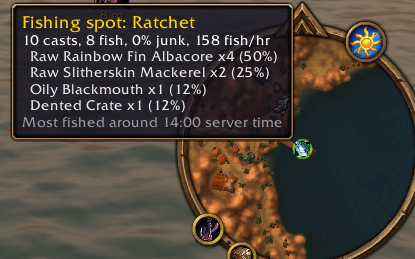
- Every cast and catch is recorded with its location. Your spots appear as pins on the world map and minimap, coloured green, yellow or red by how well they fish for you.
- Hover a pin for casts, fish per hour, junk rate, the fish you caught there and the time of day you usually fish it.
- Pool tracking: wreckage, debris and fish schools are recognised and marked with their own crate pins, so you can find them again.
/fish poolslists them. - No bundled database to go stale — the map is built from your fishing on your server.
Chests, gold and materials
- Chest and trunk alerts with a running count, and pins showing where you pulled them.
- Everything inside the chests you open — items and coins — counts toward your totals.
- Gold per hour that only counts time actually spent fishing.
- Auction house prices: EasyFish scans prices when you visit an auctioneer and uses them for its gold figures. Uses Auctionator or TradeSkillMaster prices automatically if you have them.
- Profession materials: fish and chest contents are sorted by profession (Cooking, Alchemy, Tailoring, Leatherworking and more). Get call-outs when something your professions use drops, and use
/fish find <item>to see where you got it. - Auto-loot fishing catches, and auto-sell fishing junk at any vendor.
- Alerts for quest fish, your own wanted list, and rare catches.
The dashboard
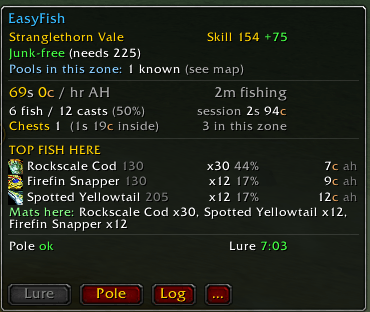
A compact, movable window showing:
- Zone, your skill and the junk verdict for where you're standing
- Gold per hour and session value
- Catches, casts and catch rate
- Your top 3 fish here, with icons, share of catches and price per fish
- Chests pulled and what they held
- Pole and lure status, with lure time remaining
- Buttons for Lure, Pole, catch Log and settings
Everything is configurable from the minimap button or /fish, also under Options → AddOns → EasyFish.
Commands
| Command | What it does |
|---|---|
/fish | Open settings |
/fish status | What EasyFish detected (spell, skill, pole, lure) |
/fish where | Zones you can fish cleanly right now |
/fish spots | Your best recorded spots |
/fish pools [all] | Pools you've found here (or everywhere) |
/fish trainer [go] | Rank requirements and trainers; go sets a waypoint |
/fish find <item> | Where you've fished up or looted an item |
/fish mats [all] | Materials for your professions from this zone (or everywhere) |
/fish chests | What your fished-up chests have contained |
/fish want <fish> | Add or remove a fish from your wanted list |
/fish price [item] | Cached auction prices, or the price used for one item |
/fish scan | Scan the auction house (while it's open) |
/fish pole | Swap between your weapon and fishing pole |
/fish stats | Catch log |
/fish keyboard | Toggle keyboard fishing |
Good to know
- Keeping your history on the Forever beta. The beta client currently saves addon data when you log out but doesn't load it back, so without help every login starts fresh. EasyFish includes an optional helper for Windows: run
EasyFishtoolsInstall-EasyFishSync.ps1once, then restart the game, and your history carries over automatically, with backups. It keeps your history in a small companion addon, EasyFish History, so updating EasyFish never touches it. It runs silently in the background, needs no admin rights, and can be removed with-Uninstall. When Blizzard fixes the bug, nothing needs to change. - Zone skill numbers come from Classic and are a guide — Forever is Classic+ and some values may differ. Zones without data say so rather than guess. Corrections are very welcome.
- EasyFish is written for the Forever client (interface 16001) using the modern addon API.
Feedback
Your feedback decides what EasyFish becomes. Every comment is a chance to fix something, add something or get the numbers right, so please don't hold back — short comments are just as welcome as long ones.
Especially helpful right now:
- Bugs and Lua errors. Paste the error text (or a screenshot) and say what you were doing when it happened.
- Forever vs Classic. Forever is Classic+, and Blizzard has changed things. If a zone's skill numbers, the fish you catch, junk rates, pools, chest names or trainer locations don't match what EasyFish says, tell us — this is data only players can provide.
- Ideas. A feature you wish it had, something another fishing addon does better, or a setting you keep wanting.
- What you love. Knowing which features people actually use tells us what to protect and polish.
Where to post:
- Comments tab on this page — the easiest place for questions, ideas and quick reports.
- GitHub issues — best for detailed bug reports, since you can attach files and follow the fix.
If EasyFish makes your fishing easier, a comment saying so (and which feature helped) is hugely motivating too.
Source and issues: https://github.com/Justin-Swets/Easyfish
You must be logged in to leave a comment.