

Disenchant Forever
Auto-targets the next disenchantable item in your bags: one click per item, with a ban list and quality filters.
Details
Expansion
 Forever
 Categories
- No categories available.
Developers

Having issues?
Disenchant Forever
A button that always points at the next disenchantable item in your bags.
Levelling a crafting profession leaves you with a lot of items to disenchant. Normally you click the spell, find the item in your bags and click it, over and over. With this addon you just click the button: it shows the next item and moves on to the following one after each disenchant.
Why one click per item
The game does not let addons cast spells on their own, so every disenchant needs a click from you. What the addon saves you is finding the item and aiming at it. The button holds a /cast Disenchant + /use <bag> <slot> macro for the next item, and updates it whenever your bags change.
Features
- Picks the next weapon or armour piece of uncommon quality or better. White and grey items are skipped since they can't be disenchanted.
- Shows how many items are left.
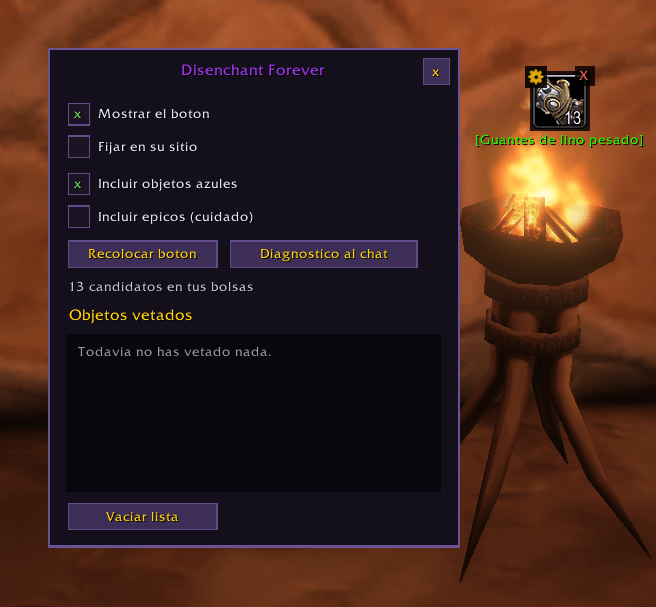
- Ban list: click the red X to skip an item. All copies of that item are skipped from then on. Saved per character.
- Blue items can be turned off. Epics are off by default so you don't destroy something valuable by mistake; you can turn them on.
- Move the button by dragging with the right mouse button, and lock it in place.
- Works in combat: changes wait until you leave combat, since the game doesn't allow them during a fight.
/dis statusprints what the addon sees, useful if something isn't working.
Options window
Open it with the gear on the button or with /dis options. It has checkboxes for the button and the quality filters, the number of items left, and the ban list, where you can remove single items.
Commands
/dis, /disenchant and /di all work. Commands are in English on every client, so instructions from other players work whatever language you play in.
| Command | What it does |
|---|---|
/dis | Show or hide the button |
/dis options | Open the options window |
/dis ban | Ban the item shown (same as the red X) |
/dis list | List banned items |
/dis clear | Empty the ban list |
/dis blues | Include or exclude blue items |
/dis epics | Include or exclude epics (off by default) |
/dis lock / /dis reset | Lock the button, or move it back to its default position |
/dis status | Show what the addon sees, for bug reports |
Languages
English, Spanish, German, French, Italian, Portuguese, Russian, Korean, and Simplified and Traditional Chinese. Other languages use English. The output of /dis status is always in English so it can be pasted into bug reports.
Compatibility
Made for World of Warcraft: Forever 1.60.1 (Interface: 16001).
Installation
- Extract the
DisenchantForeverfolder intoWorld of Warcraft_classic_beta_InterfaceAddOns - Restart the game (a reload isn't enough for a new addon).
- Check that it's enabled in the AddOns list on the character screen.
Notes
- You need Enchanting, Obviously.
- If the game asks you to confirm destroying an item, you have to accept it yourself. Addons can't do that.
License
MIT
You must be logged in to leave a comment.