

Cursor Glow Forever
Cursor Glow is an addon made for Forever Wow
Details
Expansion
 Forever
 Developers

Having issues?
Cursor Glow Forever
Never lose your cursor again. Cursor Glow Forever wraps your mouse cursor in a soft glow in your class colour, outlines the game's hover cursors, and keeps your cursor on screen while you turn the camera. Built for World of Warcraft: Forever.
In busy fights, crowded towns and dark dungeons, the small glove cursor is easy to lose. Cursor Glow Forever makes it stand out without replacing it: the game's own cursor stays exactly as it is, with a glow and outline drawn around it.
Features
A glow that fits your cursor
- A soft glow and a crisp outline shaped to the glove cursor itself, not a generic circle.
- Your class colour by default, so it changes with each character, or any custom colour you like.
- Adjustable glow strength, glow size and outline strength.
Hover cursors outlined too
When the cursor changes as you hover something, the outline follows it:
- Loot bags (including the single bag while holding Shift), ore, herbs and skinning
- Enemies (the sword)
- Mailboxes and the guild bank
- Vendors, bankers, repairers, innkeepers, flight masters, stable masters and trainers (optional, off by default). Vendors who also repair get the anvil, and pet and class trainers only get the trainer outline for the class they teach, just like the game's cursor.
- Selling from your bags at a vendor, and repair mode
Each outline is cut from the game's own cursor art, so it always matches what you see. It switches to the greyed version while you're out of range, and fades until you're close enough to interact. If the addon can't tell which cursor is showing, it shows no outline rather than a wrong one.
Your cursor, even while turning the camera
Hold a mouse button to turn the camera and the game hides your cursor. Cursor Glow Forever draws the glove where your mouse was, with a stronger glow and a tint of your colour (or its own colour), so you always know where it'll come back.
Find it, and keep track of it
- Shake to find: a quick shake flashes a bright halo around the cursor. You choose how many shakes it takes, so it never goes off by accident.
- Pulse in combat: a slow pulse while you fight, optionally in its own colour.
- Pulse when idle: the glow breathes slowly while the mouse is still. The outline stays steady.
- Show the glow always, only in combat or only out of combat. Shake to find still works either way.
Rings and clicks
- Cast ring: a ring around the cursor fills up while you cast and drains while you channel, so you can watch your cast without looking away.
- Global cooldown ring: a second, smaller ring fills up over the global cooldown.
- Click ripple: a ring spreads out and fades wherever you click.
All three are off by default. The rings can use the glow colour or their own, sit around the cursor, on its finger tip or wherever you drag them in the settings preview, and come in small, medium, large or any custom size.
Keeps up with you
The glow is placed where your cursor is heading, so it stays on the cursor during fast movement. It also copes cleanly with alt-tabbing and loading screens.
Settings
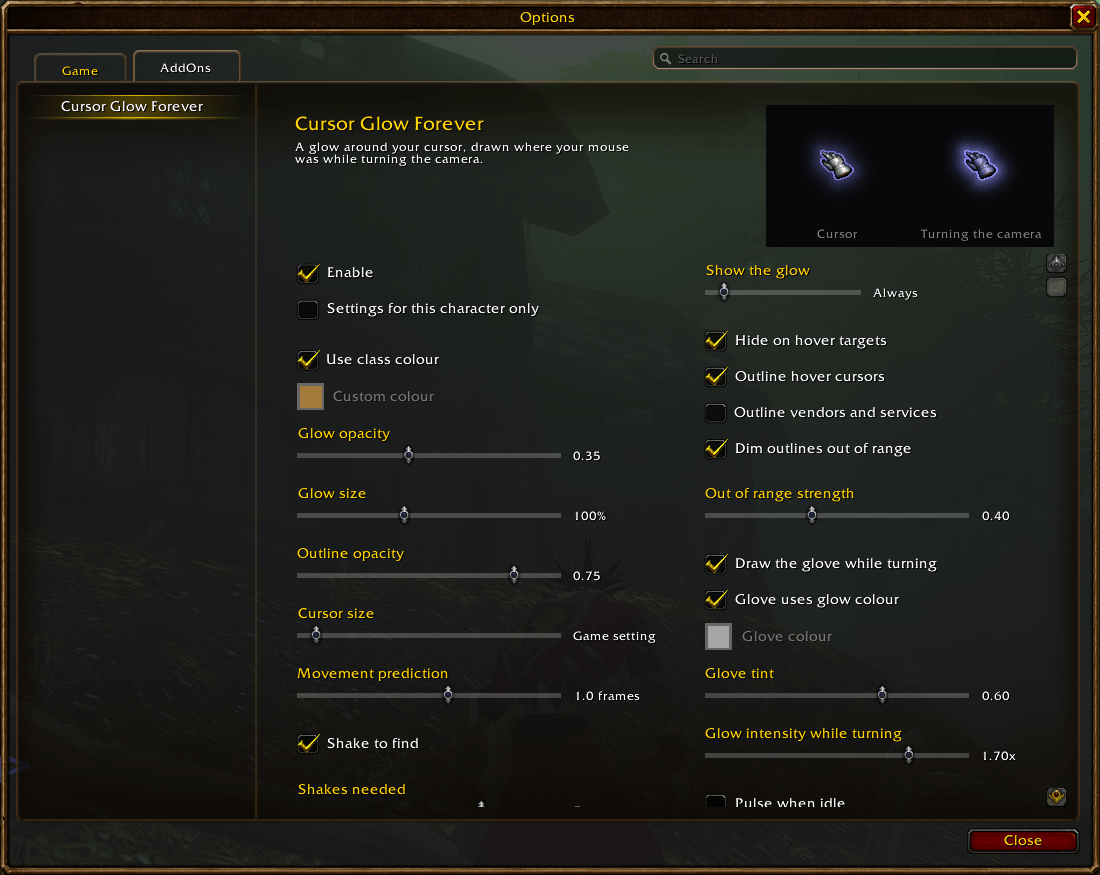
Open them with /cg (or /cursorglow), or from Esc > Options > AddOns > Cursor Glow Forever. A live preview at the top shows your cursor, and the glove drawn while turning the camera, as you change things, including the rings running through a demo cast.
Reset to defaults sits next to the tabs and resets the current profile.
Cursor tab
- Profiles: named profiles shared by all your characters; each character remembers which one it uses. Create one from a copy of the current settings, switch, copy from another, or delete.
- Colour: class colour or a custom colour
- Glow and outline: glow opacity, glow size, outline opacity, cursor size (follows the game setting), movement prediction
- Visibility: show the glow always, in combat or out of combat, and hide it over hover targets
- Hover outlines: outline hover cursors, outline vendors and services (off by default), dim outlines out of range and how faint
- Turning the camera: draw the glove, its colour and tint, and how much stronger the glow is
Effects tab
- Finding the cursor: shake to find and how many shakes it takes, pulse in combat and its colour (off by default), pulse when idle (off by default)
- Click ripple (off by default)
- Rings: cast ring and global cooldown ring (off by default), their colour, position (default, finger tip, or custom: drag them in the preview) and size (default, small, medium, large or custom)
The settings page is available in English, German, French, Spanish, Portuguese, Italian, Russian, Korean and Chinese. Spotted an awkward translation? Please let me know in the comments.
Commands
/cgor/cursorglow: open the settings/cg debug: show what the addon sees, for bug reports/cg test: run the cast and global cooldown rings on your cursor for a few seconds
Found a bug?
Please leave a comment with a screenshot of the cursor and the output of /cg debug while it happens. That shows exactly what the game reported.
Credits
Inspired by CursorMod by sfmict, whose midnight glow this addon's glow is modelled on. The NPC services, quest givers and translated NPC titles come from the Forever data of QuestieDB, with thanks to the Questie team. Cursor Glow Forever is open source under the GNU GPL v3.

You must be logged in to leave a comment.