

CraftCourier
CraftCourier lets you assign a character to each type of crafting material, and to unbound BoE gear of each rarity. When you visit a mailbox, it sends everything to the right alt in one click.
Details
Expansion
 Forever
 Categories
Developers

Having issues?
CraftCourier
Stop dragging mats into the mail one stack at a time.
CraftCourier lets you assign a character to each type of crafting material, and to unbound BoE gear of each rarity. When you visit a mailbox, it sends everything to the right alt in one click.
How it works
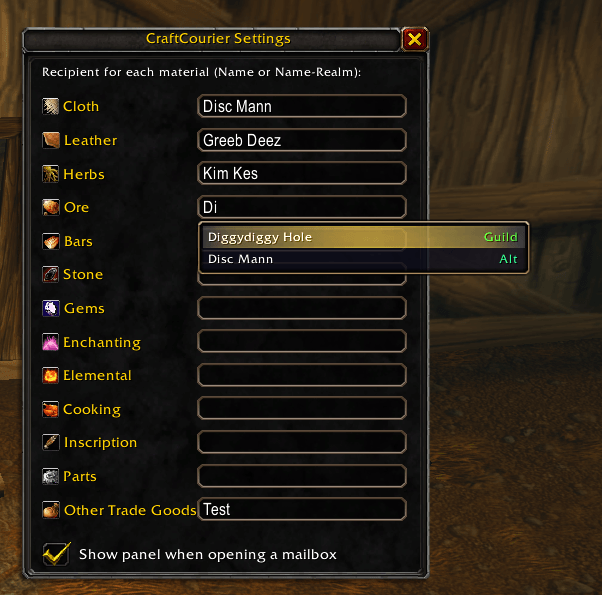
- Type /craftcourier (or use Options → AddOns → CraftCourier) and choose who gets what. Names are suggested as you type: characters on your account, friends, guild members and Battle.net friends, as long as they're on your realm and faction. For example, your tailor gets Cloth, your leatherworker gets Leather, your alchemist gets Herbs, and so on.
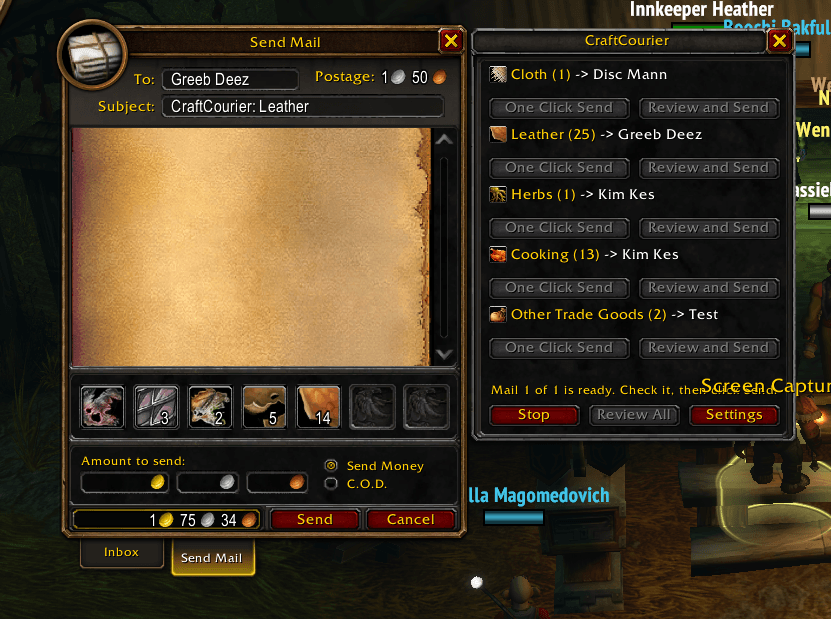
- Open any mailbox. A panel appears next to it, listing each material type in your bags and how many you have.
- For each material type, choose One Click Send to mail it right away, or Review and Send to have the mail filled in so you can check it and press Send yourself. Send All and Review All do the same for everything.
CraftCourier attaches the stacks, fills each mail to the 12-attachment limit and keeps sending until your bags are empty of that material.
Features
- 12 material types: Cloth, Leather, Herbs, Ore, Bars, Stone, Gems, Enchanting, Elemental, Cooking, Parts and Other Trade Goods.
- BoE gear by rarity: send unbound Bind on Equip items to a different alt for each rarity (Uncommon, Rare, Epic). Ideal for an auction alt or a disenchanter.
- One Click Send or Review and Send for every material type, from a panel docked to the mailbox.
- Send All packs material types that go to the same alt into shared mails, so you pay for fewer mails.
- Name suggestions as you type, showing only characters you can actually mail.
- Smart hiding: on your herbalism alt, the Herbs button doesn't appear, because it's already the right character.
- Tooltips show exactly which items will go to whom before you click.
- Safe: soulbound items are skipped, it never mails the character you're playing, and sending stops if a mail fails or you close the mailbox.
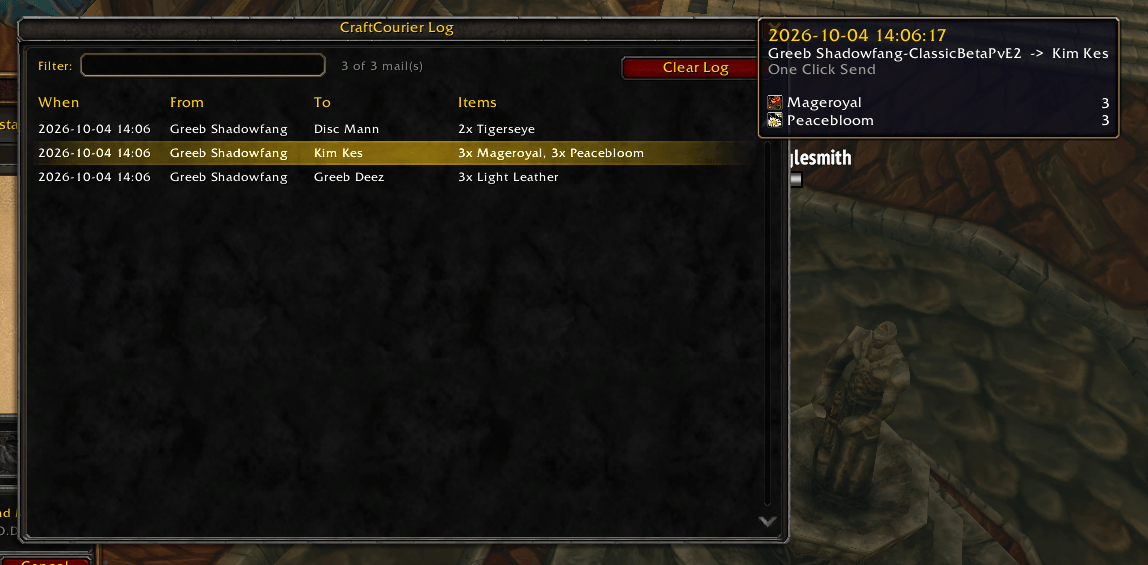
- Send log: see every mail CraftCourier has sent, from any of your characters: when it went, who sent it, who received it and what was in it. Filter by name or item.
- Overrides: reassign any item to a different category, or tell CraftCourier to ignore it.
Commands
/craftcourieror/ccr: open the settings window/craftcourier set <category> <Name Surname>: set a recipient, e.g./ccr set leather Greeb Deez/craftcourier clear <category>: remove a recipient/craftcourier log: open the send log/craftcourier list: show your recipients/craftcourier assign [item link] <category|ignore>: fix an item's category/craftcourier unassign [item link]: undo an override/craftcourier item [item link]: show how an item is categorised (handy for bug reports)/craftcourier debug: show which character CraftCourier thinks you're on
Notes
- Ore, Bars and Stone are told apart by item name, so this works best with an English client. Use
/craftcourier assignfor anything that's sorted wrong. - Normal postage applies to every mail.
Help improve CraftCourier
Please open a GitHub issue if:
- A category is missing: there's a type of material or item you'd like to send to its own alt.
- An item isn't being picked up: it's in your bags but doesn't appear in the CraftCourier panel.
- An item is in the wrong category, for example a bar showing up under Stone.
The issue forms will ask you to run /ccr item and shift-click the item into it, e.g. /ccr item [Copper Bar]. That prints everything we need to sort it correctly. Paste the output, along with the category you expected. Bug reports and other suggestions are welcome there too.
License
CraftCourier is open source under the MIT License.
You must be logged in to leave a comment.