
CompactWarFrames
Ultra-lightweight party and raid frames with built-in click-casting, subgroup sorting, dispel highlights, and zero setup hassle.
Details
Expansion
 Forever
 Categories
Developers

Having issues?
# CompactWarFrames (CWF)
**CompactWarFrames** is an ultra-lightweight, high-performance unit frame addon built specifically for healers and raid leaders. Designed with simplicity, clarity, and zero-bloat performance in mind, it provides a clean, responsive grid layout for 5-man parties and 40-man raids with full built-in click-casting support.
---
### Key Features
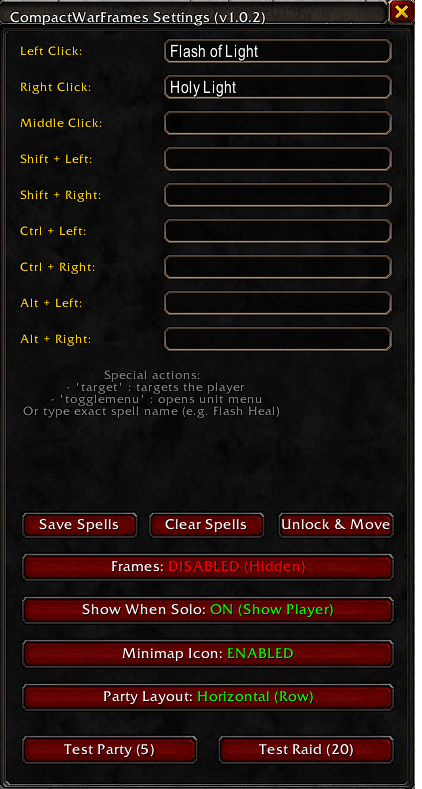
* **Built-in Click-Casting:** No third-party click-cast addons needed! Bind your heals, dispels, and utility spells directly to Mouse Clicks (Left, Right, Middle) combined with `Shift`, `Ctrl`, or `Alt` modifiers.
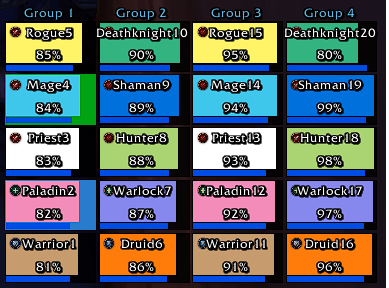
* **Auto-Sorting by Raid Subgroup:** Raid members automatically align into clean 5-person columns based on their actual raid group (Group 1–8) with clear group headers above.
* **Flexible Party Layout:** Toggle your 5-man party between a **Horizontal Row** or a **Vertical Column** at the push of a button.
* **Bottom-Up Anchoring:** Frames grow upwards from the bottom, preventing your party/raid grid from expanding downward over your action bars.
* **Role Icons & Dispel Borders:** Instant visual indicators for Tanks, Healers, and DPS, with colored border outlines when an ally is afflicted with a dispellable Magic, Curse, Disease, or Poison debuff (fully combat-taint protected).
* **Clean & Solo-Friendly:** Frames automatically hide when you are solo, keeping your screen completely clutter-free.
* **Master On/Off Toggle:** Enable or disable the entire unit frame system whenever you want.
* **One-Click Test Modes:** Preview and position your frames anytime with built-in **Test Party (5)** and **Test Raid (20)** modes.
---
### Configuration & Commands
Type `/cwf` in chat to open the in-game settings panel.
* **Unlock & Move:** Click to reveal the anchor overlay. Drag your frames where you want them, and close the window to automatically lock them in place.
* **Assign Spells:** Type any spell name into the modifier boxes (e.g., `Flash Heal`, `Renew`, `Cleanse`, `Flash of Light(Rank 1)`).
* **Clear Spells:** Reset all bindings back to default (Left Click = Target, Right Click = Menu) with a single click.
* **Party Layout:** Toggle instantly between Horizontal (row) and Vertical (column) configurations.
* **Toggle Frames:** Quickly show or hide the frames with the menu button or by typing `/cwf toggle`.
---
### Default Click Actions
* **Left Click:** Target Unit
* **Right Click:** Context / Unit Menu
* **Middle Click & Modifiers (Shift / Ctrl / Alt):** Fully configurable via `/cwf`
---
**Author:** Haldon
**Support & Issues:** Leave a comment on CurseForge or report any issues in the project tracker.

You must be logged in to leave a comment.