
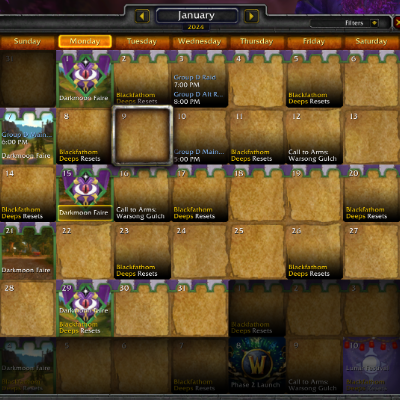
Calendar Helper
Addon to load imported raid data from Discord into the game for use with Classic Calendar - Revived
Details
Expansion
 Forever
 Categories
Developers

Having issues?
Calendar Helper — Import External Events into Classic Calendar
CalendarHelper is a lightweight companion addon for Classic Calendar - Revived. It loads the CalendarHelper.lua saved-variables file into the game and exposes its CalendarHelperDB data for Classic Calendar to import into your in-game calendar.
It is used together with a companion desktop application and a Discord bot that pull Raid-Helper raid signups out of Discord and write them into the saved-variables file for use in game — so events you organize in Discord show up on your WoW calendar without re-typing them.
The Problem
Guilds plan raids and events in tools like Discord, Raid-Helper, and spreadsheets. Getting those events into the in-game calendar means re-typing every one by hand. There is no built-in way to hand a list of scheduled events to Classic's calendar.
The Solution
CalendarHelper acts as a bridge. The companion desktop app / Discord bot writes your Raid-Helper events into the addon's saved data while the game is closed; the next time you log in, CalendarHelper loads them and makes them available for Classic Calendar to import. No copying event details by hand.
Core Features
- Event hand-off — loads the
CalendarHelper.luafile (specificallyCalendarHelperDB) into the game and exposes it for Classic Calendar to import - Discord & Raid-Helper pipeline — works with the companion desktop app and Discord bot to bring Raid-Helper signups in from Discord automatically
- Silent and lightweight — no UI, no minimap button, no performance cost; it simply loads your data at login
- Standard event fields — title, date, time, description, type, attendee cap, status, and creator carry through
How It Works
- Prepare events outside the game — the companion desktop app / Discord bot pulls your Raid-Helper events from Discord and writes them into CalendarHelper's saved data file while WoW is fully closed.
- Log in — CalendarHelper loads that data and makes it available in-game.
- Import in Classic Calendar — Classic Calendar reads the loaded events and adds them to your calendar.
Accessing the AddOn
- When enabled, the addon "just works" — there is no interface and no slash commands. It loads your data at login and hands it off to Classic Calendar.
Requirements
- WoW version: Classic Era, Burning Crusade Classic / Classic Anniversary, or WoW Forever
- Classic Calendar - Revived — CalendarHelper only carries the data; Classic Calendar is what displays and imports it
- The companion desktop app / Discord bot to write the event data from Raid-Helper (a setup guide is included with the addon)
Important: Updating Event Data
- New event data is only picked up when the game launches. To load fresh events, fully exit WoW (not just to character select), let the companion tool update the data, then start the game again.
- Do not use
/reloadto load new data — WoW overwrites the saved file on reload and your new events will be lost. - Exiting only to character select does not work either — the game keeps the data in memory until a full restart.
Known Issues
- TBD
Recent Updates
v0.3.1 (2026-09-27)
New
- WoW Forever support, so Classic Calendar can load there too
Changed
- The addon's name now shows in orange in the in-game AddOns list
Fixed
- Burning Crusade Classic and Classic Anniversary now load the correct version of the addon instead of the Classic Era one
- Classic Era no longer lists the addon as out of date
- The addon no longer prints several lines to chat every time you log in — it is now silent, as intended
v0.3.0 (2026-07-04)
- Added a Burning Crusade Classic build alongside Classic Era — the addon now ships an explicit version for each supported client
v0.2.3 (2026-01-22)
- The bundled documentation now ships with the addon
v0.2.2 (2026-01-16)
- Reworked the packaged README files
v0.2.1 (2026-01-16)
- README files are now included in the download
Credits
Pimptasty — author and maintainer.
Community
If you have any questions, comments, or anything else, please feel free to reach out on Discord!
You must be logged in to leave a comment.