
BuddiesQuestForever
A 1-60 questing guide for WoW Forever: a tracker, a direction arrow and map pins for every race and class, with Forever's new quests built in.
Details
Expansion
 Forever
 Categories
Developers

Having issues?
WoW Forever is meant to be explored: new quests, old roads. Buddies Quest Forever isn't here to rush you through that. It's here for the moments you get lost.
Because sometimes you do. You can't find the NPC, the quest text says "north of the village" and there are three villages, or you've wandered off for an hour and can't remember what you were doing. That's when you open the route: what to pick up, where the givers stand, which mobs to look for, and where to hand it all in. Buddies don't let buddies get lost.
Use as much or as little as you like. Follow it stop by stop, or glance at it when you're stuck and then go back to wandering. The in-game arrow can be hidden whenever you want to grind, gather or just explore, and turned back on when you're ready to pick the thread up again.
We are constantly updating the routes, and you can help. Now and then click Share on the tracker (or type /bqf share), copy the code, and paste it at bqforever.com. The code has no character names and nothing that identifies you, just the quests you did, where you did them and the XP they gave. Every code makes the route better for everyone, and you get a spot on the leaderboard under a made-up name. Details: bqforever.com/privacy.
Beta: routes are played and checked up to Forever's current level cap. Stops past it are marked "preview" until players have run them. Levels 1–30 have been checked quest by quest against Forever's own data.
Newest Features
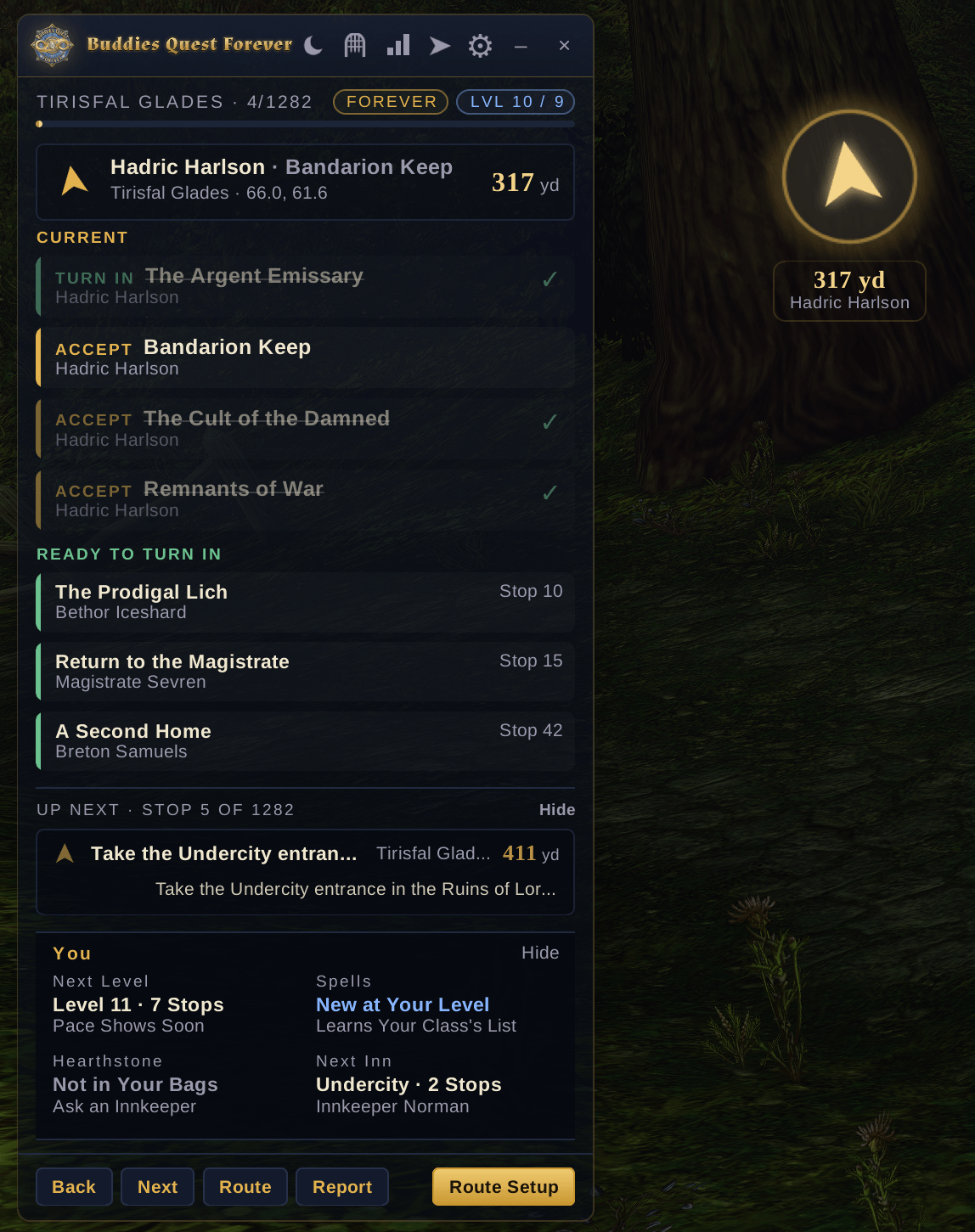
- The You panel: a box above the tracker's buttons with your Next Level (stops to go and about how long), Spells (what's new at your trainer and whether you can afford it), Hearthstone (where it takes you, when it's ready, and when hearthing beats the walk) and Next Inn. Point at any box for the details: the quests ahead and their XP, every spell and its cost, your rested XP and the next three inns.
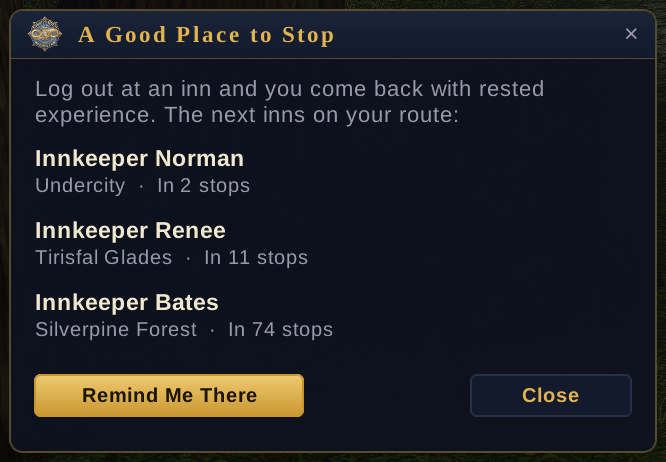
- A Good Place to Stop: the moon on the tracker lists the next inns on your route, how many stops away and about how long. Remind Me There tells you when you've arrived, so you log off rested.
- Target buttons in any language: on German, French and every other client, the addon learns each mob's name in your language when you point at one, target it or see its nameplate.
- Take It While You're Here: when an NPC offers a quest your route only takes later, an On Your Route line on the tracker says so, so you can take it now and save the trip back.
- Quest items: loot an item that starts a quest and a Quest Item line tells you which quest it starts and whether it's on your route. Right-click it in your bags.
- Best Reward for You: on a hand-in with a choice of rewards, a small window names the best one for your class and level, and which one sells for the most. It never picks for you.
- Hearthstone and campfire tips: when your next stop is by your inn and the walk is long, the tracker suggests your hearthstone and how many minutes it saves. Logging off out in the world? It reminds you to light a campfire for Boosted Rest, or points you to the nearest inn.
- Skyborne theme: deep teal with sky-glass highlights.
- Every class quest on your route: class quests and forms are now on the route for every race, including Forever's new ones (Skyborne druids get Cure Poison and Aquatic Form, night elf rogues get Mathias and the Defias, troll warlocks get the Succubus and Felhunter). When one is far from where you're questing, a New for Your Class window asks once: Add It Now, Keep It where it costs the least, or Skip It (
/bqf sidetripsbrings a skipped one back). - Helper Mode: a third choice under Full and Express, for playing your own way. No route: the tracker lists the quests in your log, each with a Take Me There button, and the arrow only comes on when you click it (the nearest part you haven't done, then the hand-in). Switch back any time and your route picks up from what you've done.
- Every target its own stop: quests whose targets are in different places now get one stop per target, each with its spot and a Target button, and targets who wander have their path drawn on your map.
- Levels 21–30 are live: Forever's beta level cap is now 30, and the route takes you all the way there: Redridge, the Wetlands, Duskwood, Ashenvale, Stonetalon, the southern Barrens, Hillsbrad, Thousand Needles and the start of Stranglethorn, with every Forever-new quest along the way. Levels 20–30 are still a work in progress: they're built from Forever's own data and checked quest by quest, but few players have run them yet. They'll get better with every quest code you share.
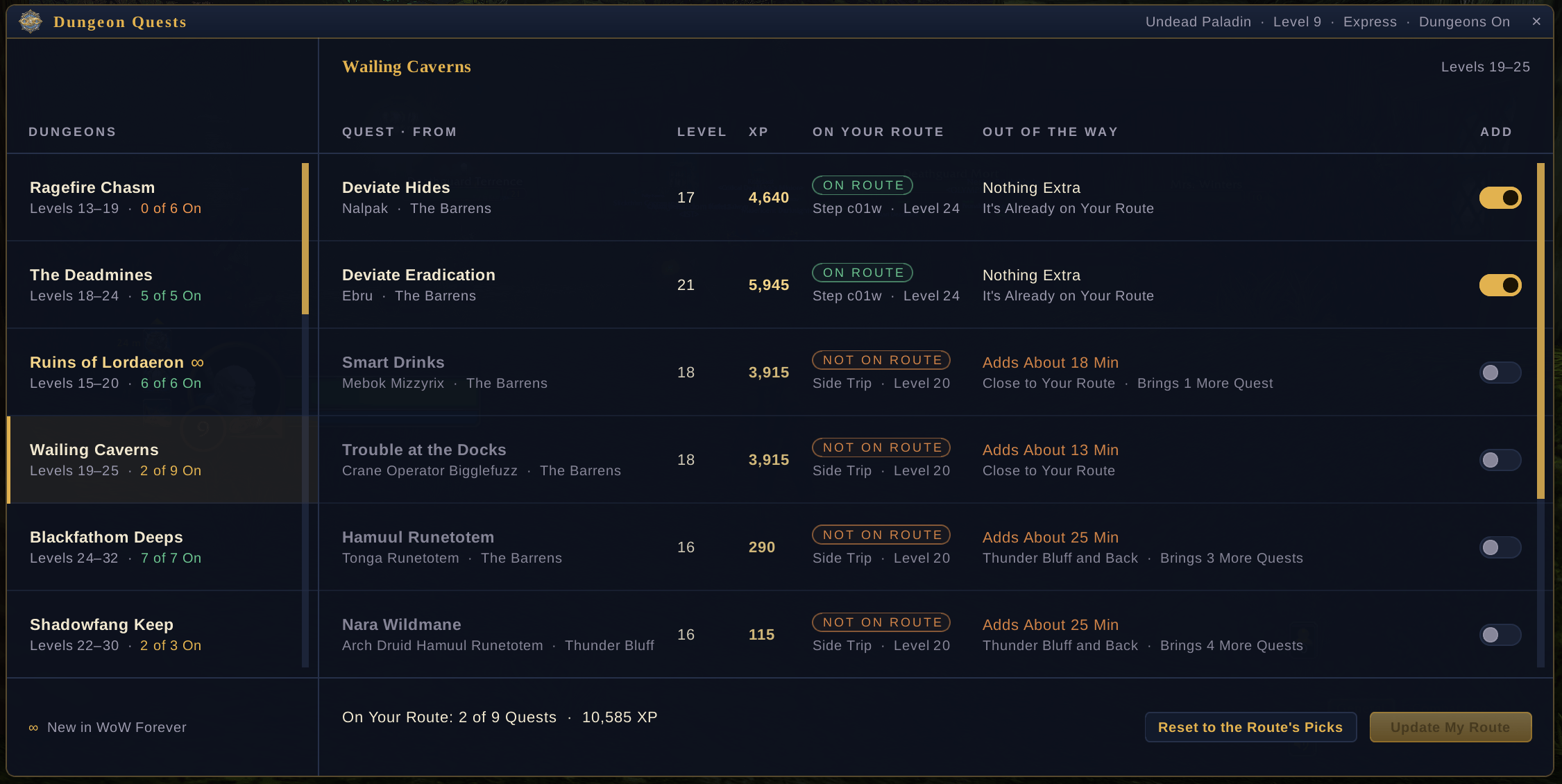
- Dungeon Quests: the gate on the tracker (or
/bqf dungeons) lists every dungeon quest your side can do, with its level, its XP and how far out of the way it is. Switch single quests on or off, or add one from another race's route as a side trip. Forever's new dungeons are marked with a gold ∞. - Reputation Turn-Ins: an optional choice in Setup. Turn it on and, when you carry a library book or another reputation item, the tracker reminds you to hand it in at a stop you already make in Stormwind or Undercity. It never adds a trip.
Features
Your Route, Built in Game
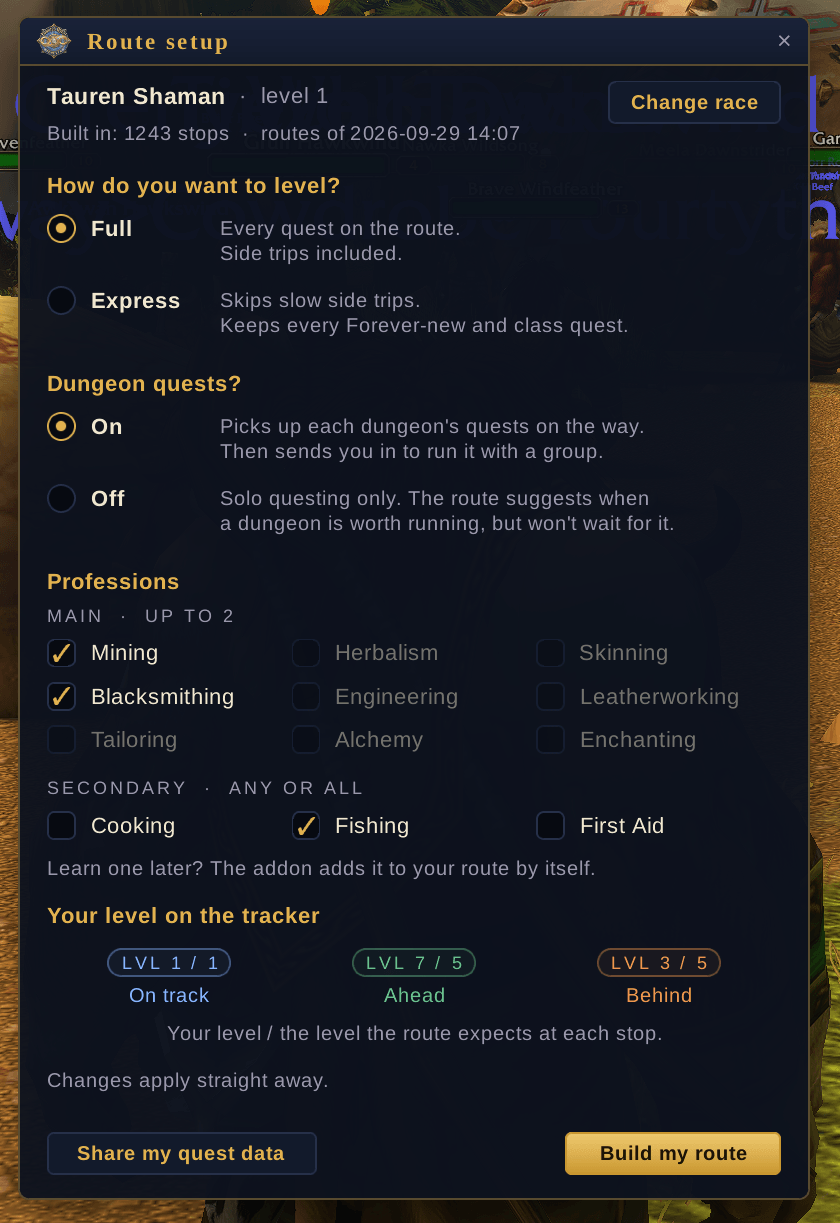
- Setup on your first login: choose Full, Express or Helper, turn dungeon quests on or off, pick your professions (up to 2 main and any secondary), and choose whether to hand in reputation items. Change any of it later with Setup on the tracker or
/bqf. - Full or Express: Full has every quest on the route. Express skips slow side trips but keeps every Forever-new quest and every class quest.
- Starts where you are: quests you've handed in are skipped, and quests in your log stay on the route. Quests you left behind and are 5 or more levels past are dropped, along with the rest of their chain.
- Every Forever-new quest is on the route, including class quests for Forever's new race and class combinations.
- Class side trips: a class quest or form that's far from your route (like a Skyborne druid's Cure Poison and Aquatic Form) sits where it costs the least, and a New for Your Class window asks once when it becomes available: Add It Now, keep it there, or Skip It.
- The arrow takes you where the mobs are: every kill and collect stop points at the spot where its mobs and items actually are, and lists every mob that drops what you need.
- Level check: the LVL pill shows your level against the level the route expects at this stop: blue when you're on track, green when you're ahead, orange when you're behind.
- Professions: learn one later and the addon adds its quests to your route.
- Reputation Turn-Ins (optional): turn it on in Setup and, when you carry a library book or another reputation item, the tracker reminds you to hand it in at a stop you already make in Stormwind or Undercity. It never adds a trip.
- Dungeon Quests: the gate on the tracker (or
/bqf dungeons) opens every dungeon quest your side can do, dungeon by dungeon: its level and XP, whether it's on your route, and how far out of the way it is: Nothing Extra when it's already on your route, otherwise the time it adds (Adds About 6 Min) and where it takes you. Switch single quests on or off, or add one from another race's route as a side trip at the level it fits (it brings along any quest it needs first, and joins your own dungeon run when you already have one). The window adds up how much time your changes add before you update your route. Forever's new dungeons are marked with a gold ∞.
The Tracker
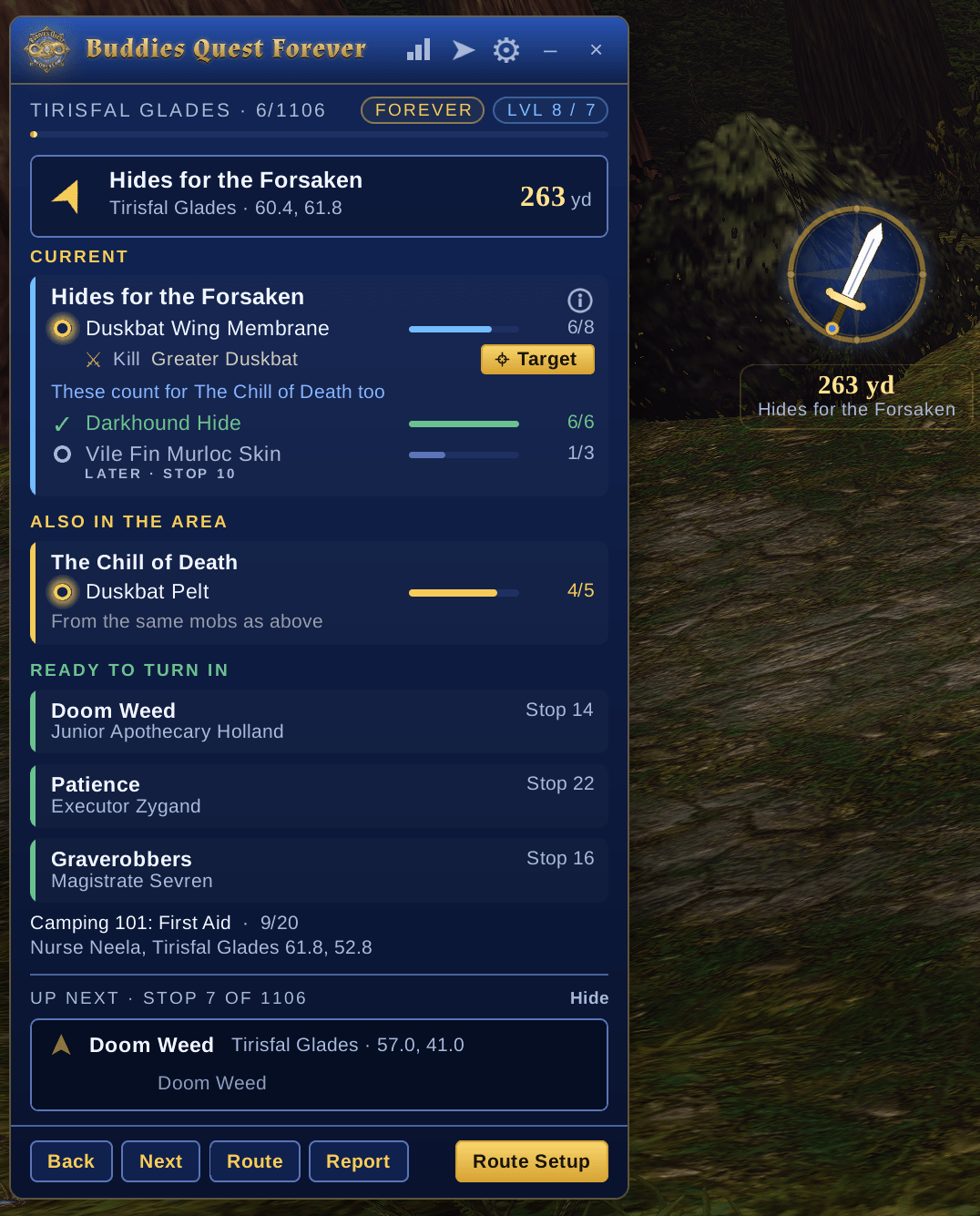
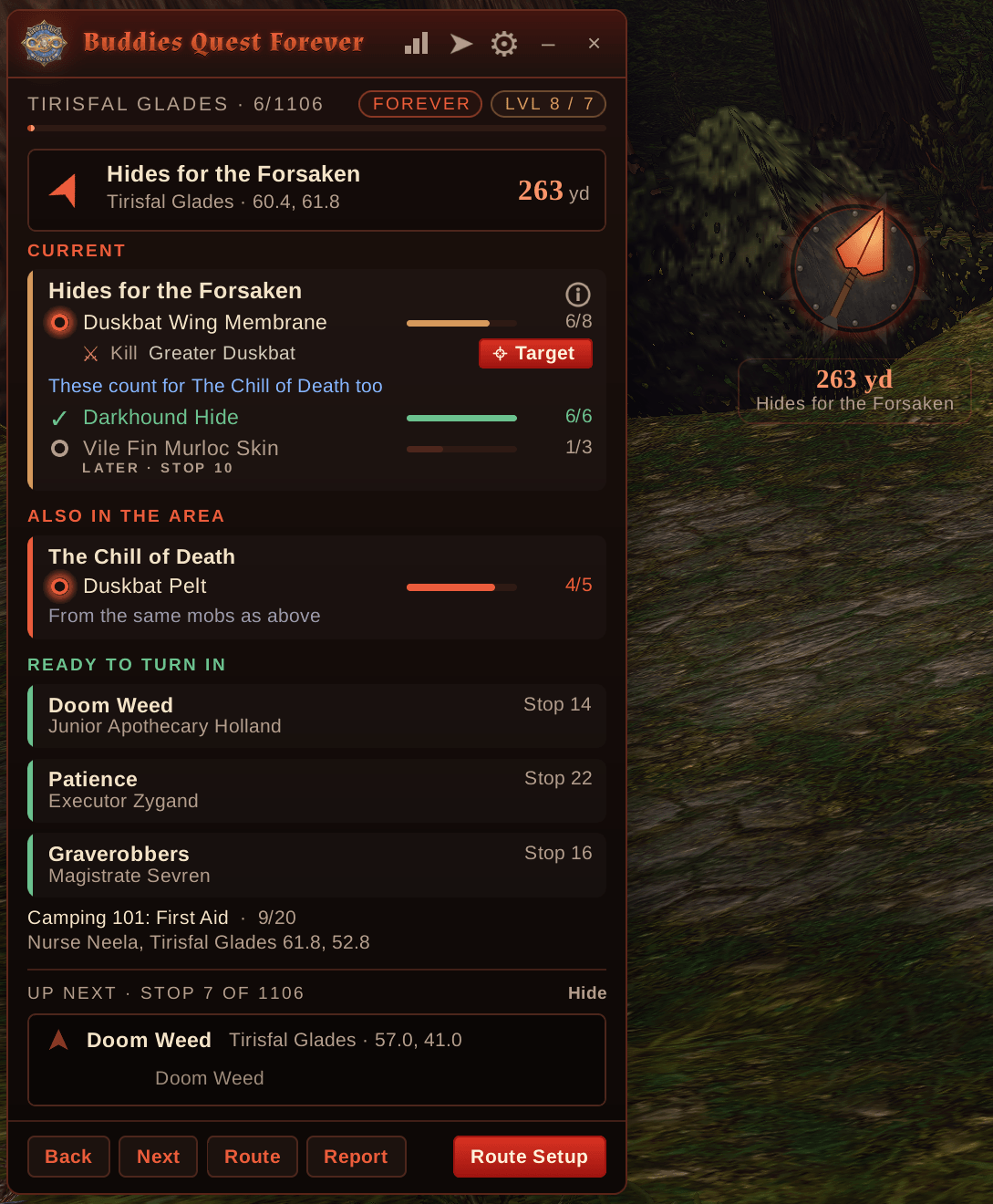
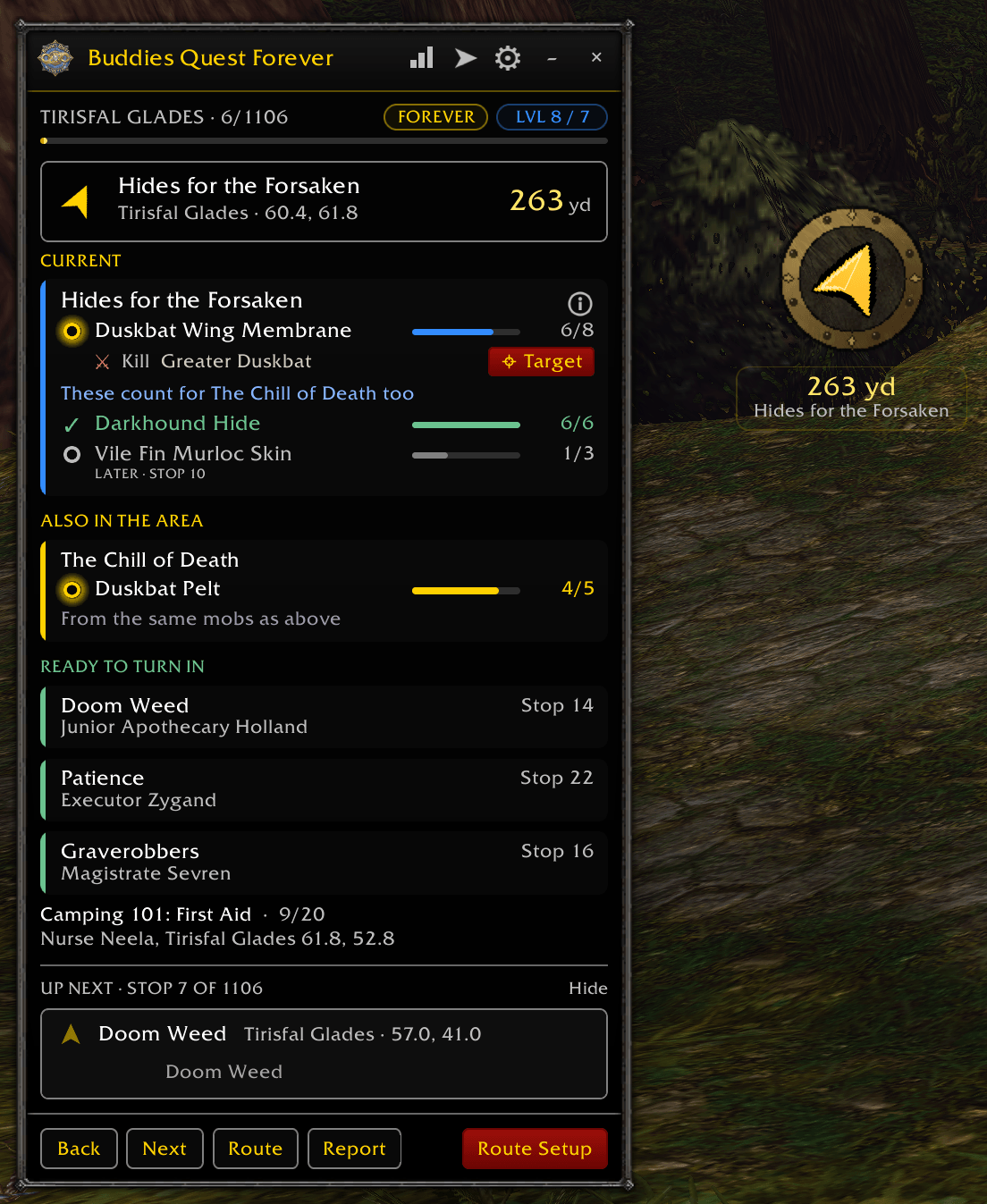
- Sections: Current (this stop), Also in the Area, Part Done · More Later, Ready to Turn In, then Up Next.
- Nothing looks missed: a quest split across stops shows every objective, marked As You Go (the mobs here drop it) or Later, with the stop that does it.
- Also in the Area: quests in your log whose mobs are where you are, with progress and Target buttons.
- The stop you're on, with each quest ticked off as you go and live progress from your quest log (for example "Scavenged Goods: 2/6").
- The mobs and people each quest needs, each with a Target button.
- Route tips on quests with a small i icon. Point at the quest to read the tip.
- It moves to the next stop by itself when you accept, finish or turn in a quest, or when you arrive at a travel stop.
- Route list: every stop in order. Click one to jump to it.
- Up Next: a look at the stop after this one.
- A compact one-line mode.
Arrow and Map
- A floating arrow with the distance to one waypoint at a time. Drag it, resize it, or hide it while you grind or explore.
- The arrow walks you around mountains: where a ridge or cliff is between you and your next stop, the arrow points at the way around it and shows the walking distance, then at the stop once you're past.
- Nearest stop first in town: in a town the tracker takes you to the nearest thing you can do next, never ahead of what a quest needs.
- Quest givers who wander: NPCs who walk a path are marked WANDERS; the arrow takes you to the nearest point of their path, and the path is drawn on your map and minimap.
- World map: the current stop, the next three stops, and the hunting area for kill and collect quests.
- Minimap: the hunting area, and an arrow to the stop when it's off the edge.
- Nearby quests (optional): pins for quests near you that aren't on the route.
- Optional TomTom waypoints, and optionally the game's own gold map marker.
Better Together
- Party tracker: everyone in your party running the addon shows up with their stop, what they're doing and their progress. Click a buddy to jump to their stop.
- Party quest sharing: each stop tells you who doesn't have a quest yet, with a Share Quest button. Do lines show every buddy's count, and hand-ins tell you who to wait for.
- Mob tooltips: hovering a mob you need shows the quest and your count, and whether a buddy needs it too.
Quality of Life
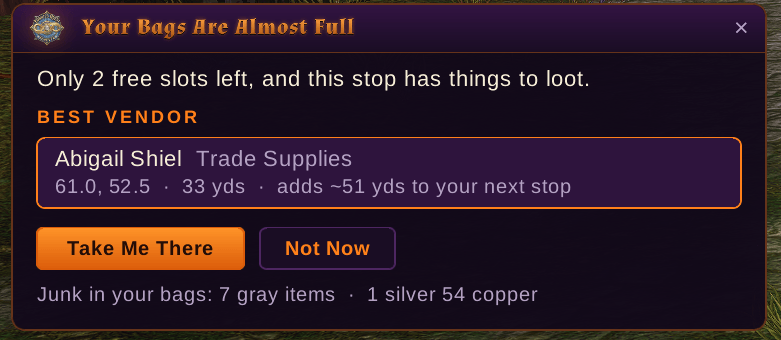
- Full bags? Two choices: when your bags fill up, Take Me There sends the arrow to the vendor that's the least out of your way (and says where it is), then straight back to your route; Wait Until the Next Shop says how many stops ahead the next one is, and then there are no more pop-ups until you've made room. It also warns you at 2 free slots when a stop has things to loot. Never mid-fight, and only vendors that serve your side.
- Sell Junk: at any vendor, one click sells your gray items and shows what they're worth, with Repair and its cost. Tick Sell Junk Automatically to have it happen every time.
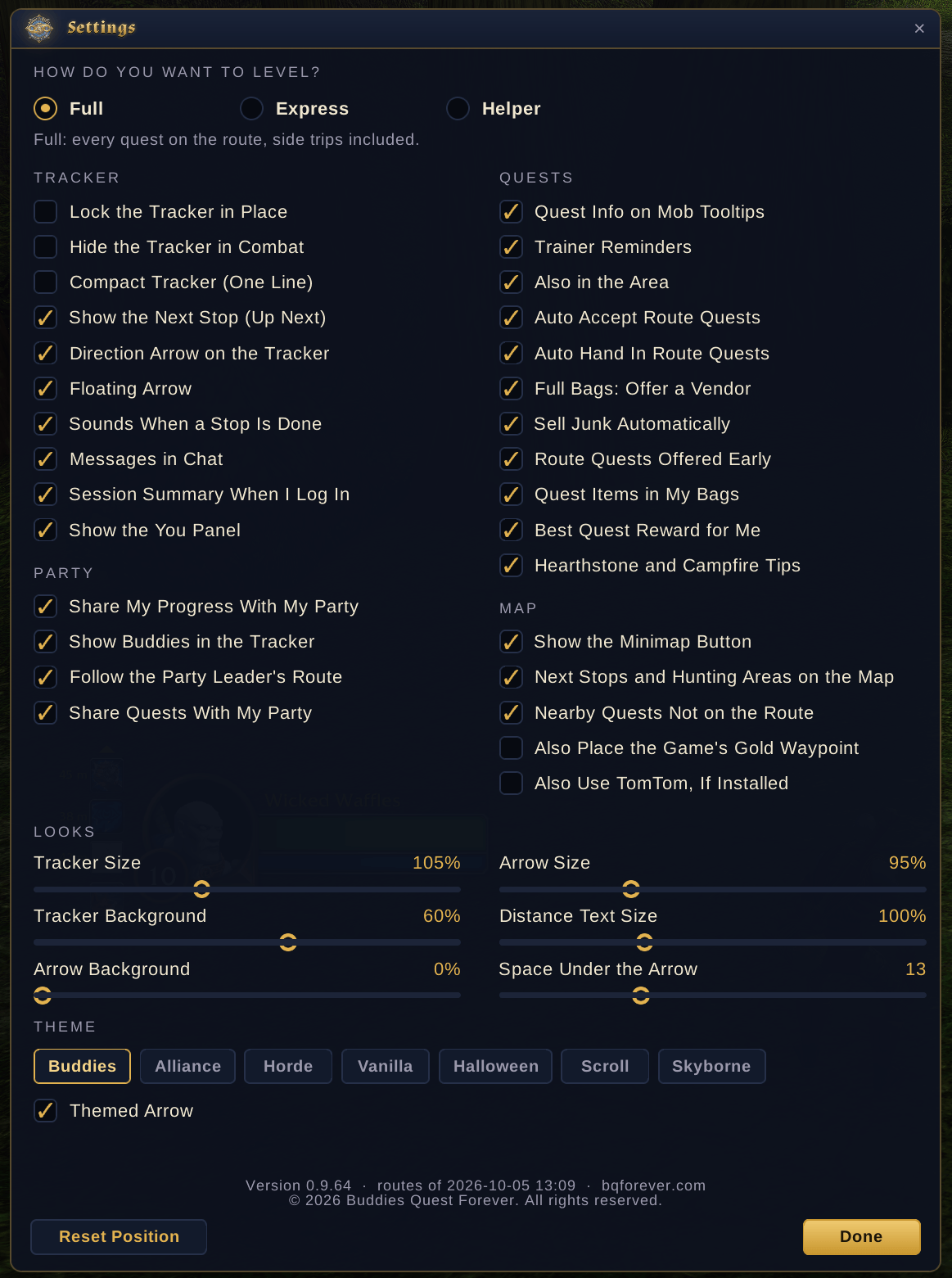
- Themes: Buddies (navy and gold), Alliance, Horde, Vanilla (the 2004 look, with the game's own font and window border), Halloween, Skyborne (new) (deep teal and sky-glass) and Scroll: an old-school RPG scroll with parchment, wooden rollers, brown ink and red wax-seal buttons, each with its own floating arrow: a gold sword, a red-hot spearhead, the classic yellow arrow, a carved jack-o'-lantern or a parchment compass. Prefer the usual arrow? Untick Themed Arrow. Halloween comes on by itself during Hallow's End unless you've picked a theme.
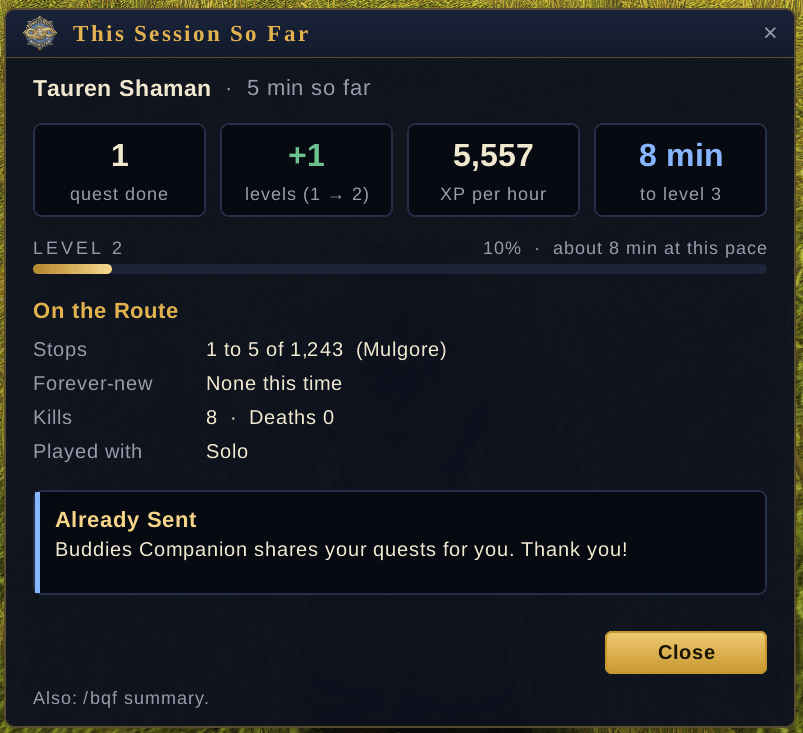
- Session summary: when you log in after a break, a Welcome Back! window shows your last session: time played, levels, quests, XP, stops, Forever-new quests, kills and who you played with. The stats icon on the tracker (or
/bqf summary) shows this session so far. - Trainer reminders: the You panel's Spells box shows when new class spells are ready and whether you can afford them. Hover it for every spell, its cost, what comes next level and where your trainer stands.
- Quest helpers (each with its own box in Settings): an On Your Route line when a quest your route takes later is offered early, a Quest Item line for items in your bags that start quests, a Best Reward window on hand-ins with a choice, and hearthstone and campfire tips.
- Auto Accept and Auto Hand In (both off until you turn them on): they only act on quests on your route, never pick a reward for you, and holding Shift pauses them.
- Share reminders: the addon reminds you to share now and then (never in combat or in a dungeon). Settings or
/bqf remindturns them off. - Any game language: the arrow, map pins, quest tracking and Target buttons work on German, French, Spanish and every other client (zones by map ID, quests by quest ID, mob names learned as you meet them). The route text is in English.
- Settings: size, background, sounds, chat messages, the minimap button, hiding in combat, locking, and more. Key bindings are included.
Commands
/bqf Setup · /bqf start the setup window · /bqf dungeons Dungeon Quests · /bqf summary session summary · /bqf sidetrips bring back a skipped class side trip · /bqf bags find a vendor · /bqf share share your quest data · /bqf list route list · /bqf next / /bqf back · /bqf arrow hide or show the arrow · /bqf nearby · /bqf options · /bqf version
Updates
Addons can't update themselves, and the routes are built in, so new routes come with each new version. Update from CurseForge. A party member with newer routes makes the addon tell you.
You must be logged in to leave a comment.