
Blood Ledger
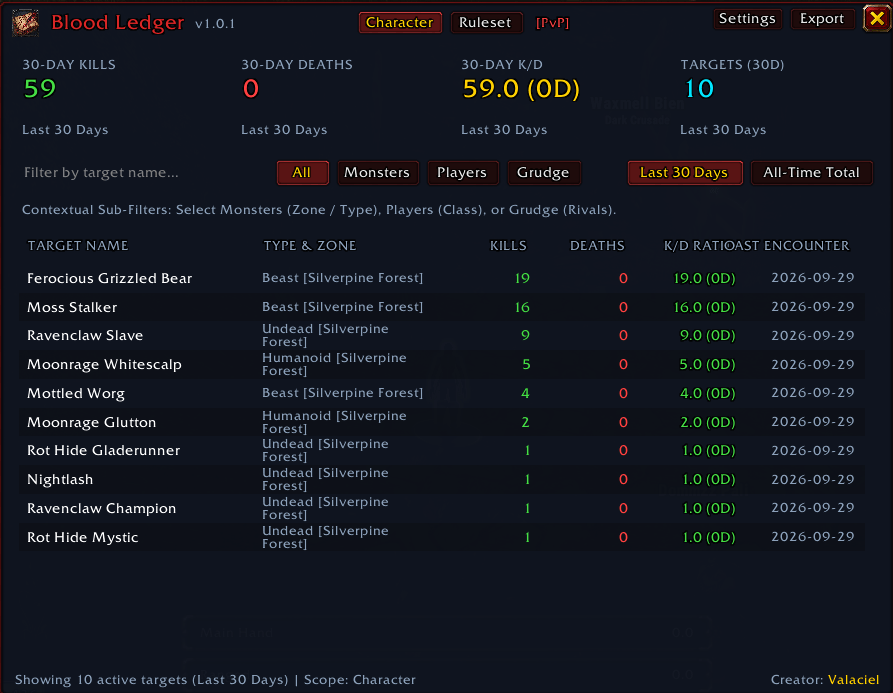
Blood Ledger tracks and aggregates player kills and deaths against both creatures (PvE) and enemy player characters (PvP), distinguishing between rolling 30-day performance and lifetime totals.
Details
Expansion
 Forever
 Categories
Developers

Having issues?
Blood Ledger
Blood Ledger is a lightweight, zero-bloat combat ledger addon for World of Warcraft Forever (supporting Classic Era / Camelot Interface 16001 and standard clients).
It tracks and aggregates all player kills and deaths against creatures (PvE) and enemy player characters (PvP), distinguishing between rolling 30-day performance and lifetime records.
Features
- Automated Combat Tracking: Automatically detects kills and lethal player deaths via combat log events:
- Kills: Records solo killing blows by default, with an optional setting to include party / tagged mob kills.
- Deaths: Tracks incoming lethal strikes and overkill values, accurately attributing fatal encounters to the specific enemy creature or player.
- Rolling 30-Day and All-Time Scopes: View kills, deaths, and K/D ratios partitioned into rolling 30-day windows and lifetime totals.
- Zero-Activity Exclusion: Creatures and characters with zero kills and zero deaths are completely excluded from the ledger and unit tooltips.
- Thousand Separators: Formats all kill and death counts with standard commas for effortless reading (e.g., 14,892 kills).
- Kill/Death (K/D) Ratio Calculations:
- Standard encounters: Formatted to two decimal places (e.g., 4.25).
- Encounters with zero deaths: Clearly displayed as
X.X (0D)(e.g.,25.0 (0D)).
- Contextual Sub-Filters:
- Monsters: Filter encounters by encounter Zone (dynamically populated from visited zones) and Monster Type / Classification (Elite, Rare, Boss, Humanoid, Beast, Undead, Dragonkin, Elemental, Demon, Giant, Mechanical).
- Players: Filter encounters by Player Class (Warrior, Paladin, Hunter, Rogue, Priest, Shaman, Mage, Warlock, Druid).
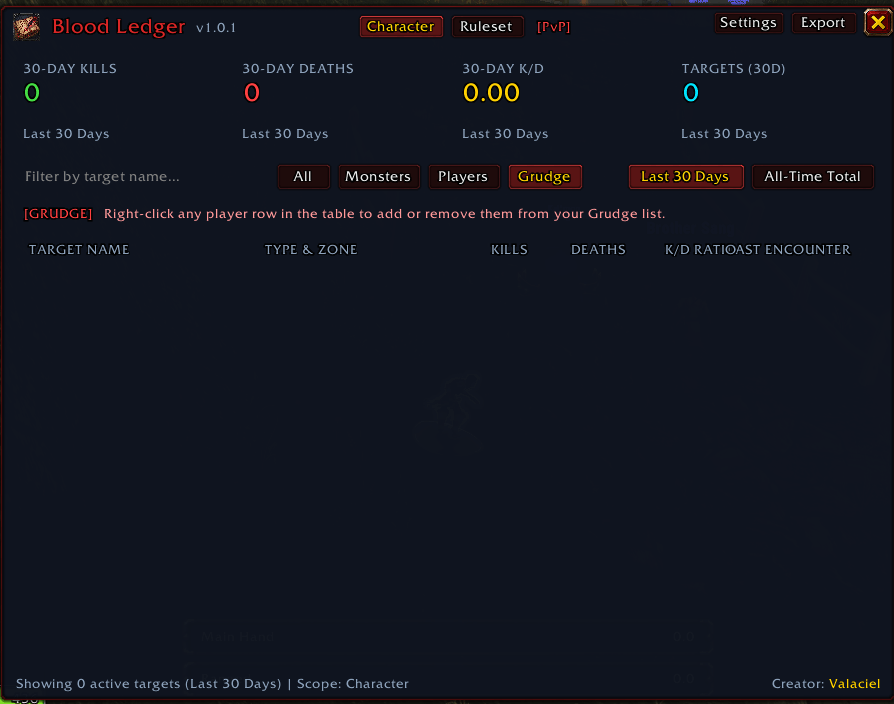
- Grudge: Dedicated tab isolating player rivals. Right-click any player row in the table to add or remove them from your Grudge list with instant table and tooltip updates.
- Grudge / Rivalry System:
- Displays a high-contrast crimson
[GRUDGE]badge beside marked rivals in the ledger. - Automatically highlights grudge targets in the 3D world with a
[GRUDGE]header on their unit mouseover tooltip.
- Displays a high-contrast crimson
- Granular Data Reset:
- Integrated Reset Data button in Settings featuring a two-stage confirmation modal.
- Choose between purging Monsters, Players, or Both without losing unrelated settings or records.
- Reactive Hero Summary Cards: Total Kills, Total Deaths, K/D Ratio, and Targets Tracked recompute immediately when toggling timeframes (30-day vs. All-Time) and when applying filters (Monsters by zone/type, Players by class, Grudge, or name search).
- Official Blizzard Class Colors: All player records, dropdown selections, class badges, and tooltip unit headers leverage authentic Blizzard class colors (
RAID_CLASS_COLORS) across all 9 classes (Warrior, Paladin, Hunter, Rogue, Priest, Shaman, Mage, Warlock, Druid). - Unit Tooltip Integration:
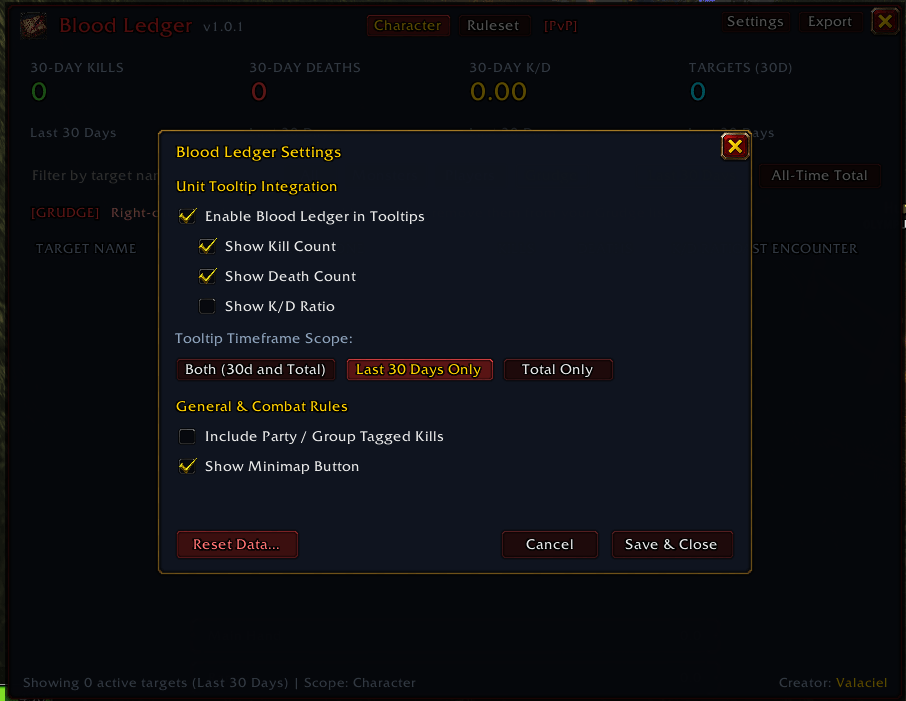
- Displays combat statistics directly on unit tooltips when hovering over monsters or enemy players.
- Configurable display: Choose between Both (30-day and Total), 30-day only, or Total only.
- Toggle visibility for kills, deaths, and K/D ratio independently.
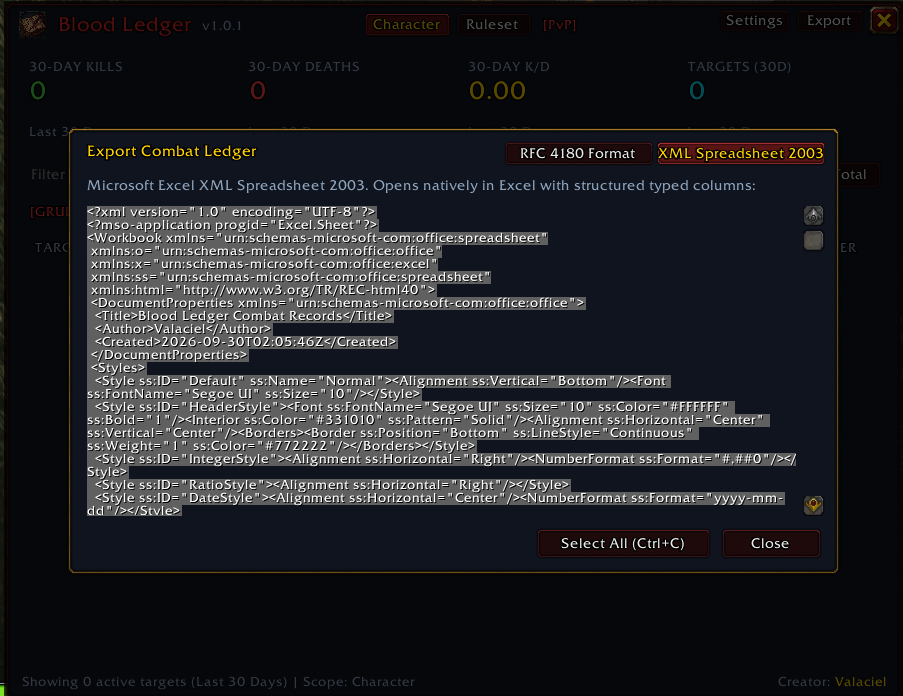
- Multi-Format Export Engine:
- RFC 4180 Format (CSV): Standard comma-separated format for Google Sheets and data science workflows.
- Microsoft Excel XML Spreadsheet 2003: Opens natively in Excel with structured column widths, cell data types, and header formatting.
- One-click "Select All (Ctrl+C)" button for rapid copying.
- Interactive Minimap Button:
- Circular minimap button with customizable orbit angle.
- Hover tooltip displaying current character 30-day and lifetime totals.
- Left-Click toggles the combat ledger window.
- Right-Click opens Settings.
- Middle-Click opens the Export dialog.
- Zero-Bloat Architecture: Instead of storing millions of raw combat events, Blood Ledger records flat integers for lifetime totals and rolling daily counters for the last 30 days. Daily counters older than 30 days are automatically purged without data loss.
Installation
- Copy the
Blood-Ledgerdirectory into your World of Warcraft addons directory:World of Warcraft/Interface/AddOns/Blood-Ledger/ - Ensure the folder is named exactly
Blood-Ledger. - Launch World of Warcraft Forever / Classic Era and verify that
Blood Ledgeris checked in your AddOns list.
Usage
Slash Commands
/blor/bloodor/bloodledger: Toggles the main Blood Ledger window./bl export: Opens the export dialog directly./bl settings: Opens the configuration settings dialog.
Minimap Controls
- Left-Click: Toggle the main combat ledger frame.
- Right-Click: Open the settings modal.
- Middle-Click: Open the export modal.
- Click and Drag: Reposition the button around the Minimap circumference.
Media and Custom Logo
The addon comes configured with a clean white circle placeholder graphic (Forever/Media/logo.tga and Forever/Media/logo.png). When ready to install custom artwork:
- Replace
Forever/Media/logo.tgaandForever/Media/logo.pngwith your 64x64 or 128x128 32-bit RGBA image. - No Lua code or configuration changes are necessary.
License
This project is licensed under the MIT License. See the LICENSE file for details.
Author: Valaciel
You must be logged in to leave a comment.