

Benediction
PallyPower on autopilot: blessings and auras assigned from each player's spec, and works alongside paladins running PallyPower.
Details
Expansion
 Forever
 Categories
- No categories available.
Developers

Having issues?
Benediction
Benediction assigns paladin blessings from the players' specs: a greater blessing for each class, and a plain blessing for a player who wants a different one from the rest of their class. It shares the plan between the paladins in the group and casts the next blessing owed from one button.
Supports WoW: Forever and TBC Anniversary. Available in English, German, French and Spanish.
Compatibility with PallyPower
- Shows a cell per class with its greater blessing and timer, coloured green, yellow or red, as PallyPower does.
- Steps through blessings with the mouse wheel over a cell. With Shift held, the list includes blessings other paladins give.
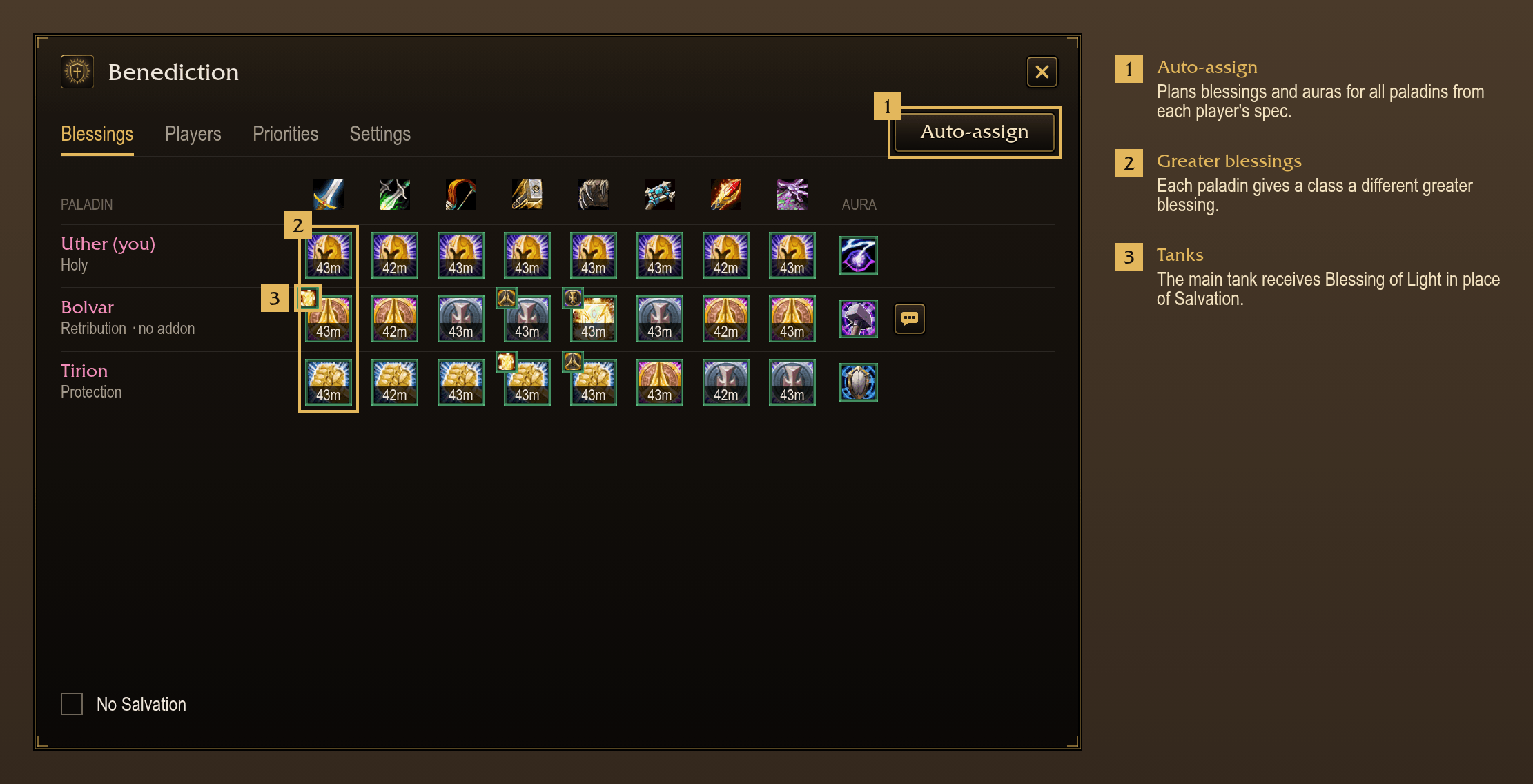
- Makes the assignments from each player's spec, as the PallyPower Auto-Assign WeakAura does. PallyPower's own Auto-Assign goes by class.
- Runs alongside PallyPower Forever, PP Forever and Paladin Toolkit, and PallyPower on TBC Anniversary. Paladins
using those addons are part of the same plan:
- Benediction paladins appear in the other addon's window like any other paladin.
- Benediction reads their assignments and plans around them.
- Benediction sends each of them their part of the plan, into their addon, when their addon accepts it. Most accept assignments from a leader or an assistant.
- Assignments made for a Benediction paladin in one of those addons' windows count as set by hand.
Plans by spec
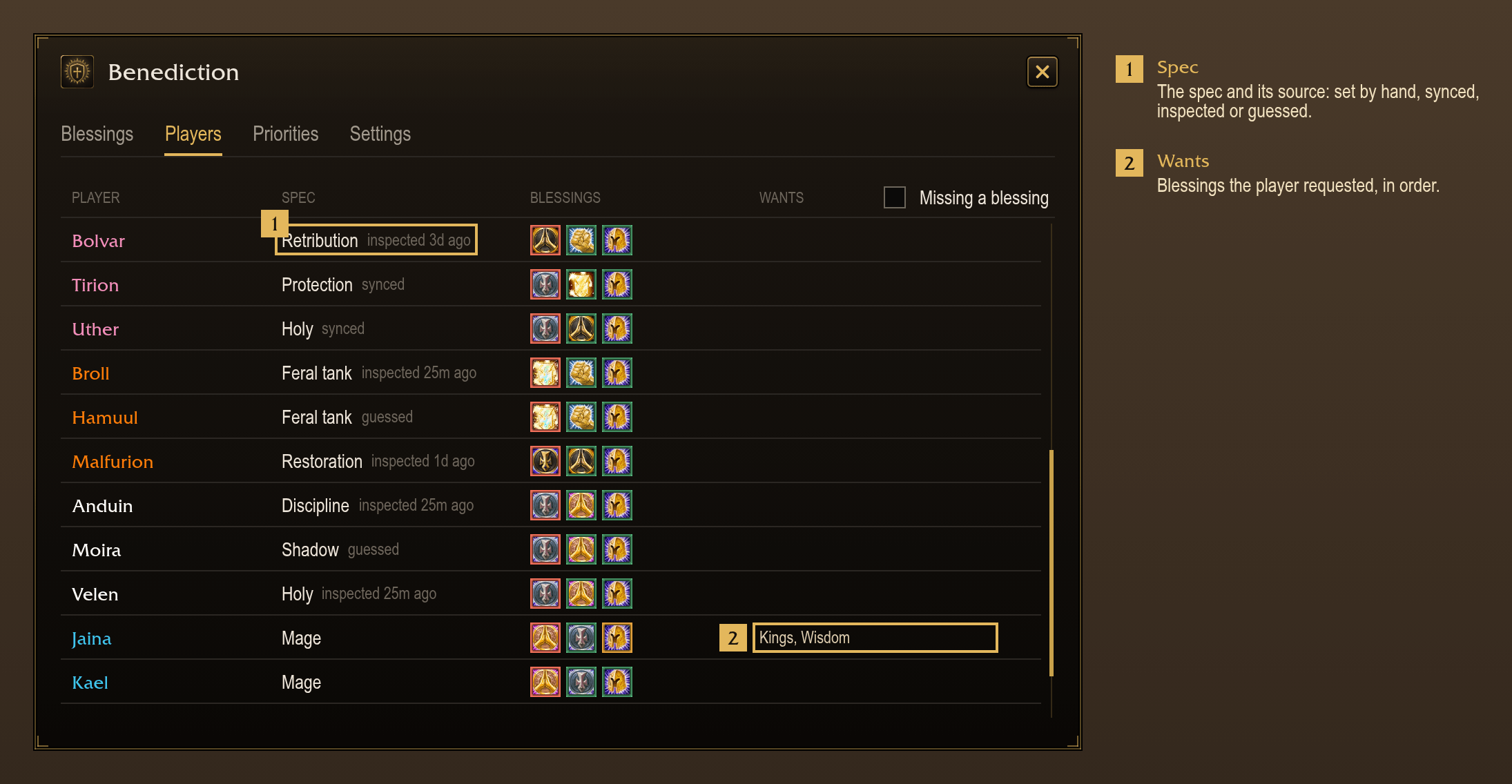
- Reads each player's spec from their own Benediction or from an inspect. Without either, guesses it from class, role and mana.
- Stores synced and inspected specs across sessions and groups, for 60 days. Guesses are not stored.
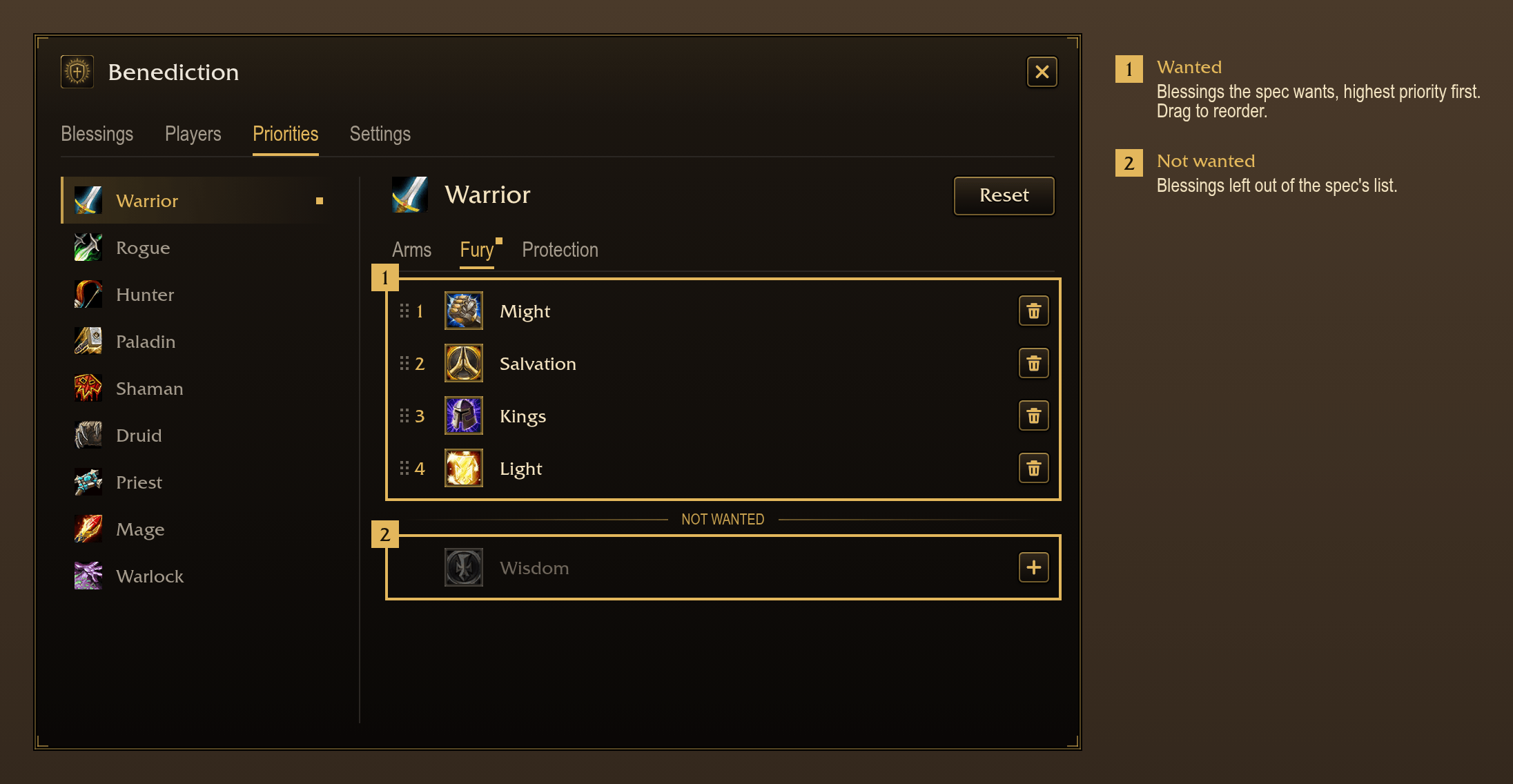
- Ranks blessings for each spec in a priority list. Drag on the Priorities page to reorder a list.
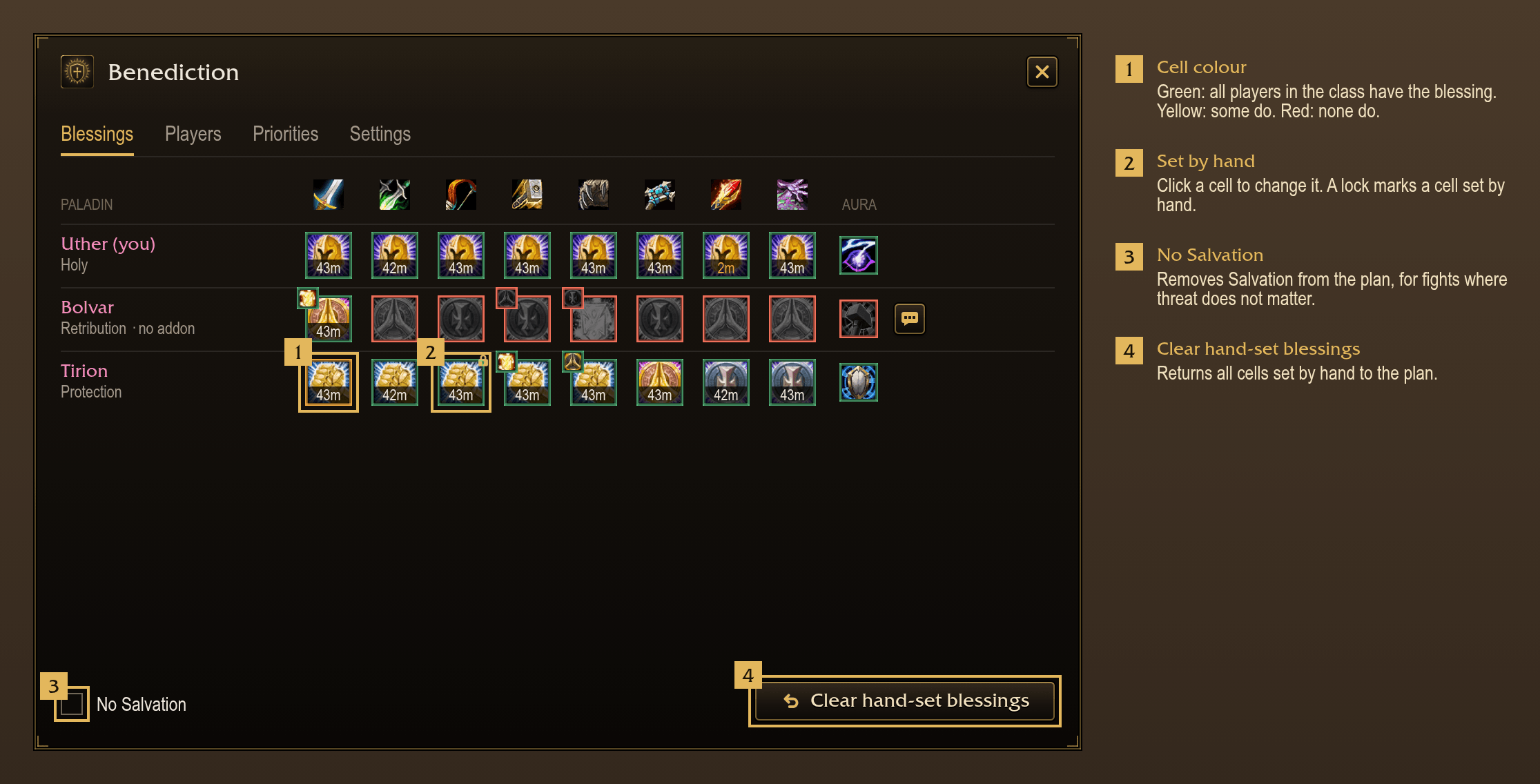
- Never assigns Salvation to a tank spec unless the player requests it.
- Moves Light to second place for tanks when a Holy Paladin is in the group. On by default.
- Puts a player's requested blessings before their spec's list. Players request blessings with
!bless want. A list can also be set for any player on the Players page. - Gives each paladin's greater blessing for a class to the blessing most players in that class want.
- Gives a player a plain blessing in place of the class's greater blessing when their list ranks another blessing higher or rules it out, such as Salvation on a tank.
- Keeps a blessing set by hand until it is cleared. The mouse wheel steps through the choices, as in PallyPower.
- Plans and blesses hunter and warlock pets by kind: Physical, Caster or Tank, with their own priorities. On by default.
Planning for the group
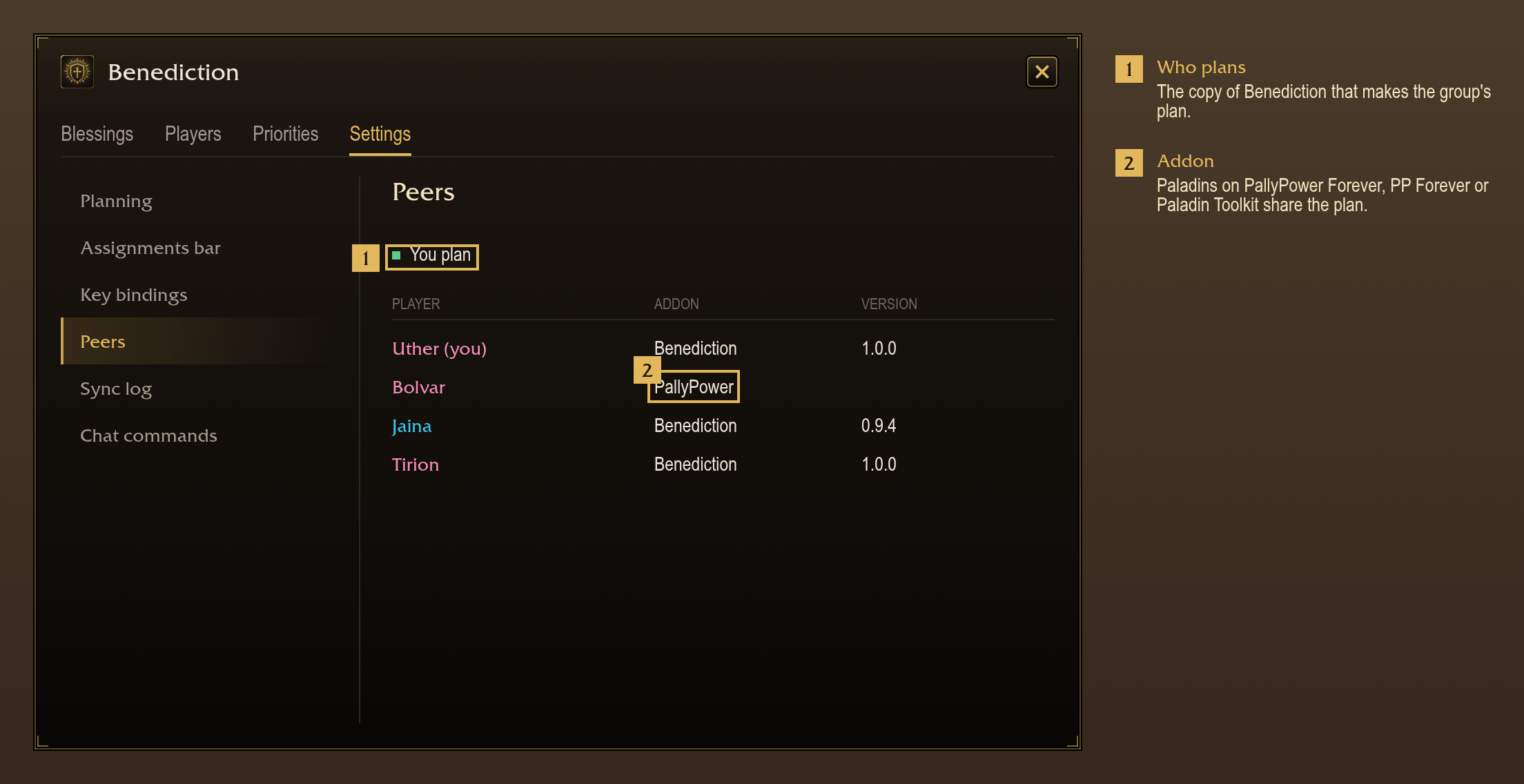
- One copy of Benediction in the group makes the plan: the newest version, then the leader and assistants, then by name. The other copies use that plan.
- Plans when Auto-assign is pressed, and when a request or anything set by hand changes. With "Re-plan when the group changes" on (off by default), also plans when the group or a spec changes.
- Gives each paladin a different aura, Devotion, Concentration and Retribution first. On by default.
- Stores the plan and blessings set by hand across a reload, a relog and group changes.
- Plans for paladins without a blessing addon from their level. One press whispers a paladin their part.
Assignments bar
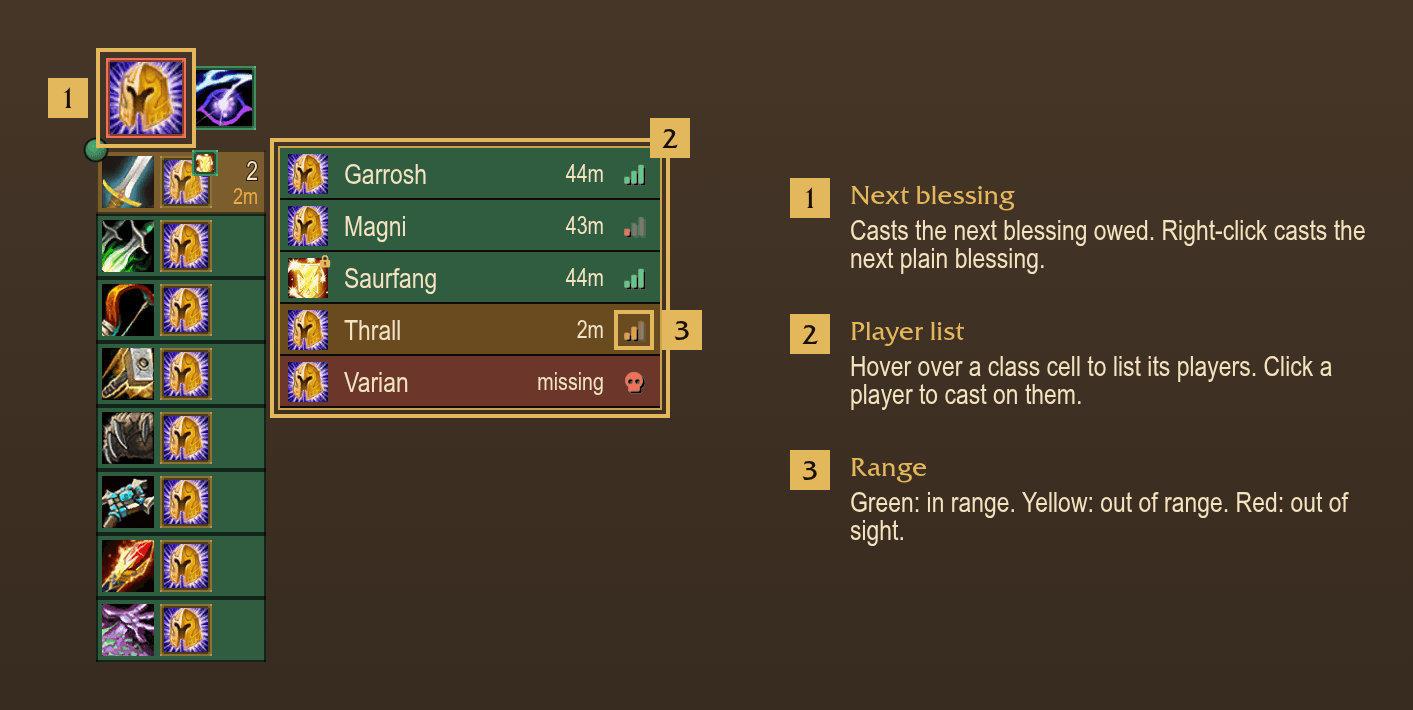
- The big button casts what you owe next: your aura, Righteous Fury as a Protection paladin, and greater blessings, missing before running low, players in range first; then plain blessings. Right-click casts the next plain blessing.
- Recasts a blessing with 5 minutes left by default. The threshold is adjustable from 1 to 30 minutes.
- Shows a cell per class with the class's greater blessing, how many players need it cast and the time left (in the Minimal style, the default, only when running low).
- Colours a cell green when all players in the class have the blessing, yellow when some do and red when none do.
- Casts the class's greater blessing when a cell is clicked. The mouse wheel over a cell changes which blessing you give the class.
- Lists each player's blessing and time left when the pointer is over a cell. Click a player to cast the greater blessing on them, or right-click to cast their plain blessing.
- Shows range on each player's row as signal bars, as PallyPower does.
- Shows the aura assigned to you next to the big button.
- Shows the reagent icon and your count in red above the big button when you carry fewer than 20 reagents for greater blessings. The threshold is adjustable, or the warning can be turned off.
- Offers three styles: Minimal, Compact and Detailed.
- Lays out as a row or a column, at 60% to 150% size.
- Locks, moves and opens the window from the bead on the bar's corner: click to lock, drag to move, right-click to open the window.
- Binds keys to the next blessing, the next plain blessing, your aura and the window, in Settings or the game's Key Bindings menu.
- Keeps the blessing it showed during combat and updates when combat ends.
Chat commands
Players without the addon type these in a whisper to a player running Benediction, or in party or raid chat. Answers are sent to the same whisper or chat.
!bless want kings, might: request blessings, in order. A leader or assistant can put a player's name first.!bless clear: clear your request.!bless missing: list who is missing a blessing.!bless report: list which paladin blesses each class.!bless report minorlists the plain blessings.!bless assign: plan again, for leaders and assistants.!bless assign -salvleaves Salvation out.!bless help: list the commands.
Blessing names are accepted with up to two typos, player names with up to three. The commands are the PallyPower
Auto-Assign WeakAura's !pp commands under the !bless prefix.
Slash commands
/beneor/benediction: open or close the window./bene assign,/bene missing: the same as the chat commands./bene report: list what each paladin casts: greater blessings by class, plain blessings and aura./bene specs: list each player's spec and where it came from./bene sync: show which copy plans and which copies of Benediction this one receives messages from./bene minimap: show or hide the minimap button. Clicking the minimap button opens the window; right-clicking it opens Settings.
You must be logged in to leave a comment.