
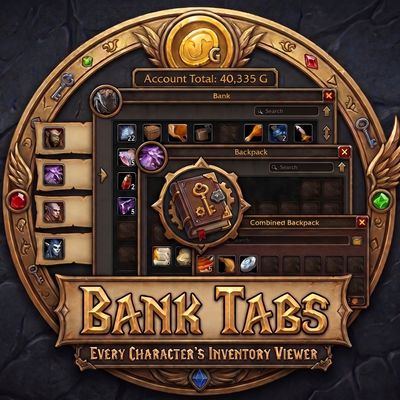
Bank Tabs – Every Character’s Bank, Inventory Bags & Guild Bank, Movable Bags
See your alts' banks, bags and guild banks from anywhere, drawn like the real windows with a tab per character and guild: an offline inventory viewer. Tooltips show which alt has an item and how many. Account gold. Movable bag and bank windows.
Details
Expansion
 Forever
 Categories
Developers

Having issues?
Bank Tabs
Bank Tabs saves what every character on your account keeps in their bank, bags and guild bank, and shows it to you from anywhere, drawn like the game's own windows with a tab per character. It is for anyone with alts who is tired of logging over just to find out who has the thing. It also lets you drag the bag, bank and guild bank windows wherever you want them.
Made for the WoW Forever client (classic-era, build 1.60.1, Interface 16001). Get it on CurseForge.
Bank Tabs was called Casement until 2.0.0. The world map tab, the coordinates and the fog reveal are now a separate addon, Map Tab. Updating brings everything Casement saved over to Bank Tabs; see Coming from Casement.
What it does
Every character's bank, bags and guild bank, from anywhere
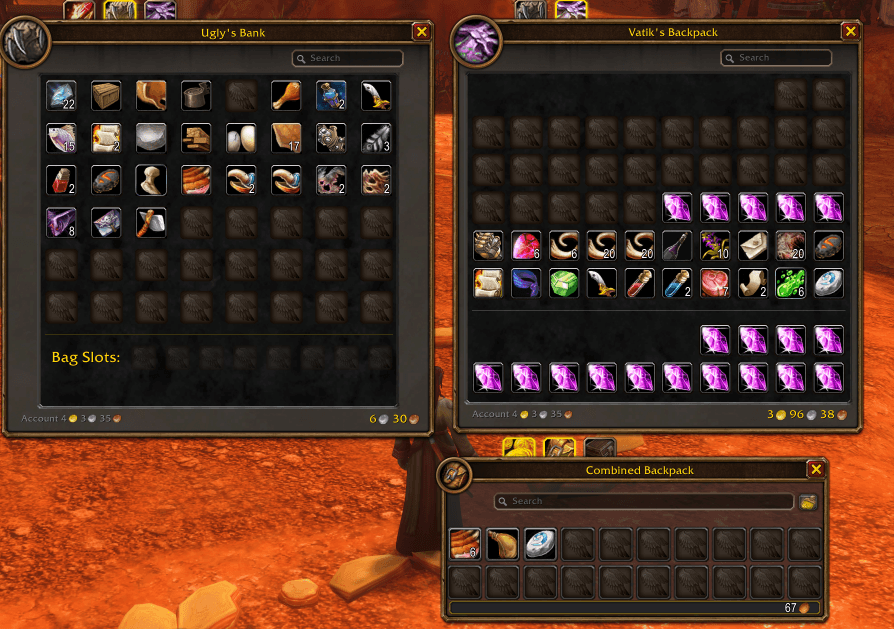
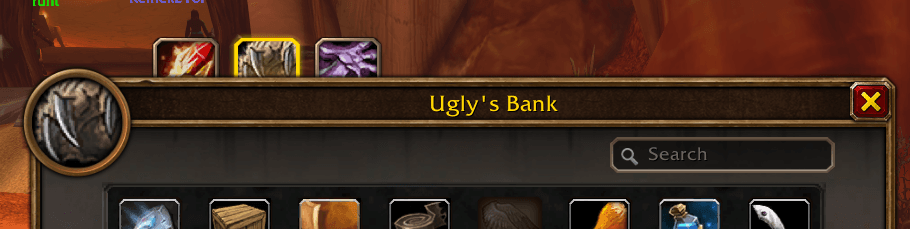
- Open your bank once and it is saved, and again every time you open it. The saved bank is drawn as the bank window: the same portrait and title frame, the search box top right, the eight wide grid with every empty slot drawn, the Bag Slots row underneath, the money bottom right. Every item is in the slot it was actually in. As in the real bank, each bag you have put in a Bag Slot adds its slots to the bottom of the grid, a page of 88 at a time with a tab per page. The Bag Slots show each bag and a padlock on the slots not bought, and pointing at a bag lights up its slots. The layout is measured off the real bank window while it is open, so the slots sit exactly where the real ones do on this client. It is measured from the grid itself, so another addon's buttons in the bank window can no longer throw the saved bank out of shape.
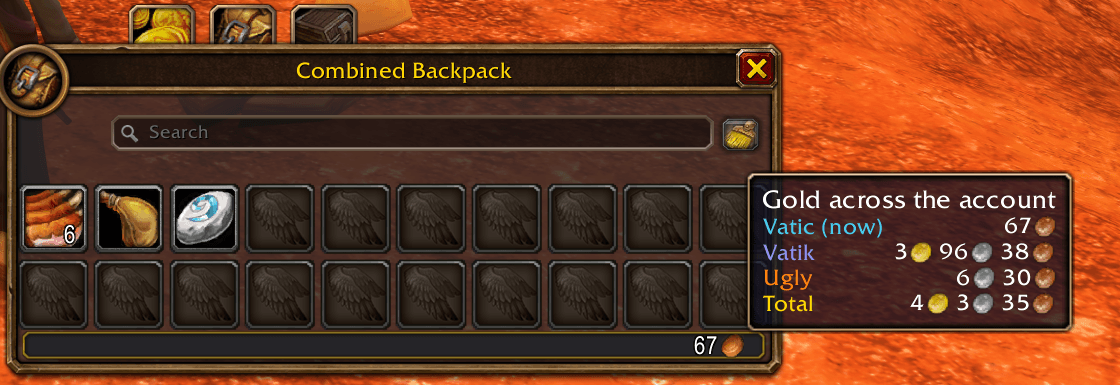
- Your bags are saved a few seconds after you log in and whenever they settle. The saved bags show your other characters' bags as the combined backpack shows them, read left to right from the top with the backpack's first slot first; the character you are playing already has its real backpack in front of it.
- The guild bank is saved when you open it, one tab at a time, and shown in its own shape with its tabs down the side. Every guild your characters have saved a guild bank for gets a tab along the top, your current character's guild first: hover one for when it was last seen, its gold and which of your characters are in it. With nothing to show, the saved guild bank says why: not opened yet, no tabs to show when it was last opened, or nobody who opened it could see into that tab.
- A tab per character. A row of tabs in the spellbook's style, one per character with their class icon, hangs off the top of the saved bank and the saved bags. Each window is titled for the character on show, by first name and surname: "Vatik Voidpact's Bank". The saved bank's first tab is the character you are playing, so your own bank can be looked at from anywhere too. Hover a tab for when that character was last saved and their gold.
- Three separate windows. The saved bank, the saved bags and the saved guild bank can be open at the same time, each with its own search: the bank and the bags on the character you pick, the guild bank on your guild. Drag each by its title; it stays on screen and is remembered where you left it. Escape closes the one opened last first. Shift-click an item in any of them to link it in chat.
- Bank, Bags and Guild tabs above your backpack open the saved windows. They are the same tabs as the character tabs, glow while their window is open, and are dimmed while there is nothing saved for them. They hang off the top of the backpack, clear of its title, close button and portrait, and move with it. On a backpack too narrow for all three in a row, the Guild tab sits in a second row above.
Who has it, and your gold
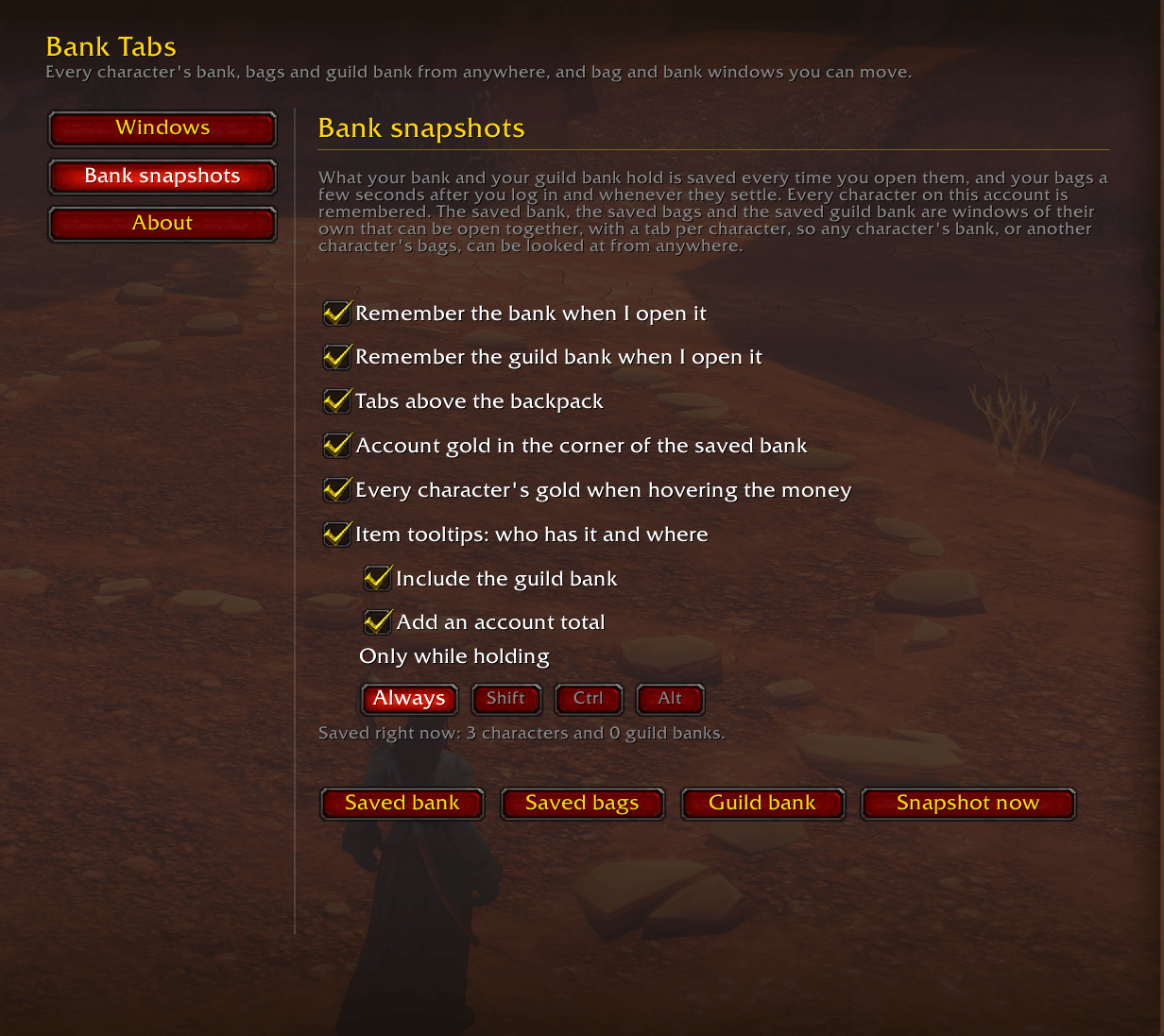
- Item tooltips say who has the item and where: a line per character with the count in their bank and bags, the guild bank, and an account total when it is in more than one place. Your own bags are counted live. Switch it off, or show it only while holding shift, ctrl or alt.
- Gold.
/banktabs goldlists every character's gold and the account total. The total also sits in the corner of the saved bank and bags and on the minimap button's tooltip, and hovering the money on your bag window, the bank or the saved bank shows the same list.
Bag, bank and guild bank windows you can move
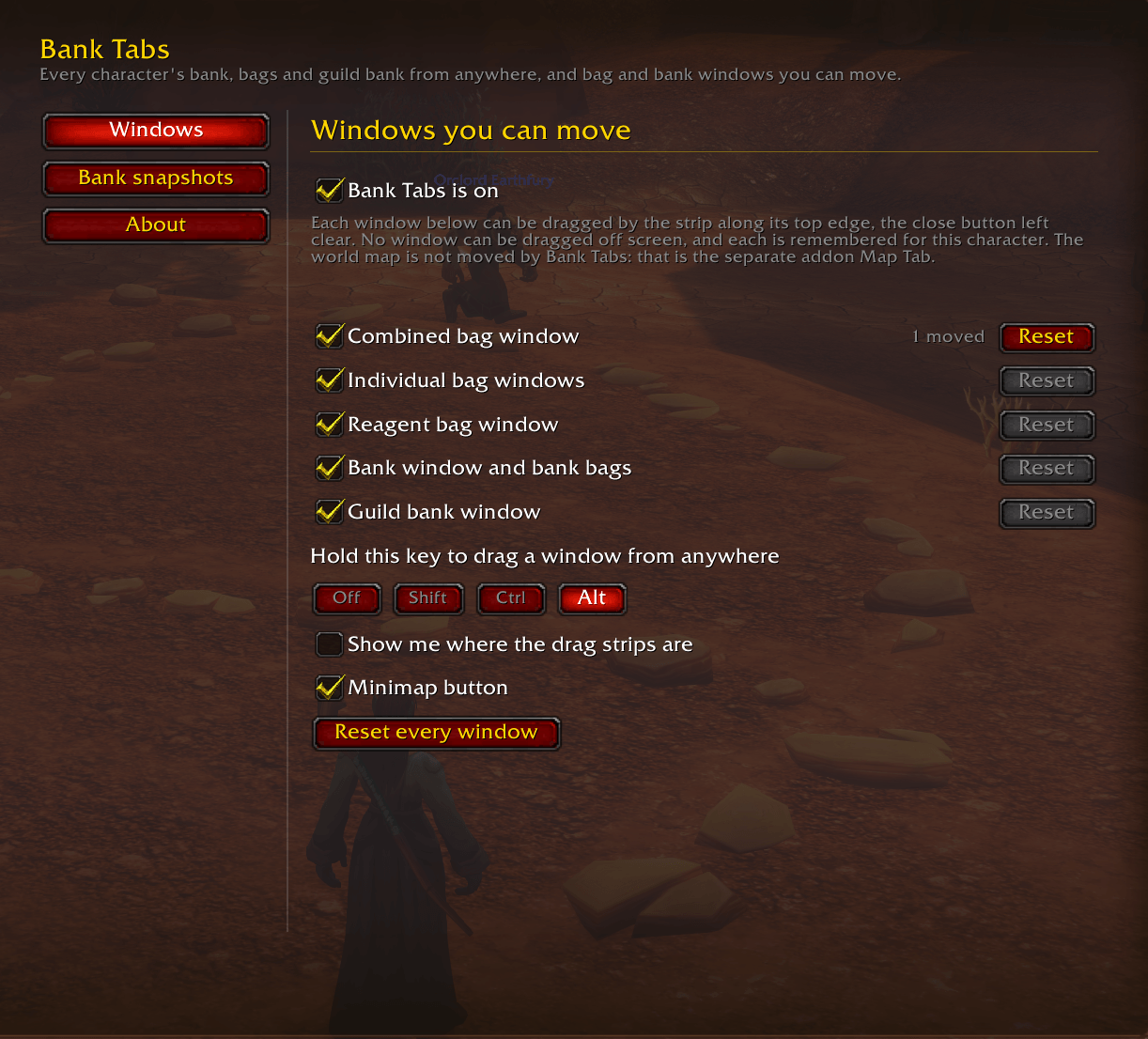
- Separate switches for the combined bag window, the individual bag windows, the reagent bag (where the client has one), the bank window with its bank bags, and the guild bank, each with its own Reset.
- Drag any of them by the strip along the top edge, the close button left clear. The strip is invisible unless you switch on "Show me where the drag strips are".
- Hold alt (or shift, or ctrl, your choice, or switch it off) and you can drag a window from anywhere on it, which helps when its top edge is busy.
- Every window is remembered per character, and the game putting a bag window back in its stack, or placing the bank as it opens, does not undo your placing.
- No window can be dragged off screen. It is clamped while you drag it, when the position is saved, and again if you change your resolution or UI scale. The backpack is kept far enough below the top of the screen for its tabs to stay in reach.
A minimap button
Left-click for the saved bank, right-click for the options, shift and left-click to switch Bank Tabs' window moving and the backpack tabs off or on, drag it around the rim. /banktabs minimap hides or shows it (on and off work too, for macros).
Install
- Download it from CurseForge.
- Unzip it into
World of Warcraft_classic_beta_InterfaceAddOns, so that you have aBankTabsfolder withBankTabs.tocinside it. The zip also holds a smallCasementfolder, the old data holder; unzip that too (see Coming from Casement). - Restart the game fully the first time;
/reloaddoes not pick up a new addon. After that,/reloadis enough for updates.
Getting started
- Open your bags. The Bank, Bags and Guild tabs hang above the backpack. Drag any bag window by its top edge.
- Visit a banker once on each character, and log in once on each so their bags are saved. Open the guild bank once.
- Hover any item to see who has it.
The options are in Esc > Options > AddOns > Bank Tabs, on /banktabs, or on a right-click of the minimap button, in three pages:
- Windows: the master switch, one switch per window with its own Reset, the drag anywhere key, the drag strip outlines, the minimap button.
- Bank snapshots: saving the bank and the guild bank, the tabs above the backpack, the account gold in the corner, the money hover, and the item tooltip lines (guild bank, total, only while holding a key).
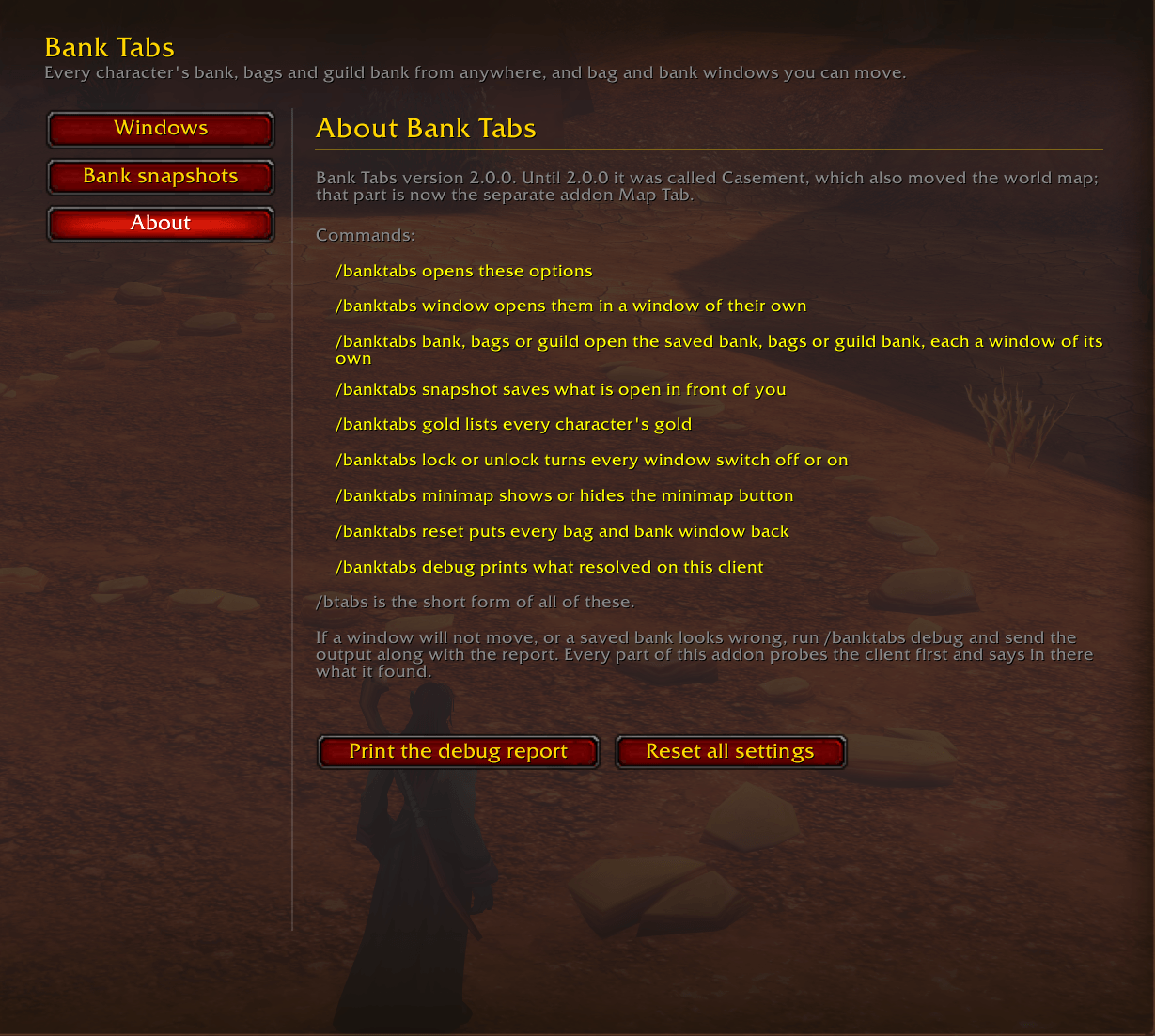
- About: the commands, and buttons for the debug report and for resetting every setting.
Everything is on by default except the drag strip outlines.
Commands
| Command | What it does |
|---|---|
/banktabs | Opens the options |
/banktabs window | Opens the options in a window of their own |
/banktabs bank | Opens the saved bank, drawn like the bank window, or closes it when it is in front |
/banktabs bags | Opens the saved bags (your other characters'), or closes them when in front |
/banktabs guild | Opens the saved guild bank, or closes it when it is in front |
/banktabs snapshot | Saves your bags, and the bank or guild bank if one is open |
/banktabs gold | Lists every character's gold and the account total |
/banktabs lock / unlock | Turns every window switch off or on |
/banktabs reset | Puts every bag and bank window back where the game had it, and forgets where you left the saved windows |
/banktabs grips | Outlines the part of each window you can drag |
/banktabs minimap | Shows or hides the minimap button |
/banktabs debug | Prints what resolved on this client |
/btabs works as a short form of all of these. /casement and /cst still work too, for macros written before 2.0.0, once the old Casement is no longer running.
Coming from Casement
Update Casement as usual and it becomes Bank Tabs; restart the game fully afterwards, since a new addon is not picked up by /reload. The game names an addon's saved settings after its folder, so the package also carries a small Casement folder ("Casement (old data)" in the AddOns list). It runs no code; it only keeps Casement's saved files where Bank Tabs and Map Tab can read them.
- At your first login Bank Tabs copies every character's saved bank, bags and guild banks, and the measured bank layout, and says so once in chat.
- Each character's window switches, drag key, window positions, minimap button, snapshot and tooltip settings come over the first time that character logs in.
- Nothing you have already set in Bank Tabs is overwritten, and a snapshot taken since is never replaced by an older one. The world map's settings are left for Map Tab: install Map Tab if you used the world map tab, the coordinates or the fog reveal, and it brings its own half over the same way.
- The minimap button now opens the saved bank on left-click and the options on right-click, the other way round from Casement.
- If the old Casement is still running next to Bank Tabs, it is switched off from your next login and chat says so once. Until then it keeps the bag and bank windows, the backpack buttons, the minimap button, the tooltip lines and the
/casementcommand, so the two do not fight over them; after a/reloadBank Tabs takes over. Whatever you change in the old Casement until then (a bag or the bank moved, a switch flipped) comes over when you log out or reload, unless you changed the same setting in Bank Tabs meanwhile. - If Casement's files cannot be read yet (the old Casement switched off, say), chat says why once and Bank Tabs tries again at each login. With no Casement folder at all nothing is said, and each login looks again in case one turns up later.
- Once Bank Tabs and Map Tab have both loaded on every character you play, the Casement folder can be deleted. Each Bank Tabs update puts it back, which does no harm.
/banktabs debugshows what was found and what came over.
Known limits
- The saved windows show what was there the last time each bank, set of bags or guild bank was seen, and they are read only: nothing in them can be moved, used or taken out.
- A character appears once it has logged in with Bank Tabs (or came over from Casement), and its bank once it has been opened. Other characters' tooltip counts are as old as their last snapshot.
- The saved guild bank opens on the guild of the character you are playing (on a character with no guild, the first saved by name); every other saved guild bank is a tab away, and item tooltips count each one. A guild bank shows what the last character to open it could see.
- A guild bank tab your rank cannot view keeps what a character who could view it saved.
- There is no way yet to remove a character you deleted or moved: it keeps its tab, its tooltip lines and its share of the account gold.
- Built for WoW Forever (build 1.60.1) only.
If something does not work
Post in the comments and paste the output of /banktabs debug. Every part of the addon probes the client before it uses it, and the report says what it found: which windows it located, which templates resolved, whether the bag re-stacking hook took, what the bank scan saw, what the bank window measured, and what came over from Casement.
Development and tests
The addon files sit at the repo root, as the CurseForge packager expects. .pkgmeta packages them as BankTabs, moves Legacy/Casement to a top level Casement folder (the data holder), leaves tests out, and takes each release's notes from RELEASE-NOTES.md, which holds only the newest section of CHANGELOG.md.
tests/banktabstest.js is an offline harness. It stubs the game API in fengari, including a small layout engine for points, anchors and scales, and walks the addon's main paths: clamping and dragging the bag and bank windows, putting them back after the game re-anchors them, the bag switches, all three snapshots, the saved bank, bags and guild bank replicas slot by slot, the three saved windows open together (their own characters and searches, Escape order, where they open and are left), the tabs above the backpack, the tooltips, the gold, and the options. It also loads the addon afresh for each way the Casement import can meet a login (the data holder present, the old addon still running, nothing present, already imported, and the ways those go wrong), and checks the package files.
node tests/banktabstest.js              # the normal client: 923 checks
node tests/banktabstest.js --bare       # every UI template missing: 914
node tests/banktabstest.js --noenum     # no Enum.BagIndex, classic bank ids: 898
Run it from the repo root. It needs fengari on the module path (for example through NODE_PATH); the copy this was developed against is not checked in. See tests/README.md for what each part of the count covers.
License
MIT.
See also
Map Tab: the world map tab, coordinates and fog reveal that used to be part of Casement.
Discord
Join my Discord for Feedback, Development Updates, Addon Ideas, Feature Requests, and Bug Reports.
You must be logged in to leave a comment.