

auxForever
The aux auction house addon by shirsig, rebuilt & re-imagined for WoW Forever: fast searches, safe buying, and posting at the right price in one click.
Details
Expansion
 Forever
 Categories
Developers

Having issues?

aux by shirsig, re-imagined by a fan.
auxForever is aux, the auction house addon by shirsig (Simon), rebuilt to run on World of Warcraft: Forever. The search filter language, saved searches, price history and the way aux works are his. auxForever adapts them to Forever's modern auction house and gives the window a new look.
Beta
auxForever is in beta. Searching, buying, posting and the price history all work in game; each file's changelog lists what changed. Please report anything that breaks on the issue tracker, with the error text if BugSack or the game shows one. Do not report auxForever problems to Simon: he is not involved in this version.
What is different on Forever
Forever runs on the modern client and its modern auction house, so some things work differently from aux on Classic:
- Trade goods are "commodities". Herbs, cloth, ore and the like are bought by quantity and the game always sells the cheapest units first. The buy bar offers quantities with their total cost, asks the server for the real price, and nothing is bought until you press Confirm. If the price went up in the meantime, the purchase is cancelled and the listings are read again.
- Gear is bought one at a time at the price on the button, and can still be bid on.
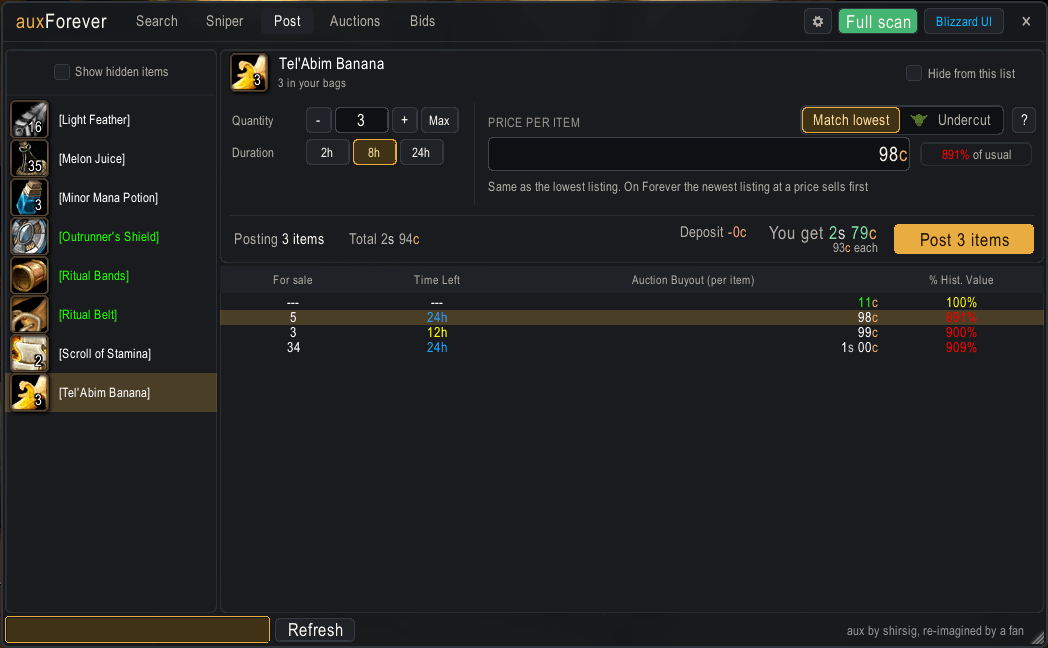
- Match the lowest price by default. On Forever the newest listing at a price sells first, so matching the cheapest listing sells just as fast as undercutting it and keeps prices from sliding. Undercut mode (the goblin on the Post tab) goes one step below when you want it.
- Full scans are allowed once every 15 minutes.
Features
General
- Completely independent replacement for the Blizzard auction house window, one click away from the unaltered Blizzard interface.
- A resizable window that remembers its size and position.
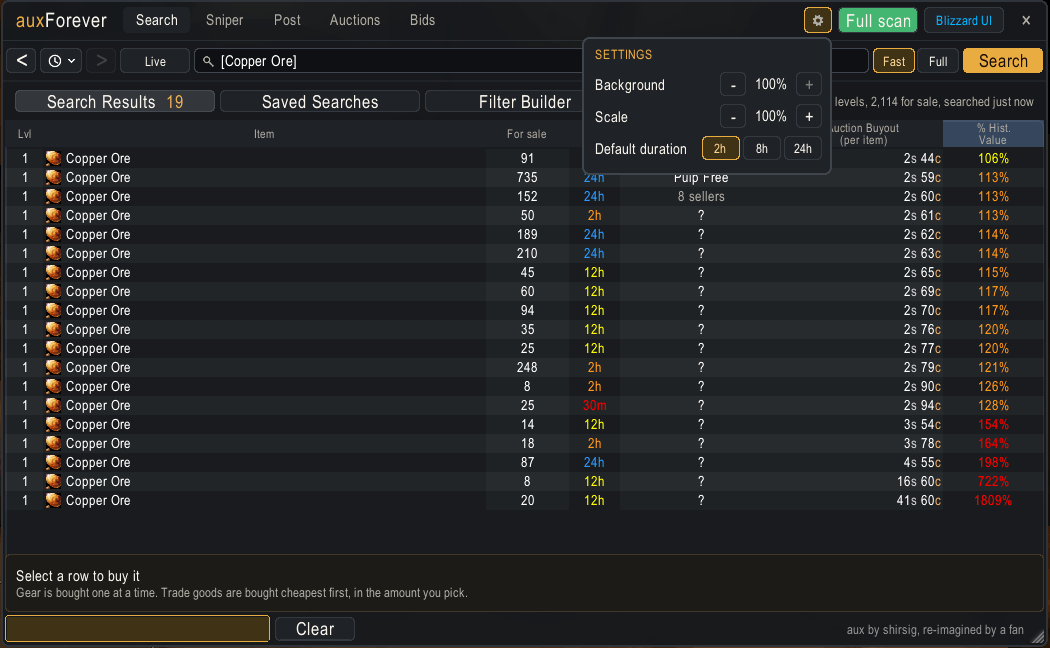
- Settings behind the gear: background opacity, window scale and the default auction length.
- Many convenient shortcuts.
Search
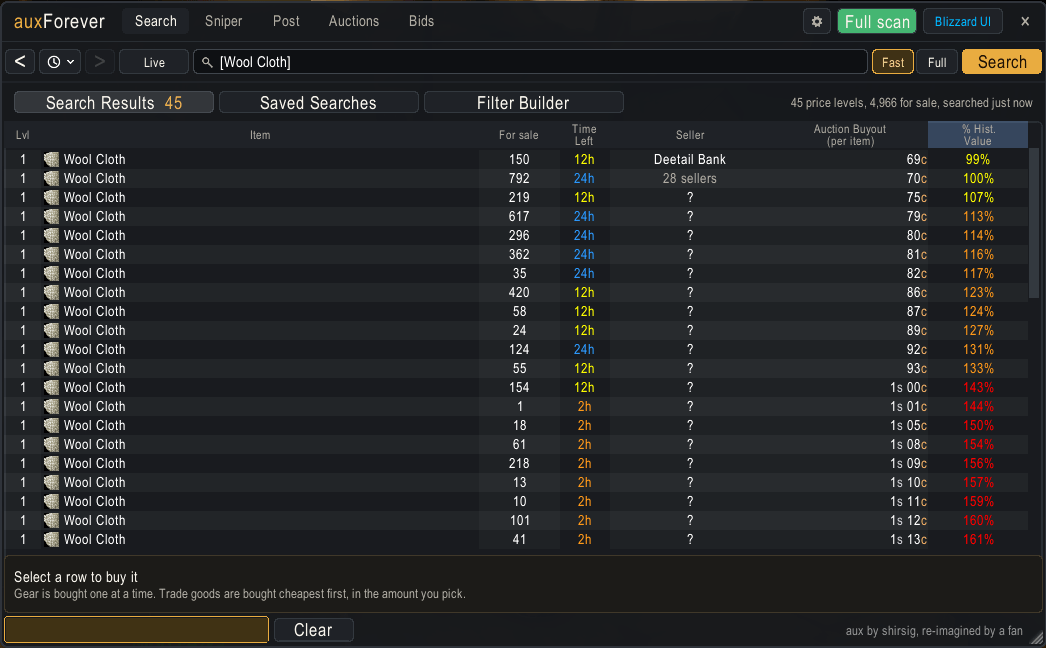
- Fast searches: a search over many items lists each item once with its lowest price, read in seconds. Click an item to see its auctions. Switch to Full to read every auction as aux always did.
- Live mode repeats a search every few seconds, with a countdown on the Live button, and alerts you when a new auction matches one of your alert favorites. It waits while you buy, and any new search ends it.
- Advanced search filters which can be combined with logical operators, with autocompletion.
- A Filter Builder that writes those searches for you: conditions in plain words, Match All or Any, "not", and groups inside groups, read back in plain English as you build.
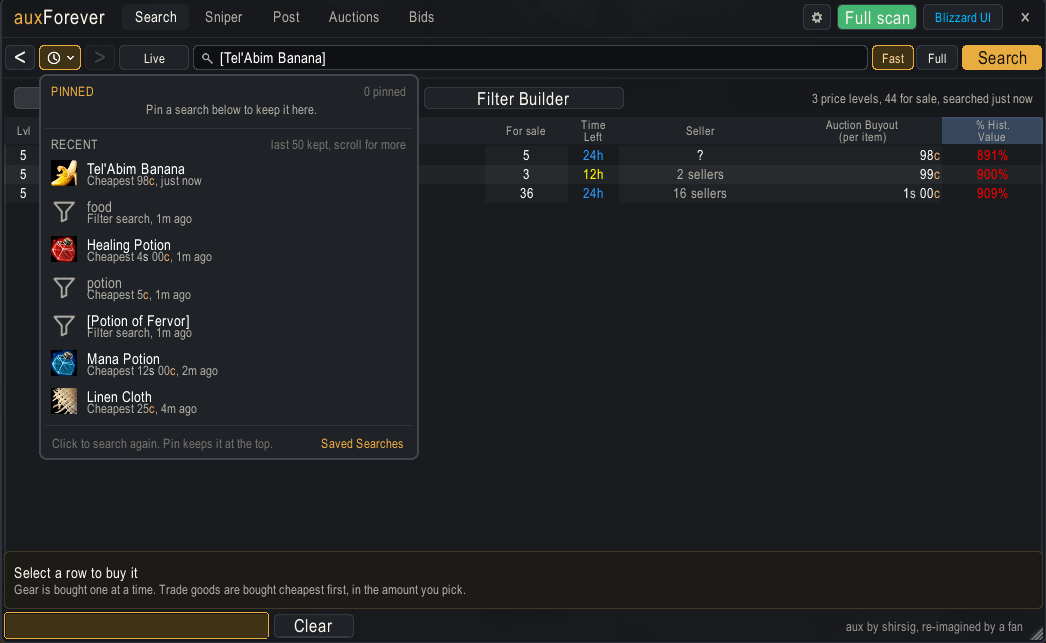
- Quick searches: your recent searches with their cheapest price, and pinned favorites, one click away. Back and forward arrows step through earlier results like a web browser.
- Concise listings: level, item, how many are for sale at that price, time left, seller, bid, buyout and the percentage of the usual price.
- Sorting across all results, by unit price or by percentage of the historical value.
- A count of the results and a summary of what they hold: price levels, items for sale and when the search ran.
- A buy bar under the results that never spends more than the price you saw.
Recipes
- With aux open at the auction house, the profession window gets a "Search in aux" button (or Alt-click a recipe). aux searches the item the recipe makes and all its materials at once, and the bar under the results adds up the materials, what the item sells for after the cut, and the profit or loss.
- Recipe searches stay in your recent and saved searches, labeled "Recipe", with the last profit or loss in the quick search menu.
Sniper
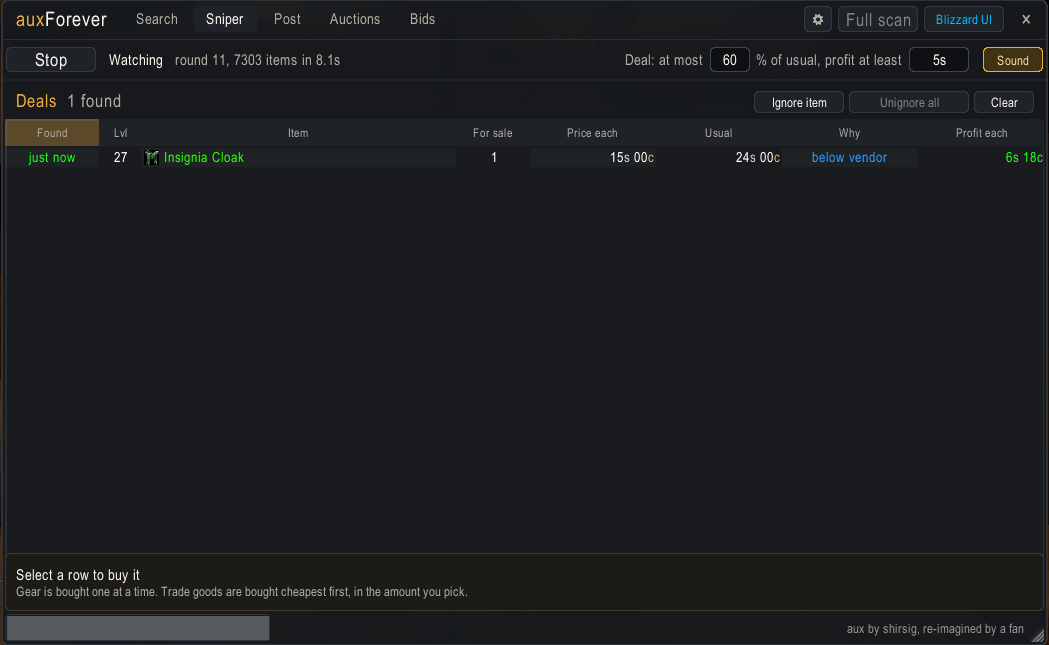
- Watches the whole auction house round after round and lists deals as they appear: items below vendor price, or well under their usual price, with a minimum profit. You set the percentage and the profit.
- Every deal is checked against the item's real auctions before it is shown, and bought from the same buy bar as on the Search tab.
- Deals show up while a round is still running. A sound (at most once every 10 seconds) and a flashing game icon for new deals; deals that sell are marked gone and sit at the bottom, and items you never want can be ignored.
- The buy bar offers only the units that are a deal, and the Sniper waits while you buy.
Post
- Lists the auctionable items in your bags, the reagent bag included; hide the ones you never sell.
- Trade goods are posted as one listing of any quantity, up to everything you have.
- Reads the existing auctions for the item and starts at the lowest price (or one step below in undercut mode). Click any listing to use its price instead.
- Shows what you get after the auction house cut, the deposit, and warns you when a vendor would pay more.
- Remembers your settings per item. Prices are typed the aux way (see Usage).
- After you post everything of an item, the next item in the list is selected.
Auctions
- Compares each of your auctions with the other sellers: undercut (and by how much), tied, lowest or sold.
- "Cancel undercut" cancels the undercut ones, one click each, and shows what each cancel costs. Cancelled items come back by mail.
History
- Gathers price history from every search and scan.
- A single, simple but reliable historical value per item.
- Tooltip with the historical value, vendor prices, disenchant value and more.
Slash commands
/aux and /auxforever both work.
General
/auxlists the settings./aux scale factorscales the window./aux opacity Nsets the background opacity, from 50 to 100 percent./aux undercutexplains undercutting on Forever;/aux undercut on|offsets undercut mode. It always starts off when the auction house opens./aux ignore ownerstops waiting for owner names when scanning./aux action shortcutsenables the Alt-click shortcuts for buyout, bid and cancel./aux post bidadds a bid price to the Post tab./aux post duration hourssets the default auction duration (2, 8 or 24)./aux clear item cacherebuilds the item list used for autocompletion./aux debugturns the search timing log on or off: after each search, chat says where the time went. Useful for bug reports about slow searches./aux debug listtimes the item list of the whole auction house./aux memorysays how much memory aux uses, and how much is left after a cleanup (the rest is garbage the game frees over time)./aux memory detailalso lists what aux keeps: Sniper, price history, searches, Post, tooltips and events. Useful for bug reports about memory.
Tooltip
/aux tooltip value/aux tooltip daily/aux tooltip disenchant value/aux tooltip disenchant distribution/aux tooltip merchant buy/aux tooltip merchant sell/aux tooltip money icons
Usage
Listings (Search, Auctions and Bids)
- Double-click a row with a blue count to expand it.
- Right-click a row to search for that item.
- Shift-click a row to link the item in chat; Ctrl-click to preview it.
- Click a column header to sort.
- With action shortcuts on, Alt-click the selected row to buy or cancel.
Search
- Tab accepts an autocompletion.
- Shift-click or Alt-click an item in your bags to search for it.
- The clock button next to the arrows opens your quick searches. Pin the ones you use often.
- Alt-click a recipe in the profession window to search it with its materials.
Post
- Prices take
g,sandcfor gold, silver and copper. A number alone counts as gold, and decimals work (1.5gis 1g 50s). - Shift-click or Alt-click an item in your bags to select it.
- Right-click an item in the list to search for it.
Search filters
The filter language is the same as in aux. Parts of a query are separated by slashes, and
semicolons mean "or": q1;q2 finds everything matching either. The first part is the item name
unless it matches a filter keyword, and exact matches the name exactly. Filters can be combined
with and, or and not in polish notation. The Filter Builder sub-tab builds queries for you, shows the search text it writes
and reads it back in plain English, so it is the easiest way to learn them. A few examples:
armor/cloth/50/intellect/staminafinds cloth armor from level 50 with both intellect and stamina.recipe/usable/not/libramfinds recipes you can use, skipping librams.or/and2/profit/5g/percent/60/and3/bid-profit/5g/bid-percent/60/left/30mfinds auctions at least 5g and 40% below their usual price, or bids that are, with 30 minutes or less left.
Simon's aux page describes every filter in detail.
Historical value
The historical value is a slightly time-weighted median of up to 12 saved daily values, where a daily value is the lowest unit buyout price seen for the item over that day.
Install
Install with the CurseForge app, or download the file, unzip it and copy the auxForever folder
into your Forever InterfaceAddOns folder. If you tried an early test copy named aux-addon,
delete it so the two don't load together.
Credit and license
aux was created by shirsig (Simon), who gave permission for this version: "as far as I'm concerned you can feel free to use it, work on it and distribute it in any way you please." auxForever is made by Tyler. Source code: TylerHampton/aux-forever.
You must be logged in to leave a comment.