

Allemano CraftBoard
See who in your guild can craft what. Search every guild recipe, spot who is online, whisper crafters in one click, link reagents for the AH and see "Craftable by" on item tooltips. For WoW Forever.
Details
Expansion
 Forever
 Categories
Developers

Having issues?
Stop asking in guild chat "who can make X?"
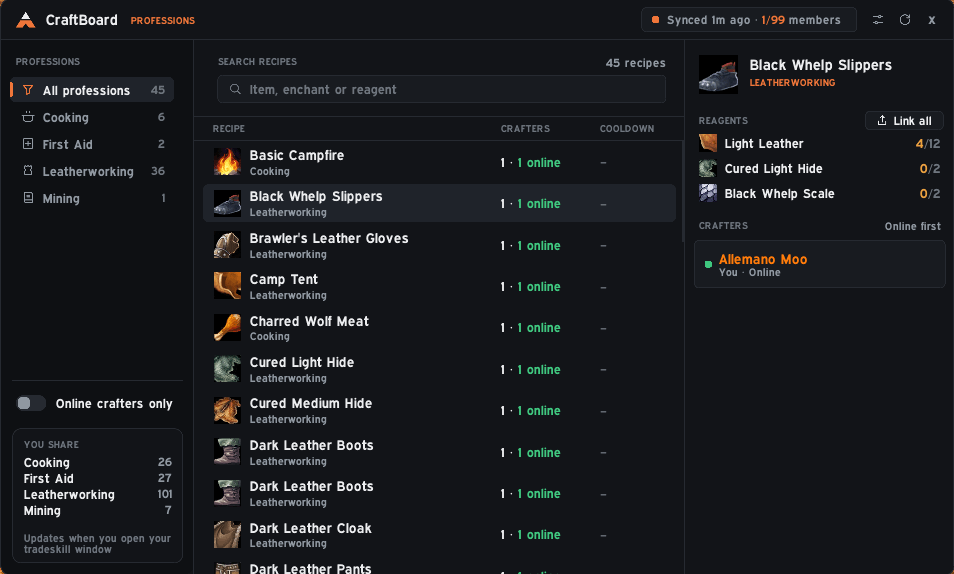
CraftBoard is a guild crafting directory for WoW Forever. It remembers the recipes of all your characters, shares them with the other guild members who run the addon, and lets you search everyone's recipes in one window: who can craft an item, who is online right now, and a one-click whisper to ask them.
Alpha. CraftBoard is new. Sharing works between guild members who all run the addon, so it gets better the more of your guild installs it.
Type an item, an enchant or even a reagent in the search box ("Light Leather", "Thorium Bar") and see every matching recipe. Filter by profession (Alchemy, Blacksmithing, Enchanting, Engineering, Leatherworking, Tailoring, Cooking, First Aid and more), or show only recipes that someone online can make.
Example: You need a Major Healing Potion. Search "Major Healing", see "3 crafters, 2 online", and click Whisper on the one who is online.
Click a recipe and the right-hand panel lists every crafter, online members first, in their class color. Offline members stay in the list (with when they were last seen, when the game provides it), so you know whom to mail. Recipes with a cooldown (transmutes, for example) show whether the crafter's cooldown is ready or how long is left, so you don't ask someone who can't make it today.
- Whisper starts a chat with the crafter right away (it uses Hush if you have it, the normal chat otherwise).
- Mail fills in the mail address when a mailbox is open.
Every reagent of a recipe is a real item:
- Hover for the item tooltip.
- Shift-click to link it in chat.
- Click to put its name into the Auction House search box.
- "Link all" pastes every reagent with its count into your chat box, ready to send to the crafter or to post in a trade request.
- Each reagent shows how many you already own against how many the recipe needs (green when you have enough), counting bags and bank.
Hover over an item, in your bags, on the Auction House or in a chat link, and the tooltip tells you who in your guild can make it, online members first. No window needed.
Open a profession window once on each character and CraftBoard saves that character's recipes, skill level and cooldowns. Your alts show up in the directory too, so you can see which of your characters can make something.
Only recipe IDs, skill levels and cooldown timers are sent, as small addon messages to your own guild, and only to members who also run CraftBoard. Nothing is sent outside the guild, and you can turn sending off in the settings while still receiving other members' recipes.
Open with the gear icon in the window or /cb settings:
- Font (the game's fonts plus any fonts other addons register), text size, accent color (or follow Hush or your class color), window scale and background opacity
- Turn sharing on or off, ask the guild for recipes now, clear received data
- Show or hide the "Craftable by" tooltip line and whether offline members are included
- Show, hide, lock or reset the launcher button
- Install and start the game.
- Open each of your profession windows once (on each character). The "You share" box in the sidebar dims professions that have not been opened yet.
- Type
/cbor click the small button at the top of the screen. - Ask your guildmates to install it too. The header shows how many guild members have shared their recipes.
/cbopens the window,/cb settingsopens the settings/cb recipeslists what is saved for your characters/cb syncasks the guild for recipes now/cb share on|offturns sharing your own recipes on or off/cb selftestshows a fake guild member built from your own recipes, so you can see how the window looks with more crafters (/cb selftest clearremoves it)/cb errorsshows the last Lua errors CraftBoard caught
CraftBoard is made for WoW Forever (interface 16001). If the CurseForge app does not install it into the right folder, download the file from the Files tab and unzip it so that the folder is:
World of Warcraft_classic_beta_InterfaceAddOnsCraftBoard
Then restart the game.
- Pure Lua, no libraries and no other addons required.
- Part of Allemano Addons, together with Hush, AltBoard and more. If Hush is installed, CraftBoard can follow its accent color and use it for whispers.
- Issues, ideas and source code: https://github.com/Allemano-Addons/CraftBoard
You must be logged in to leave a comment.