
Adaptive Brightness
Evens out brightness between zones in WoW Forever, so going from the Barrens into a forest or cave isn't a shock, while bright places still feel brighter.
Details
Expansion
 Forever
 Categories
Developers

Having issues?
Adaptive Brightness
For WoW Forever. Made by xuanji.
Every zone in Forever has its own lighting, and it can't be switched off. Open places like the Barrens and Tanaris are very bright, while forests, caves and buildings are much darker. Riding from one into the other means squinting one minute and peering into the dark the next.
Adaptive Brightness evens that out. It takes the glare off bright places and opens up dark ones, so the jump between them is smaller. For dark places it mostly raises gamma rather than brightness, which lifts the shadows without turning the blacks grey. It doesn't make everything the same, though. Open country still feels brighter than a forest or a cave; the addon only narrows the gap.
It works out where you are (out in the open, in a forest, in a cave or a building, or in a dungeon) and what time it is on the realm, and fades to the new values gradually, so most of the time you won't notice it happening.
What it does
- Zones are sorted into bright, normal and dark. The Barrens, Tanaris, Westfall and the other deserts, plains and snowfields count as bright. Forests, swamps and the Plaguelands count as dark.
- Caves and buildings have separate settings. Forever doesn't give caves a map of their own, so the addon carries a list of about 50 caves and mines, from Fargodeep Mine to the tunnel through Timbermaw Hold, and knows them by name. Anywhere else the game treats as indoors counts as a building, and that includes inns, towers, Ironforge and Undercity.
- Dungeons and raids each have a setting of their own, since some raids are a lot darker than a five-man.
- At night (realm time), outdoor zones get brighter. Evening, the middle of the night and the hours before dawn each have their own values for bright, normal and dark zones. It fades in around dusk and back out after dawn. Untick "Brighten outdoor zones at night" in the settings if you'd rather not have it.
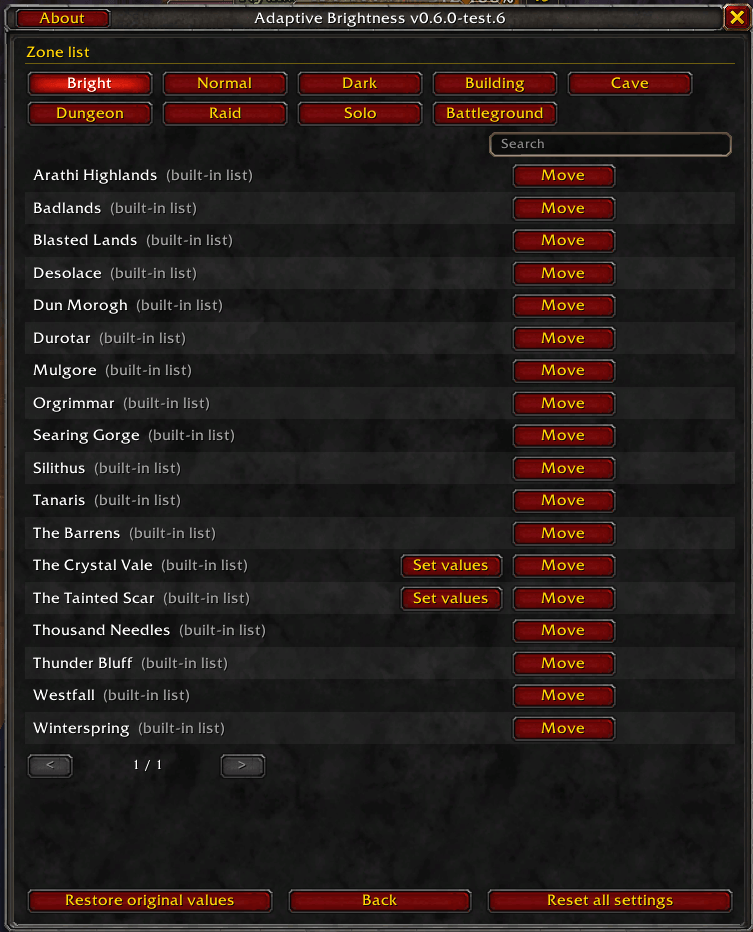
- If a place still looks wrong, like a dark valley inside a bright zone, you can move that zone, or just the one subzone, to another group in the settings. The same goes for a cave the addon doesn't know yet, which counts as a building until you move it. And if one spot needs something the groups can't give it, like a raid that's much darker than the rest, you can give that place its own values. The Zone list page in the settings shows what's in each group, and you can move things from there without going back to the place.
- The minimap button shows your current brightness, contrast and gamma when you hover over it. Left-click opens the settings, right-click turns the addon off and on.
- All your characters share one setup, but you can give any of them its own profile, say a darker one for the alt that lives in Duskwood.
- You can copy your whole setup as a line of text and give it to a friend, or paste theirs in. Import can also just add their zone choices to yours.
- Turning the addon off gives you back the brightness, contrast and gamma you had before. It can also do that every time you log out, so removing the addon won't leave your screen looking strange.
It's written in English and translated into German, Spanish, French, Italian, Brazilian Portuguese, Russian, Korean, and Simplified and Traditional Chinese. All of those translations were made with AI, so a line here and there may read oddly. It uses your game's language, but you can switch the addon to another one with the Language button if you'd rather read it in something else.
Setting it up
There isn't much to set up. Pick your overall look in the game's graphics settings first (plenty of people like contrast around 60, brightness a bit under 50 and gamma 1.1). The addon takes your brightness, contrast and gamma as its "normal" level, so normal zones look the same as before, and if you change your look later the whole set of presets moves with it.
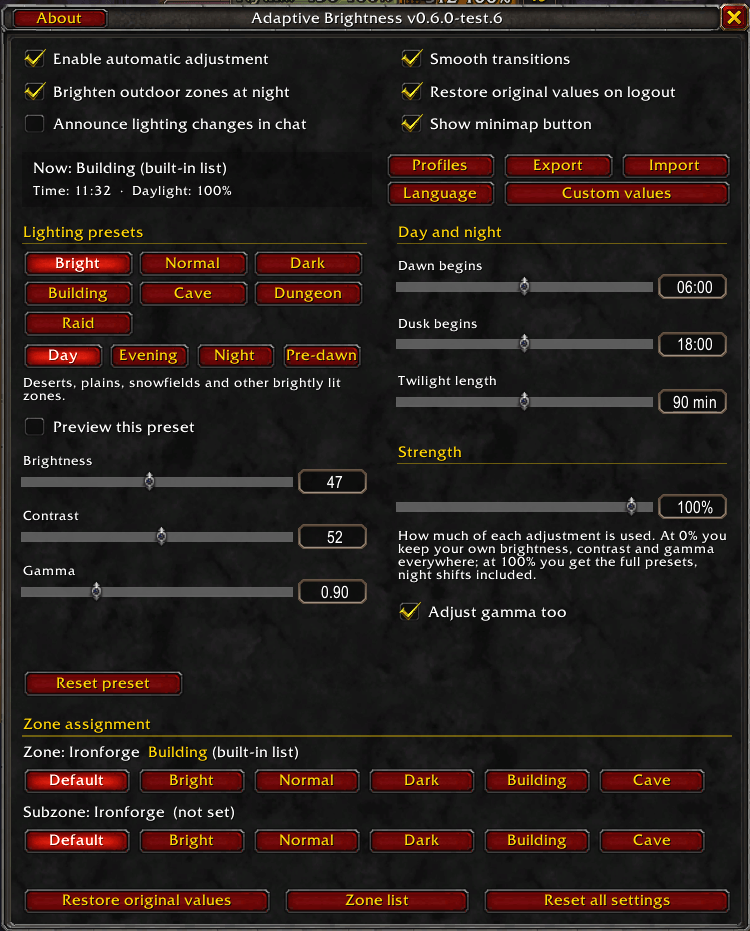
If something looks off, type /ab. Each lighting type has its own
brightness, contrast and gamma sliders. Tick "Preview this preset" to see the result right where
you're standing. That's the easiest way to tune the dark, building and cave ones. If
places start to feel too alike, turn down the Strength slider, which pulls
every preset back toward your own values at once.
Commands
/abopens the settings/ab on,/ab offand/ab toggleturn it on or off/ab statusprints what it's using right now/ab exportand/ab importshare a setup as a line of text/ab langshows or changes the addon's language (/ab lang deDE,/ab lang game)
Notes
- It changes brightness, contrast and gamma, nothing else. If gamma does nothing in your display mode, untick "Adjust gamma too" and it won't touch gamma at all.
- While it's on, it overwrites those sliders, so turn it off first if you want to set them by hand.
- The zones that only exist in Forever start out as normal for now.
If a zone is in the wrong group, or a translation reads badly, leave a comment with the zone name or the text and I'll fix it.
You must be logged in to leave a comment.