
MogIt
In-game catalogue of items for transmogrification purposes.


Details
Expansion
Developers

Having issues?
MogIt is an in-game catalog of items with the aim of helping players build their own sets for transmogrification purposes.
Database of all equipable item appearances in the game
Preview enchants
Filterable and Sortable by various criteria
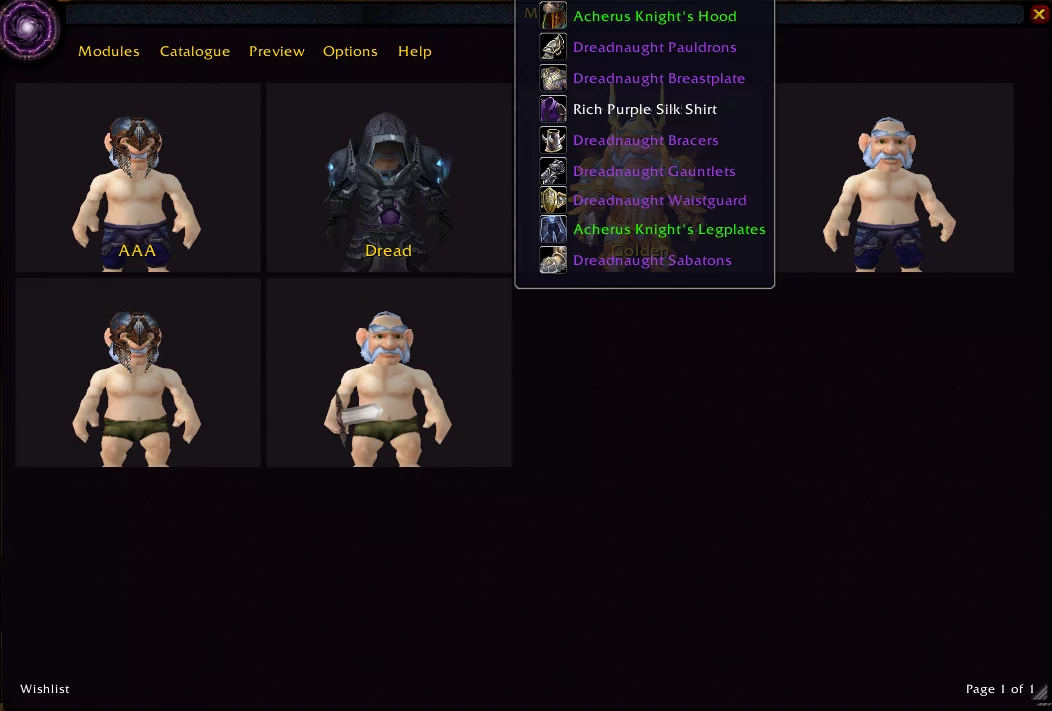
Create item sets and wishlists to keep track of wanted items
Link and share full transmog sets and wishlists to friends with the addon
Create links to Wowhead databases
Functions:
Items are grouped by type and can be further filtered by:
Name, Level, iLvl, faction, class, source, quality, and binding.
Weapon types also have a sheath type filter (back, side, hidden)
One-hand weapons can additionally be filtered by hand slot.
NOTE: Some filters require an item to be cached to function.
If an item is not in the item cache, it will have a red asterisk * next to it’s name.
Items will be cached as seen. To cache Other Appearances, hold alt and left click to cycle.
Items that are owned are marked with a green checkmark.
Items on the wishlist are marked with a yellow star.
Wishlists can be a single item or a full set.
Ctrl-Left click will bring the entire wishlist into the Dressing Room.
Shift-Click into a chat window will create a link to the wishlist for others to view.
Help
Type /mog or /mogit to open the main panel.
For full instructions, each page on MogIt features an in-game help menu explaining the controls for that page.
In general, a modifier (Alt, Ctrl, Shift) and either Left or Right click will have some function.
FAQ
What items are included?
All obtainable items are included and any unobtainable item that was previously available to players.
f.ex: GM only items are NOT in the database, but Classic Naxxramas, and removed quest rewards are in the database.
How are item appearances grouped?
Items are grouped by their Model, Texture, Geoset, and Visual enchant.
Some items may appear as duplicate entries, but their DisplayID may have a unique set of data. Some helms appear the same, but have different options of showing hair or other appearance options.
f.ex: Cataclysm helm vs Cataclysm Headguard
You must be logged in to leave a comment.