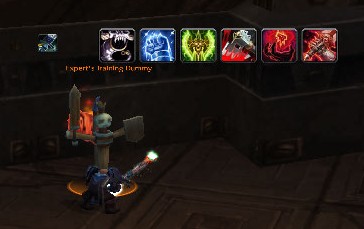
Blood DK Tank Preemptive Rotation
Profile Details
 WeakAuras for WOTLK
 Type & Expansion
Classes
-
 Death Knight
 Death Knight
 Categories
-
Class
-
PvE
 Class
Class  PvE
PvE Author

🩸 Blood DK Tanking Assistant: Buff & Uptime (PvE)
This WeakAura (WA) is a focused, single-target rotation assistant designed exclusively for Blood Death Knight Tanks in PvE environments WotLK. It prioritizes flawless buff uptime, and efficient Runic Power dumping.
🔑 Core Features & Threat Management
Pestilence Preemption (AoE Threat): The WA calculates the correct timing to apply Pestilence to refresh both primary AoE DoTs. It cues you 5 seconds before the DoTs fade, ensuring maximum uptime and sustained threat on multiple targets.
DoT Tracking: Clearly displays missing or soon-to-expire DoTs required for maintaining high threat.
Runic Power Dump: Intelligently tracks the remaining Runic Power. It suggests using Death Coil as the optimal Runic Power dump when Rune Strike alone is insufficient to prevent capping.
Melee Swing Timer: Includes a dedicated melee weapon swing timer indicator to help synchronize abilities like Rune Strike with auto-attack timing.
🛡️ Buff Uptime & Survival
Mandatory Buff Monitoring: Ensures full uptime on critical rotational and utility buffs:
Horn of Winter: Indicator for full, continuous uptime.
Frost Presence: Ensures you are always in the correct presence for threat generation and mitigation.
Consumable Tracking: Displays a prominent reminder when your required tanking potion, Flask of Stoneblood fades out.
⚙️ Modularity
- Fully Modular: Like all high-quality WeakAuras, everything is modular and easy to configure.
- You can easily adjust the visual elements, timing cues, and use your preferred potions or specific buffs within the WA settings.
Code
How to install
1 Copy the entire code string shown above.
2 Open World of Warcraft and type /wa in the chat to open the WeakAuras settings.
3 Click on the Import button.
4 Paste the code string into the box.
5 Click Import to apply the profile.