

EavesDrop
A simple combat log that displays events similar to SCT
Addon Details
Expansion
 The Burning Crusade
 Categories
Developers

Having issues?

This is my attempt to keep Grayhoof's addon alive!
The goal is to make this work under latest game version (currently 11.x). Please report any issues or bugs on the project's Github page.
What does it do?
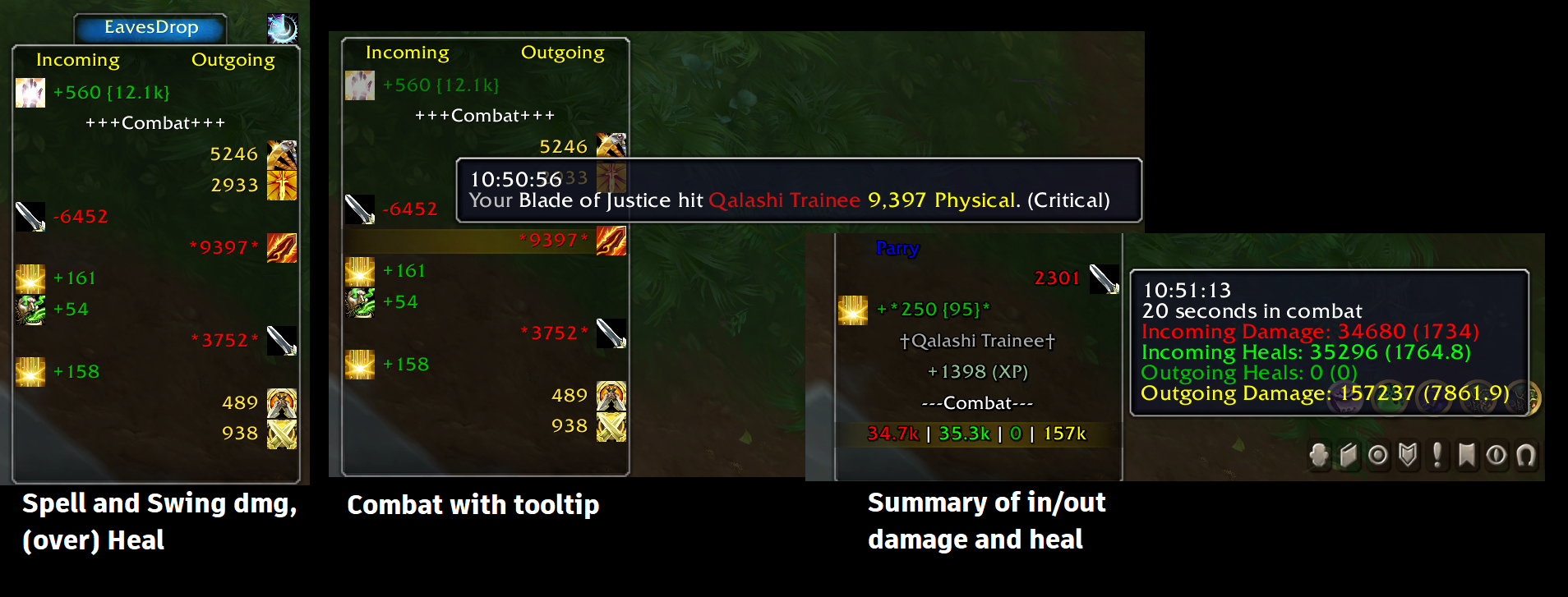
A simple combat log that shows events (such as damage, heal, buff/debuff...), using icons and colors to make it easy to find important information by a quick skim. It separates incoming events (left side) from outgoing events (right side) from misc. events (middle).
What all can it show?
- Your hits, spells, misses, heals, etc...
- Incoming damage, spells, heals, buffs, debuffs, etc...
- Power gain
- Honor, Reputation, Skill, and Experience gain
- Mob/People you have slain
- Combat start/stop
- Timestamps and details in tooltip
- Highest hit stat tracking for both incoming and outgoing skills.
- Combat Summaries
Additionally, it keeps track of each spell's maximum normal and critical hits!
Usage
All events related to player will be shown in 3 columns. After each combat, a summary of incoming and outgoing heals and damage will be displayed.
- Shift+scroll up/down will show the top/bottom of events.
- Ctrl+scroll up/down will take you to the next/previous combat.
- Shift+Click will copy the highlighted event to the chat edit box
- Click the "sun clock" icon, to open history of highest values of all events, divided into healing and damage.
To customize the events (buff, debuffs, colors, values, ...), open the options window by right-click on the EavesDrop tab or entering slash command: /ed.
You can adjust the minimum damage/healing values in the options windows under Misc tab.
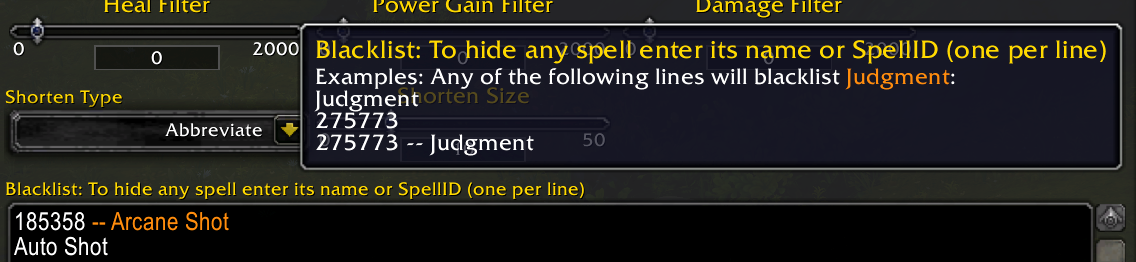
You can also completely exclude spells under the same tab. Enter the unwanted spell names or IDs in the Blacklist box, one spell per line. Any of the following lines will exclude Judgment:
Judgment
20271
Installation
Using addon managers
Install wago.iop app or CurseForge and search for EavesDrop in the apps to install the addon.
Manual Installation
Download the EavesDrop.zip file from either wago.io or github.com.
Then follow these instructions:
- Go into your WoW installation folder (e.g.
C:Program Files (x86)World of Warcraft_retail_). - Go into the
Interfacesub-folder. - Go into the
AddOnssub-folder (if you don't have one, create it). - Copy/Extract this addon's folder into the
AddOnsfolder. - Make sure the folder name is
EavesDrop.
Verification
The following folder paths will exist within your WoW Install directory:
InterfaceAddOnsEavesDrop
InterfaceAddOnsEavesDroplibs
InterfaceAddOnsEavesDroplocals
Look for the following (wrong) files as evidence of common mistakes:
- If you have
InterfaceAddOnsEavesDrop.tocthen you've extracted the zip file's contents without its folder structure, or copied the contents without the parent folder. - If you have
InterfaceAddOnsEavesDropEavesDropEavesDrop.tocthen you've extracted the zip file into a folder an extra level deep. Move the files and any sub-folders up one level and remove the extra folder. - If you have
InterfaceAddOnsEavesDrop-2.8or similar, you need to rename it toEavesDrop.
For more detailed instructions see wowointerfaces's FAQ.
Credits:
Some of the code to update Eavesdrop from 7.x to 8.0 is done by domzae, upon which I added required changes from BFA, SL, DF and TWW. If you feel you have contributed to this code base and you should get credited, please contact me.
Comments (0)
More addons for The Burning Crusade
Discover other addons that might interest you
WeakAuras
A powerful, comprehensive utility for displaying graphics and information based on triggers.
AlphaMap
AlphaMap is a scalable, moveable and transparent WorldMap
Who Pinged?
Displays players who have pinged the minimap in the chat window.
ShadowedUnitFrames
Improve your boring Blizzard UI with prettier unit frames.
PallyPower
Raid/Party Paladin buffs.
Advanced Trade Skill Window
An improved window for your tradeskills.
MoveAnything
MoveAnything enables you to move, scale and hide screen elements.
BankItems
View bank, inventory, mail, equipped and guild bank contents from any character anywhere!
You must be logged in to leave a comment.