
Yata
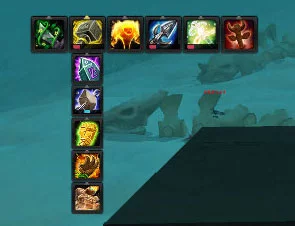
Small totem bar with timers.


Details
Expansion
Categories
Developers

Having issues?
What is Yata?
Yata is a hugely flexible totem bar addon, enabling your shaman to organise their totems, cast them (individually, through the multicast spells or by /castsequence macro) and track cooldowns and timers.
Yata was originally created by Tornhoof and was one of the pioneers of totem bar support during The Burning Crusade. It has been brought up to date in Wrath of the Lich King by kaytikat.
Features
Bars
Horizontal or vertical layout (with the ability to choose which side the pop-outs go)
Customisable order or groups and individual totems
Ability to hide useless or unused totems
Fully skinnable with ButtonFacade
Scale and position configurable
User-configured number of rows permanently visible
Button indicators showing which spells belong to which multicast spell
Short tooltip support
Key bind a spell group (e.g. a single key that will cast whichever fire totem is currently selected)
Spell Management
Key modifier to reorder totems (default: ctrl left click)
Key modifier to drop a totem without reordering (default: shift left click)
Key modifier to set/clear a totem as part of a multicast spell group (default: alt left click)
Cooldowns and timers shown on the button or on separate bars
Destroy Totem or Totemic Call (right click and shift right click, respectively)
How to get started
Open the Blizzard interface frame and choose yata or type /yata in the chat window
Type /kb to keybind abilities
You must be logged in to leave a comment.