

RollFor-WotLK
A World of Warcraft (3.3.5) addon that manages rolling for items with SoftRes integration.
Details
Expansion
 Wrath of the Lich King
 Categories
Developers

Having issues?
RollFor
A World of Warcraft (3.3.5) addon that manages rolling for items.
New in this branch:
- Listens to raider whispers of "?sr" and auto-responds telling them what they have SoftReserved
- Added a scrollable window to view SRs in game
- Added the option to not announce whether something is SRed, and then allowed open rolls for SR items.
NEW
Classic Look
Enable: /rf config classic-look
See the classic-look in action: https://youtu.be/G37j5XXBKxs
Overview
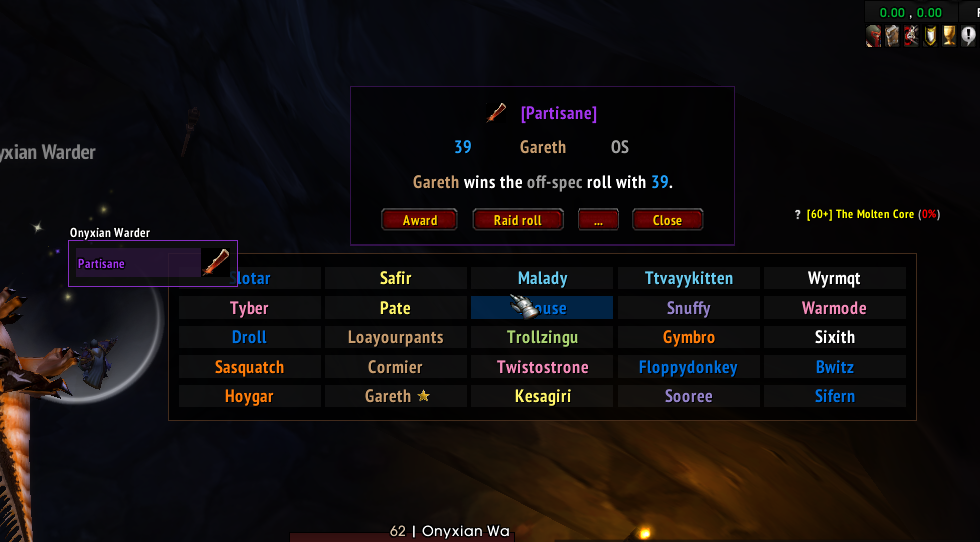
In this example, the addon shows the soft-ressed items in the loot list.
The Master Looter raid-rolls the trash item, then rolls non-SR items.
Then the SR items are rolled.
View better quality (fullscreen): https://youtu.be/f5nY-CxreIM
Tie roll
In this example, the addon automatically detects that the item is soft-reserved by two players.
It restricts rolling for the item to these players only and resolves any tie automatically.
The Master Looter then assigns the item directly to the winner.
<img src="https://github.com/sica42/roll-for-vanilla/blob/master/docs/gui-sr-tie.gif" alt"="soft-res rolling" style="width:1024;height:380">

Two top rolls win
In this example, two identical items drop. When clicked on any of these, the addon selects
both and performs a "two-top-rolls-win" roll. Then the Master Looter is presented with
individual award buttons for each winner.
Features
Fully SR-integrated loot list
Automatically enables Master Loot when a boss is targeted
Disable this feature with:
/rf config auto-master-loot
Shows the loot that dropped (and who soft reserved)
Makes Master Loot window pretty and safe
- one window with players sorted by class
- adds confirmation window
Fully automated
- Detects if someone rolls too many times and ignores extra rolls.
- If multiple players roll the same number, it automatically shows it and waits for these players to re-roll.
Soft res integration
- Integrates with https://softres.epoglogs.com/ and https://raidres.top/ (Epoch).
- Integrates with https://softres.it (Other) via Gargul Export.
- Minimap icon shows soft res status and who did not soft res.
- Fully automated (shows who soft ressed, only accepts rolls from players who SR).
This version includes the following features:
- New option
/rf config auto-class-announceToggle replace normal roll message with classes for items that has class restrictions. - New option
/rf config auto-tmogToggle automatically disable tmog roll option on trash loot. - New option
/rf config loot-frame-cursorToggle loot frame being positioned at cursor location. - New popup to keep track of winners. Shift-click map icon or type
/rfwto access.- Right click headers to customize filters
- Click headers to sort the list
- Right click roll type to change it.
- Tracks raid trades
- New options GUI. Ctrl-click map icon or type
/rfoto access. - Show roll popup for all group/raid members who have the addon installed when loot master starts a roll.
- Enable with
/rf config client show-roll EligibleorAlways /rf config clientto view additional client options
- Enable with
And more
- Supports "two top rolls win" rolling.
- Supports raid rolls.
- Supports offspec rolls (
/roll 99). - Supports transmog rolls (
/roll 98) (1.12.1). - Automatically resolves tied rolls.
- Highly customizable - see
/rf configand/rf config help.
See it in action
Usage
Roll item
/rf <item link>
Raid-roll item from your bags
/rr <item link>
Insta Raid-roll item from your bags
/irr <item link>
Roll for 2 items (two top rolls win)
/rf 2x<item link>
Ignore SR and allow everyone to roll
If the item is SRed, the addon will only watch rolls for players who SRed. However, if you want everyone to roll, even if the item is SRed, use /arf instead of /rf. "arf" stands for "All Roll For".
Soft-Res setup
- Create a Soft Res list at https://softres.epoglogs.com/ and https://raidres.top/ or https://softres.it
- Ask raiders to add their items.
- When ready, lock the raid and click on RollFor export (softres.epoglogs.com) or Gargul Export (softres.it) button.
- Click on Copy RollFor data to clipboard buton.
- Click on the minimap icon or type
/sr. - Paste the data into the window.
- Click Import!.
The addon will tell you the status of SR import.
Hovering over the minimap icon will tell you who did not soft-res.
The minimap icon will be green if everyone in the group is soft-ressing.
The minimap icon will be orange if someone has not soft-ressed.
The minimap icon will be red if you have an outdated soft-res data.
The minimap icon will be white if there is no soft-res data.
To show the SR items type:
/srs
If someone needs to update their items, repeat the process and copy the data again.
Soft-Res data format
The SR data from Raidres is a Base64 encoded JSON. Decode it to see what's inside.
Fixing mistyped player names in SR setup
When using soft-res, the players sometimes mistype their nickname, e.g. Johnny in game will be Jonnhy in the raidres.fly.dev website.
The addon is smart enough to fix simple typos like that for you.
It will also deal with special characters in player names.
However, sometimes there's so many typos and the addon can't match the
player's name - you have to fix it manually.
/sro (stands for SR Override) is the command to do this.
Finish rolls early
/fr
Cancel rolls
/cr
Show soft-ressed items
/srs
Check soft-res status (to see if everyone is soft-ressing)
/src
Clear soft-res data
Click on the minimap icon and click Clear or type:
/sr init
- { ver = "1.2.6", text = "Fix capitalisation and improve Boss List to include all bosses included in stock 3.3.5a" },
- { ver = "1.2.5", text = "Fixes for issues around combat rolling" },
- { ver = "1.2.4", text = "Added Ascension/Bisbeard referral links and Bug fixes." },
- { ver = "1.2.3", text = "Track winners of Blizzard's built-in group-loot Need/Greed/Disenchant rolls into the same award history as SR/MS/OS." },
- { ver = "1.2.2", text = "Bug fix and seperate changelog" },
- { ver = "1.2.1", text = "Aggregate per-player +1s & multiline rows" },
- { ver = "1.2.0", text = "Add +1s GUI and improve award handling" },
- { ver = "1.1.8", text = "Strip realm suffix from player names" },
You must be logged in to leave a comment.