
Johnny’s Raid Browser
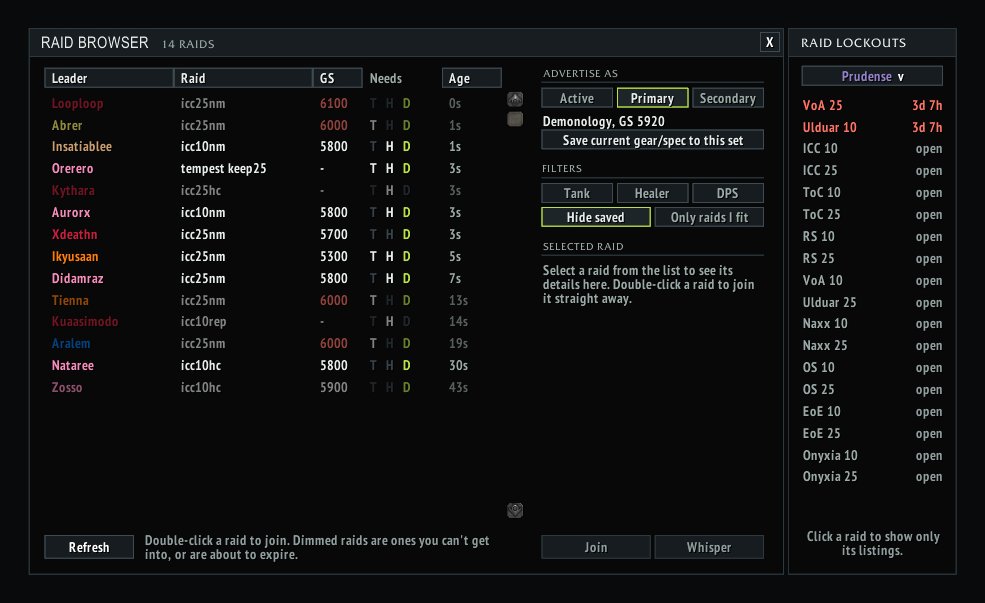
Find raids forming in chat: every LFM in one sortable list with role and GearScore filters, one-click whisper or join, and your raid lockouts at a glance.
Details

Expansion
 Wrath of the Lich King
 Categories
Developers

Having issues?
Johnny's Raid Browser reads the LFM messages in chat and turns them into one tidy list, so you can find a raid without watching Trade and LFG scroll past.
What it does
- Every raid being advertised, in a sortable list: leader, raid, GearScore needed, roles wanted and how long ago it was posted.
- Filters for tank, healer or DPS, and "Only raids I fit", which hides anything your gear or spec doesn't meet. Your filters are remembered.
- Click a raid to see the full ad, then Join or Whisper in one click. You see your join message before it's sent, and raids you've already whispered are marked.
- Raid lockouts panel docked beside the list: every raid at 10 and 25, green when you're free, red with the time until reset when you're saved. A character picker shows your alts' lockouts too.
- Hide raids you're already saved to, or click a raid in the lockouts panel to show only its listings.
- Works on its own, with nothing else to install.
Opening it
Use the minimap button, type /jrb, or use Johnny's Addon Hub if you have it. /jrb minimap shows or hides the minimap button.
Settings
The Cfg button sets window size and opacity, shows the changelog, and has a link for reporting bugs or requesting changes.
Made for Warmane 3.3.5a. Feedback and bug reports are welcome on GitHub:
https://github.com/JohnnyL1993/JohnnysRaidBrowser/issues
1.4
- Works without Johnny's Addon Hub: a minimap button opens the raid browser (left-click) or its settings (right-click). Drag it round the minimap to move it.
- Slash command: /jrb (or /raidbrowser) opens the window; /jrb minimap shows or hides the minimap button. It can also be turned off in the Cfg panel.
- Esc closes the window.
- New magnifier logo for the minimap button.
1.3
- Works on its own now: the raid chat parser is built in, so you no longer need to install RaidBrowser separately. If you already have it installed, your copy is used instead.
- New Cfg button: window scale and opacity, a changelog, and a Report a bug / request button.
- After an update, the changelog pops up beside the window the first time you open it.
1.2
- New blue-black "workshop" look with a lime accent.
- Reworked window: sortable Leader / Raid / GS / Needs / Age columns, filters that are remembered, a preview of your join message, and raids you've whispered marked in the list.
- Click a raid in the lockouts panel to show only its listings.
- Update checks from all of Johnny's addons share one slow queue, so logging in with several no longer trips the chat mute.
1.1
- Raid lockouts panel docked to the window: every raid, green when available, red with time to reset when saved. A character picker shows your alts' lockouts too.
- In-game "Update available" notice when someone with a newer version is seen.
1.0
- First release: a window listing raids advertised in chat, with role and GS filters and one-click whisper or join.
You must be logged in to leave a comment.