

Johnny’s Messenger
A Teams-style whisper messenger for 3.3.5a: all your whispers in one window, with chat bubbles, a conversation list, unread badges, emojis and quick replies.
Details

Expansion
 Wrath of the Lich King
 Categories
Developers

Having issues?
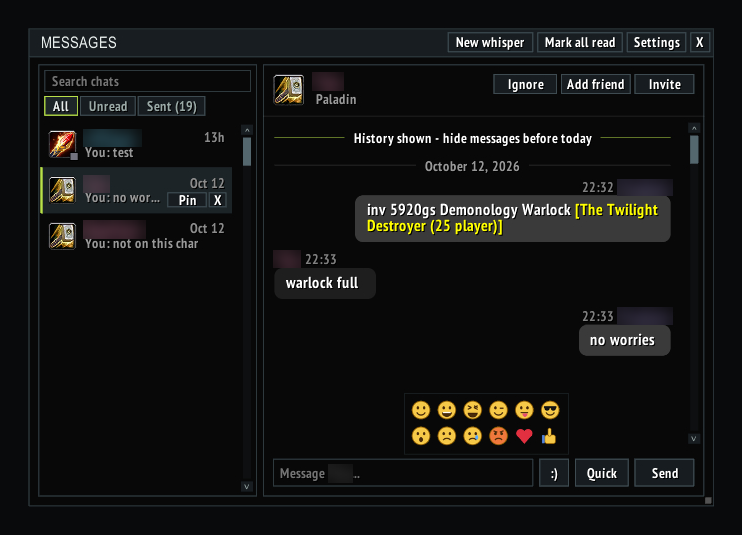
Johnny's Messenger turns whispers into proper conversations. Instead of whispers getting lost in your chat frame, every conversation lives in one clean window: your contacts on the left, the open chat on the right - like Teams or Discord DMs.
CONVERSATIONS
- Chat bubbles: their messages on the left, yours on the right, grouped by time, with day separators and a "New messages" marker where you left off.
- Threads open on today's messages; older ones sit behind a History bar, one click away.
- Item, spell and achievement links show tooltips and can be clicked. Web addresses open a copy box, and you can right-click any bubble to copy its text.
CONTACT LIST
- Class icons, online / away / busy / offline dots (from your friends list, guild and group), last-message preview and unread badges.
- All / Unread / Sent tabs - unanswered whispers you sent (LFG and invite requests) get their own tab with a one-click Clear.
- Search that looks inside messages as well as names.
- Right-click a contact to pin, mute, mark unread, invite, /who or remove.
REPLYING
- Each conversation keeps its own draft.
- Quick replies - as many as you like - one click from the reply box.
- Emojis: sent as plain 🙂 😀 <3, so players without the addon still see the text, while Messenger shows them as icons.
- Keep typing after sending; Esc or a click outside lets go.
- Up/Down recalls messages you've sent.
- Whispering someone with /w or /r opens their conversation (never in combat).
QUALITY OF LIFE
- Friend, Ignore and Invite buttons on every conversation.
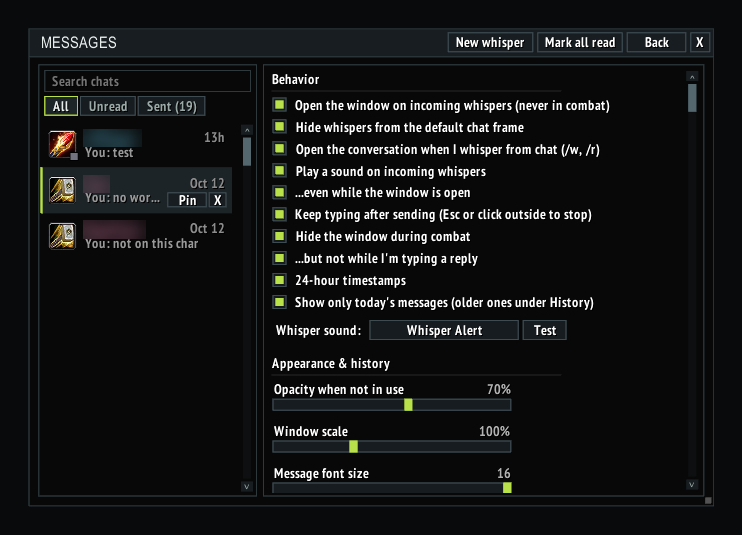
- Choose your whisper sound: the WoW whisper, the Messenger chime, or any shared sound from your other addons (including ElvUI's "Whisper Alert"). No sound while the window is open.
- Optional auto-open on incoming whispers, hide whispers from the default chat, and hide in combat (it stays open if you're typing).
- Resizable window with an adjustable list width, opacity, scale and font size; it fades when not in use.
- Minimap button with an unread count and the top unread senders in its tooltip.
- Keybindings for toggling the window and replying to the last whisper.
- Built-in changelog, a Report a bug / request button, and an update notice when someone nearby runs a newer version.
COMMANDS
/jm or /messenger - toggle the window
/jm reply - open the last person who whispered you
/jm settings - open settings
/jm help - list commands
No other addons required. Part of the Johnny's addon suite for Warmane.
Version 2.4
Changes
- Emojis: a smiley button next to the reply box. They're sent as :) :D <3 and so on, so anyone without Messenger sees the text; Messenger shows them as icons for you and anyone else using it.
- Keep typing after sending: the reply box stays active until you press Esc or click outside the window. Can be turned off in Settings.
- Search now looks inside messages as well as names, and shows the line it found.
- Friend and Ignore buttons in the conversation header. Click Friend again to remove them from your friends list; Ignore and remove both ask first.
- History: conversations open on today's messages only; older ones sit behind a "History" bar at the top of the thread, one click to show or hide. Can be turned off in Settings.
- "Delete all but today" in Settings clears older history in one go.
- As many quick replies as you like: "+ Add another" adds a row, X removes one. "Edit quick replies..." at the bottom of the Quick menu jumps there.
- Sent requests have their own tab (All / Unread / Sent).
- Whisper sound: pick the WoW whisper, the new Messenger chime, or any shared sound from your other addons (ElvUI's "Whisper Alert" included), with a Test button.
- No whisper sound while the Messenger window is open (tick "...even while the window is open" to keep it).
- Whispering someone from chat (/w, /r) opens their conversation in Messenger - never in combat. Can be turned off in Settings.
- Hide in combat leaves the window open if you're typing a reply (can be turned off in Settings).
- On a narrow window the Ignore / Add friend / Invite buttons move to their own row under the name instead of covering it.
- Changelog and Report a bug / request buttons in Settings.
Bug fixes
- The whisper sound was silent unless whispers were hidden from chat; it now always plays, even with game sound effects turned off.
- Online status stuck on "online": for people who aren't friends, guild or group, a whisper now only counts for 5 minutes, and friend log-in/log-out notices update the dot straight away.
- Opening a sent request (or typing in one) moved it into the main list.
- Emojis drew smaller than the text, and messages full of them spilled out of their bubble.
- Clicking outside the window didn't leave the search box.
- The resize corner jumped the window bigger on the first click; it now follows the mouse from where you grabbed it.
- The Window scale slider only went to 75% or 150%; the new scale now applies when you let go.
You must be logged in to leave a comment.