
CleanerChat
A modern chat UI overhaul with message filtering, animations, and extensive customization for WoW 3.3.5a.


Details

Expansion
 Wrath of the Lich King
 Categories
Developers
Having issues?
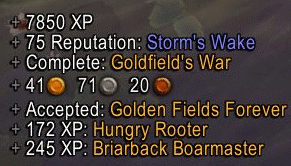
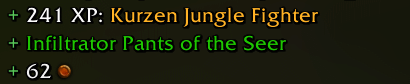
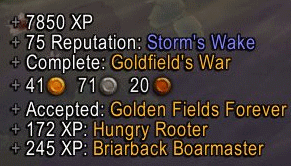
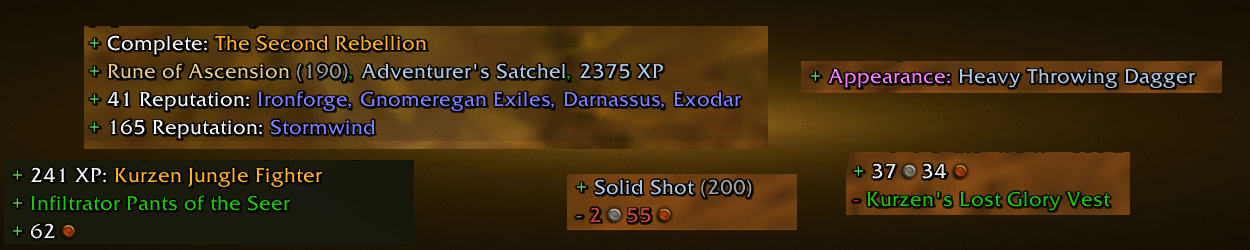
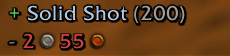
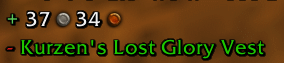
CleanerChat is an addon designed to clean up chat clutter and provide a modern, immersive chat experience. It filters and reformats spam-heavy messages such as loot, rolls, achievements, quests, crafting, auctions, XP, and reputation gains, making chat easier to read while keeping important information visible, it also replaces the default chat frame with a sleek Glass-inspired interface featuring fading messages, a clean tab system, movable frames, clickable links, URL support, and extensive customization options.
Everything can be configured through the /cc options panel, allowing players to adjust filters, appearance, animations, fonts, opacity, and layout to match their preferred style.
No changelog available.
# Changelog
All notable changes to CleanerChat are documented in this file.
## v2.37
### Fixed
- Improved message fade-out logic to prevent stranded chat messages.
---
## v2.36
### Fixed
- Added an additional safety net preventing stranded messages in SlidingMessageFrame.
---
## v2.35
### Added
- Added new LibSharedMedia widgets for backgrounds, borders, sounds, and status bars.
### Fixed
- Improved compatibility with older profile settings.
- Corrected SharedMedia header formatting.
- Removed unnecessary BackdropTemplate compatibility override.
---
## v2.34
### Added
- Added synthetic quest message generation with duplicate detection.
- Introduced Chat Formatting options.
- Expanded localization support.
### Fixed
- Improved synchronization with Blizzard chat filters.
- Improved quest reward and experience formatting.
- Refined options layout.
---
## v2.33
### Added
- Added option to hide other players' profession broadcasts by default.
### Maintenance
- Fixed release workflow.
---
## v2.32
### Added
- Optional item icons next to chat links.
- Localization for item icon settings.
### Improved
- Better message fading transitions.
- Improved edit box focus behavior.
- Better handling of inline item icons and wrapped links.
---
## v2.31
### Added
- Overlay mask option for the scroll indicator.
### Fixed
- Improved scroll indicator positioning and visibility.
- Better edit box positioning and defaults.
- Updated profession broadcast filtering.
- Improved compatibility with WoW 3.3.5.
---
## v2.30
### Maintenance
- Removed unused embedded libraries (LibMoreEvents and LibEasing).
---
## v2.29
### Maintenance
- Removed WoW color codes from TOC files.
---
## v2.28
### Refactored
- Simplified AceHook integration for improved maintainability.
---
## v2.27
### Improved
- Channel numbering is now always displayed correctly in "None" mode.
---
## v2.26
### Maintenance
- Removed AceTimer dependency.
- Removed unused widget files.
- Removed bundled lodash.wow library.
---
## v2.25
### Added
- Added missing TOC files.
- Updated addon packaging.
---
## v2.24
### Added
- Interface Options panel.
- Chat restoration after UI reload.
- Channel join/leave notification filtering.
- Combat Log tab visibility option.
- Edit box padding configuration.
- Increased message history limit to 4096.
### Improved
- Chat history restoration.
- Localization updates.
---
## v2.23
### Maintenance
- Internal improvements.
---
## v2.22
### Fixed
- Improved chat tab flashing behavior.
- Improved mover dialog.
- Better channel formatting.
- Reduced unnecessary padding.
- Removed obsolete options.
### Maintenance
- Automatic formatting with StyLua.
- Removed OptionsSkin module.
---
## v2.21
### Maintenance
- Improved changelog generation.
---
## v2.20
### Added
- Boss message filtering.
- Honor notification filtering.
- Force class colors option.
- Group channel display customization.
- New localization entries.
### Refactored
- Simplified chat event handling.
---
## v2.19
### Fixed
- Disabled custom OptionsSkin to prevent styling conflicts.
### Refactored
- Cleaner and more maintainable OptionsSkin implementation.
---
## v2.18
### Added
- Shift-click item links now insert directly into the chat edit box.
---
## v2.17
### Added
- Flashing notification effects for inactive chat tabs.
- Multiple flash styles.
- Localization for flash settings.
### Fixed
- Ctrl-click item links now correctly open the Dressing Room.
---
## v2.16
### Maintenance
- Automatic code formatting.
---
## v2.15
### Refactored
- Major code cleanup and maintainability improvements.
- Reduced duplication.
- File organization improvements.
---
## v2.14
### Maintenance
- Removed unused overlay mask asset.
---
## v2.13
### Added
- Version broadcasting system.
- Version checking between players.
- Broadcast throttling.
---
## v2.12
### Added
- Hide Chat Menu button.
- Hide Social button.
- Highly customizable chat tab appearance.
- Dynamic tab sizing.
- Automatic orphaned window cleanup.
---
## v2.11
### Added
- Full multi-window chat support.
- Individual profiles per window.
- Independent settings per chat window.
- Window mover improvements.
- Saved window positions.
- Per-window hover behavior.
- Improved detached window management.
---
## v2.10
### Added
- Internal timer implementation for WoW 3.3.5 compatibility.
### Fixed
- Safer timer callbacks.
- Improved AceHook implementation.
---
## v2.9
### Fixed
- Prevented crashes caused by malformed chat events.
- Improved changelog generation.
---
## v2.8
### Added
- Independent font selection for:
- Chat messages
- Chat tabs
- Chat edit box
---
## v2.7
### Added
- Lua syntax validation workflow.
- Previous releases are now automatically marked as pre-releases instead of being deleted.
### Fixed
- Improved BackdropTemplate compatibility.
- Improved release packaging.
---
## v2.6
### Added
- README downloads badge.
No changelog available.
You must be logged in to leave a comment.