
ArenaLFG
A 2v2 arena partner finder for WoW 3.3.5a
Details
Expansion
 Wrath of the Lich King
 Categories
Developers

Having issues?
ArenaLFG
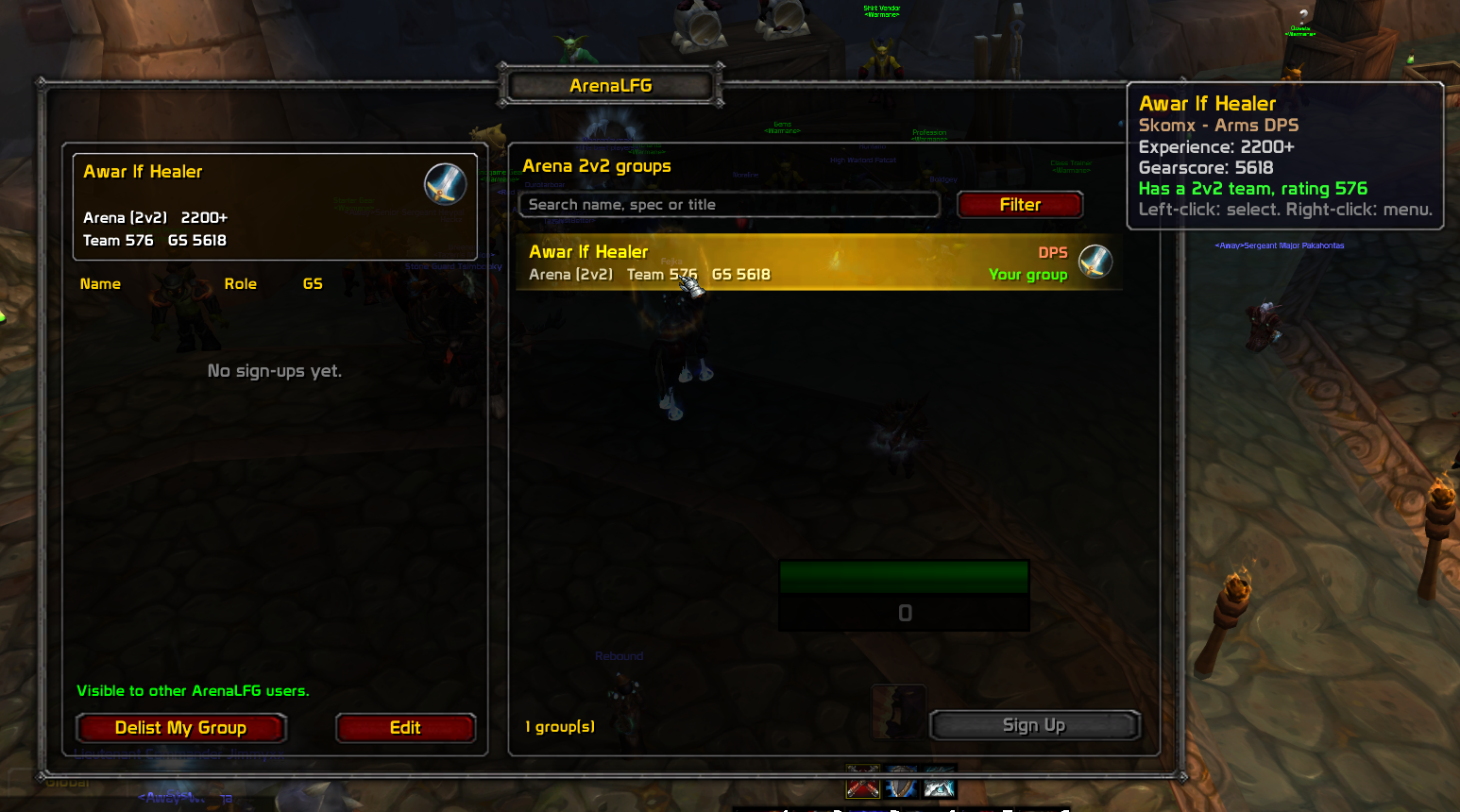
A 2v2 arena partner finder for WoW 3.3.5a (WotLK). Stop scrolling through global chat: see who is looking for a 2v2 partner, sign up with one click, or list your own group, in a window modeled on the Premade Groups finder from modern WoW.
Features
- Group browser with search and filters: role, team / no team, seasonal / non-seasonal, "10 games only".
- Sign Up flow like retail: pick a group, press Sign Up, the leader sees you in their applicants list and can Invite or decline.
- List your group with role, gearscore, experience tier, a short title and flags (seasonal character, 10 games for arena points).
- Auto-detection: your class, spec, 2v2 team and team rating are read from the game. Gearscore is read from your GearScore addon if you have one.
- Roles: DPS, Healer, Tank.
- Minimap button to open the window.
- Nothing in your chat window: listings travel through a hidden channel that is filtered out of every chat frame.
Usage
| Action | How |
|---|---|
| Open / close the window | Click the minimap button, or type /alfg |
| List your group | Left panel, fill the form, press List Group |
| Edit or remove your group | Edit / Delist My Group (also in the right-click menu on your row) |
| Sign up to a group | Click a group in the list, then Sign Up |
| Cancel a sign-up | Select the group, press Cancel Sign-Up |
| Invite an applicant | Press Invite next to their name (sends a normal party invite) |
| Refresh the list | The refresh button asks other players to announce their groups again |
Listings expire automatically if the poster goes offline, so the list stays clean.
Notes on your profile
When you sign up to someone's group, the leader receives your role, spec, gearscore, team rating and experience tier. These come from the same form you use to list your own group, so fill it in once.
Slash commands
| Command | Description |
|---|---|
/alfg or /arenalfg | Toggle the window |
/alfg minimap | Show or hide the minimap button |
/alfg me | Print what the addon detects about your character (class, spec, GS, arena teams) |
/alfg comm | Show the status of the hidden sync channel |
/alfg debug | Toggle debug messages (sent / received data) |
/alfg clear | Clear the local list |
/rl | Reload the UI (shortcut for /reload, useful while developing) |
How it works
3.3.5 addons cannot access the internet, so ArenaLFG syncs through the game itself:
- Listings are sent as plain text in a hidden custom channel called
ArenaLFGSync. The addon joins it automatically, removes it from your chat windows and filters its messages and join/leave notices, so you never see them. Every 60 seconds your listing is re-announced; a listing disappears after about 2.5 minutes without an update. - Sign-ups, invites and declines are private addon messages sent directly between the two players.
- Only players who run ArenaLFG can see each other's groups. Alliance and Horde use separate lists, as the game does not allow channel chat across factions.
Privacy
When you list a group, your character name, class, spec, role, gearscore, 2v2 team rating (if you have a team), experience tier, flags and title are visible to other ArenaLFG users. When you sign up to a group, the same profile is sent privately to that leader. Nothing is sent outside the game and there is no external server.
Requirements
- WoW client 3.3.5a (interface 30300).
- Optional: a GearScore addon (GearScore / GearScoreLite). Without one, enter your gearscore by hand.
Troubleshooting
- "Could not join the sync channel": the server may restrict custom channels, or you already have the maximum number of channels. Free a channel slot and
/reload. Run/alfg commto check. - The list stays empty: the addon is only useful when other players run it too. Ask a friend to install it, post a group, and press the refresh button.
- Your 2v2 team is not detected: run
/alfg meand check the arena slots it prints. Open the PvP / arena team frame once, then/reload. - The addon does not appear in the AddOns list: check that the folder is named
ArenaLFGand containsArenaLFG.tocdirectly (not another folder inside). - Lua errors: enable error display with
/console scriptErrors 1and open an issue with the message.
Known limitations
- Early version: expect rough edges. Please report them.
- Visible listings depend on how many players run the addon.
- Gearscore is self-reported (or read from your GearScore addon), so it can be edited by the player.
- Solo-queue style teams reported by the server are ignored; only real 2v2 teams count.
No changelog available.
You must be logged in to leave a comment.