
AddOns CPU Usage
Show how much your addons are using the CPU.
Details
Expansion
 Legion
 Categories
Developers

Having issues?
By default, World of Warcraft client only show to us information about memory usage. These days, in terms of performance, the memory used by an addon is almost irrelevant. But, unfortunately, a large portion of players still have the wrong idea of 'more memory using = less fps', which is completely wrong.
The use of the CPU is the real bad guy and isn't shown to us by the default interface, leaving it to 3rd party addons measure it.
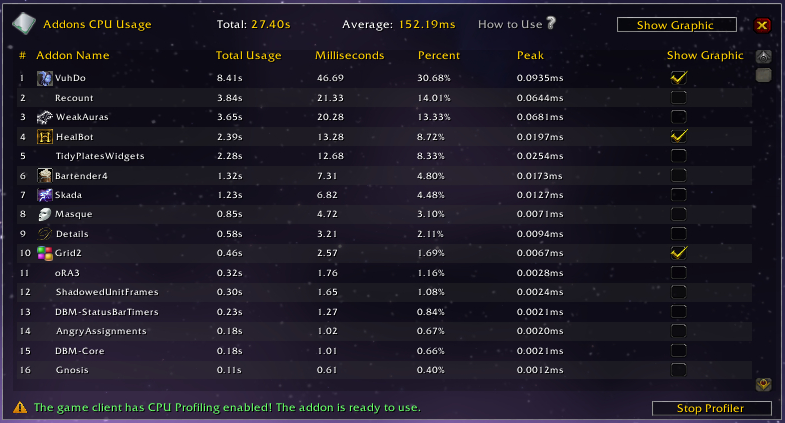
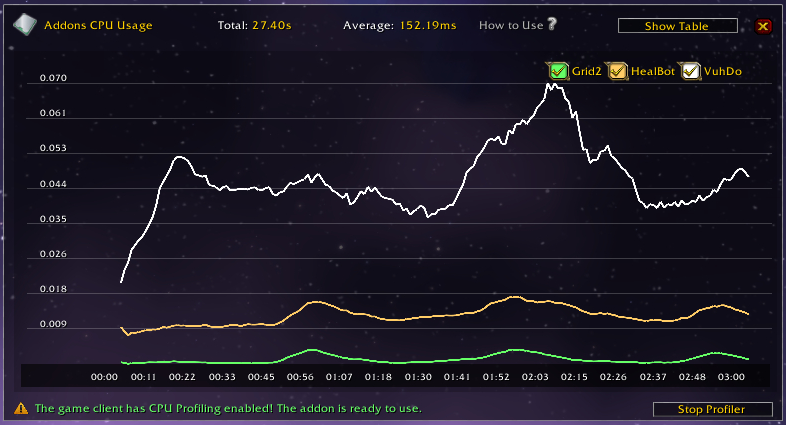
The goal of 'Addons CPU Usage' is help you with this task, providing an easy Interface and solid results on the use of CPU by your addons.
Main usage:
- Find addons harming your frame rate.
- Diagnostic and fix problems related to FPS drops during Bloodlust / Heroism.
- Make comparisons between two or more similar addons.
How to use:
- As you do with any other addon, close your game, install and reopen the game client.
- Join a raid group, can be a raid finder one.
- Open the addon's panel through /cpu or clicking on the minimap icon.
- Take a look at the bottom of the window, if there is a red phrase telling 'Performance Profiler Disabled', click on the 'Start Profiler' button.
- After clicking, your game screen may reload and the red phrase is now green telling the addon is ready to use.
- Engaging the Raid Boss will make the addon start to capture data.
- When the encounter end, the panel is shown again with the results.
Important:
- When you are done with the tests or if you are going to do real raid with your guild, don't forget to disable the profiler clicking in the 'Stop Profiler' button.
You must be logged in to leave a comment.