
ThreatMaster
A threat meter that looks exactly like the built-in Damage Meter and follows its settings.
Details
Expansion
 Forever
 Categories
Developers

Having issues?
ThreatMaster
A threat meter that looks exactly like the built-in Damage Meter.
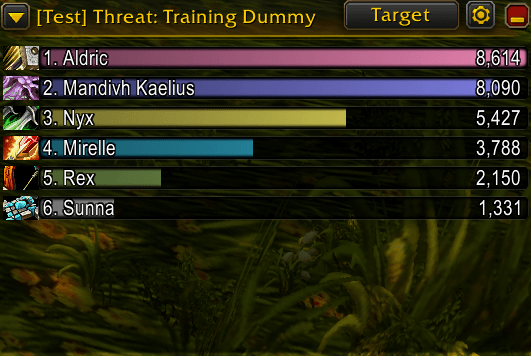
ThreatMaster is built from the Damage Meter's own parts: the same header, background, dropdowns, resize handle and bars. It sits next to your Damage Meter and looks like part of it, because it follows the same settings you already chose. Or make it your own: every look setting can be overridden.

How to use it
- Type
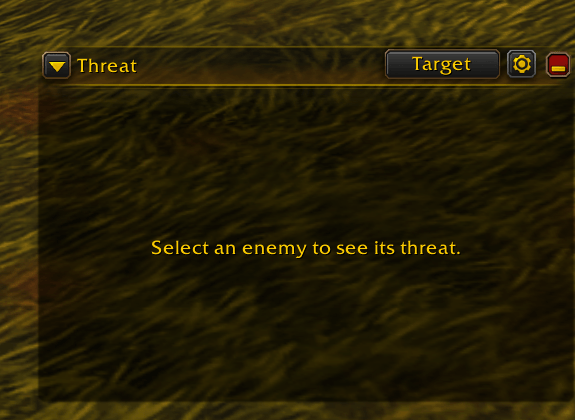
/tmto open the window. - Target an enemy. Its threat list appears.
- Use the two dropdowns in the header to switch between Threat and To Pull Aggro, and between your Target, Focus and Boss 1.
- Not sure how it behaves? Type
/tm testto watch a mock fight without pulling anything.
What you get
Looks native. Same header art, same bars, same resize handle as the Damage Meter. Bar height, spacing, text size, style and class colors follow your Damage Meter settings, until you choose values of your own.
Two views. Threat shows each player's threat. To Pull Aggro shows each player's threat as a percentage of what it takes to pull aggro, so 100% means that player takes the enemy.
Smooth and light. Bars glide to their new length, slide past each other when the order changes and fade in and out as players come and go, on by default, and it costs nothing while nothing moves. Built to stay cheap in big pulls and raids.
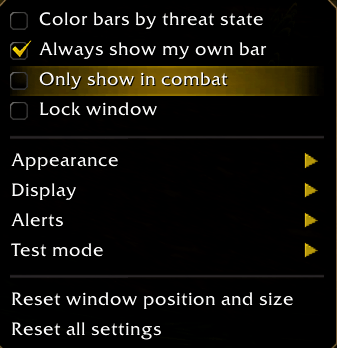
Your own bar is always visible, even when you are far down the list. Highlight it in its own color against everyone else's, or color by class or by threat state instead.
Honest when the game hides numbers. Blizzard hides exact threat values in some fights, such as against bosses. ThreatMaster then shows the threat state instead (Aggro, Unsafe, Close). If that is hidden too, it says so, instead of showing an empty list.
Aggro alerts. Damage dealers are warned before they pull aggro and when they have it. Tanks are warned when someone is about to pull aggro from them, and when they lost it. Or let it pick from your group role. Choose a sound, a soft screen flash and/or a chat message, and the percentage that counts as close. Off by default, and they work with the window minimized or hidden.
Test mode. Play a scripted mock fight to set the window up, try the alerts and show it off, without pulling anything. Six fights: you pull aggro in a dungeon, a damage dealer takes aggro from you as the tank, a boss fight with hidden numbers, a 25 player raid, everything hidden, and no enemy.
Threat per second and time to pull (optional). See how fast each player's threat is growing and how long until they pull aggro at that pace, for example 2.4K · 61/s · pull in 5s.
A real settings page. /tm settings, or the gear button's "Open Settings", opens ThreatMaster under the game's own Options > AddOns list: bar height, spacing, text size, opacity, class icons and colors, header behavior, most bars shown, pets, number format and the alerts, all in one place. The gear button itself stays small: Open Settings, Test Mode, Reset Position.
Plays nicely with a layout addon. Drag or resize the window and it stays exactly there. A layout addon will not move it again until you ask it to.
Commands
/tmshows or hides the window./tm target,/tm focus,/tm boss1,/tm autochoose whose threat is shown./tm threatand/tm pullchoose the view./tm combatswitches between always shown and only shown in combat./tm lockand/tm unlocklock or unlock the window./tm resetputs the window back at its default place and size./tm settingsopens the settings page./tm dock on|offcontrols whether a layout addon may move the window./tm color self|othersopens the color picker for the bar highlight./tm test,/tm test list,/tm test offrun the mock fights./tm alerts off,dps,tank,autoortestset up the aggro alerts./tm set <setting> <value>,/tm scale <number>,/tm options,/tm defaultschange and list settings./tm debugprints what the addon sees. Please include it when you report a problem.
Good to know
- This is a beta. ThreatMaster was built for the WoW: Forever beta and tested against a simulated client. Threat numbers in real fights, and the alerts, need players to confirm them. Please report anything that looks wrong.
- It needs the built-in Damage Meter. If your client does not have it,
/tmtells you. - The current Forever beta has occasionally been seen not loading saved variables, which would reset settings and the window's position back to their defaults;
/tm debugshows what was actually loaded. Please report it if this happens to you. - Nothing is sent anywhere and no data is collected.
ThreatMaster is not affiliated with or endorsed by Blizzard Entertainment.
☕ Support Development
Enjoying ThreatMaster? If the addon makes your WoW Forever experience a little smoother, consider supporting its development!
Your support helps motivate continued development, improvements, bug fixes, and new features.
❤️ Buy Me a Coffee
If you find ThreatMaster useful, you can support me here:
☕ Support Milan's Addon Development
Every coffee is greatly appreciated. Thank you for supporting the project and being part of the community!
You must be logged in to leave a comment.