

ThreatDiff
See your exact threat lead or gap on every enemy's nameplate, plus a Details-style threat meter showing who's about to pull. Colour-coded for tanks and DPS, fully customisable, lightweight. Built for WoW Forever. /tdiff
Details
Expansion
 Forever
 Categories
Developers

Having issues?
ThreatDiff
See how much threat you have on every enemy you're fighting, and how close you are to pulling aggro. Built for World of Warcraft: Forever.
Quick start
- Install it, log in, and turn on enemy nameplates (default key: V).
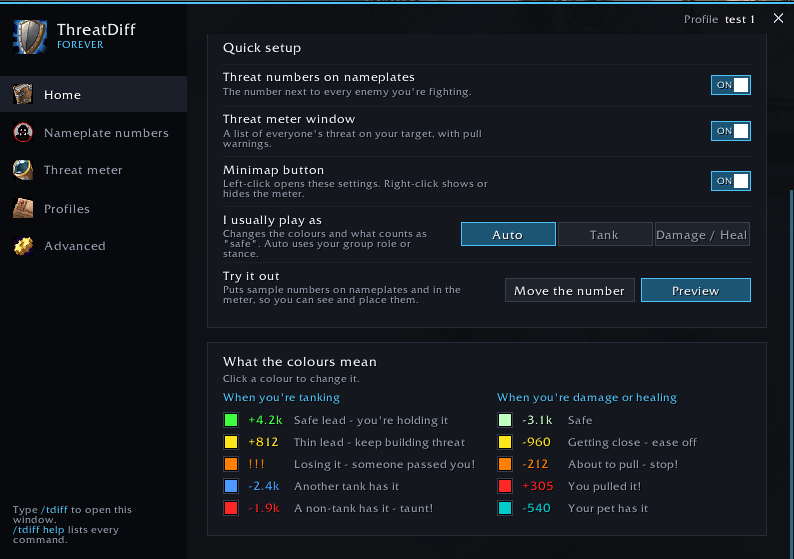
- Type /tdiff or click the minimap button to open settings.
- Click Preview on the Home page to see sample numbers without a fight.
- Set "I usually play as" to Auto, Tank, or Damage / Heal. Done.
Reading the numbers
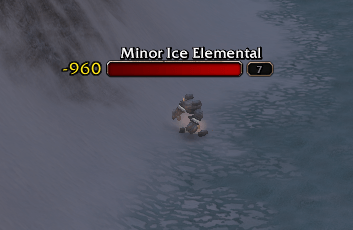
- +1.2k means you're ahead of everyone else by that much threat.
- -850 means someone is ahead of you by that much.
- Colours show where you stand. Tanks see safe lead, thin lead, losing it, or a taunt warning. Damage and healers see safe, getting close, about to pull, or you pulled it. Pets get their own colour.
- Damage and healers can switch to "Threat until pull" to see how much more threat they can do before taking aggro.
Threat meter
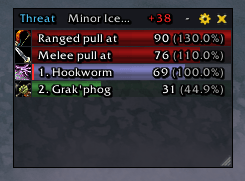
- A Details-style window ranking your group by threat, with class colours and icons.
- Melee / Ranged pull rows show where aggro would flip.
- Healers: target your tank and the meter follows their target.
- Resizable, collapsible, lockable, and can hide outside combat.
Make it yours
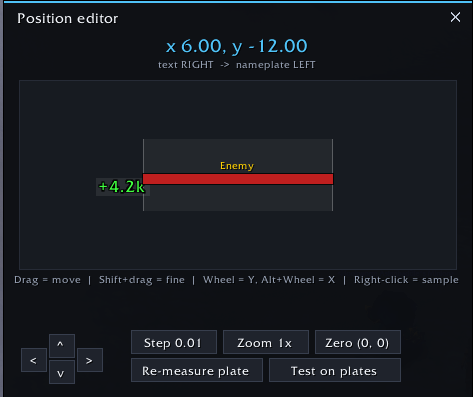
- Place the number left, right, above or below the nameplate, with exact offsets or by dragging.
- Fonts, bar styles, colours and transparency. Works with SharedMedia.
- Profiles per role or activity, saved automatically for each character.
- Minimap button: left-click settings, right-click meter, shift-click preview.
- Very light: nothing updates every frame.
Not seeing numbers?
- Numbers show only on enemies you're in combat with, and clear when combat ends.
- Make sure enemy nameplates are on (V).
- WoW Forever hides threat on enemies you're not targeting. ThreatDiff keeps their last number, dimmed, for a few seconds. Target or mouse over them to refresh.
- Still stuck? Run /tdiff probe in a fight and include the output in your bug report.
Commands
/tdiff settings · /tdiff help all commands · /tdiff test preview · /tdiff edit position editor · /tdiff pos 2.34 10.25 exact position · /tdiff role auto|tank|dps · /tdiff on|off · /tdiff meter show/hide the meter (also lock, unlock, collapse, reset) · /tdiff minimap · /tdiff profile · /tdiff reset · /tdiff probe
Found a bug?
Report it on GitHub. The form asks for what you need to include, such as your version and the /tdiff probe output.
You must be logged in to leave a comment.