
TargetPanel
Compact Blizzard-style targeting frames for WoW Forever Beta with Focus, Target of Target, raid markers and customizable layout.
Details
Expansion
 Forever
 Categories
Developers

Having issues?
TargetPanel
TargetPanel is a lightweight World of Warcraft Forever Beta addon that adds compact Blizzard-style unit frames for frequently used targeting relationships such as Focus, Focus Target, Target of Target, Pet, and Pet Target.
It is designed for players who want a faster way to:
- keep important units visible without opening additional large unit frames
- quickly target Focus, Focus Target, Target of Target, Pet, and other useful units
- see health, power, and casting information at a glance
- assign raid target markers directly from the panel
- control Focus quickly using the optional Focus button
- customize the panel while keeping a Blizzard-style interface
Main Features
- Compact Blizzard-style unit frames
- Secure click targeting
- Focus and Focus Target support
- Target of Target support
- Target, Pet, and Pet Target frames
- Health and power bars
- Cast bars
- Friendly and hostile unit indication
- Raid target marker menu
- Optional Focus action button
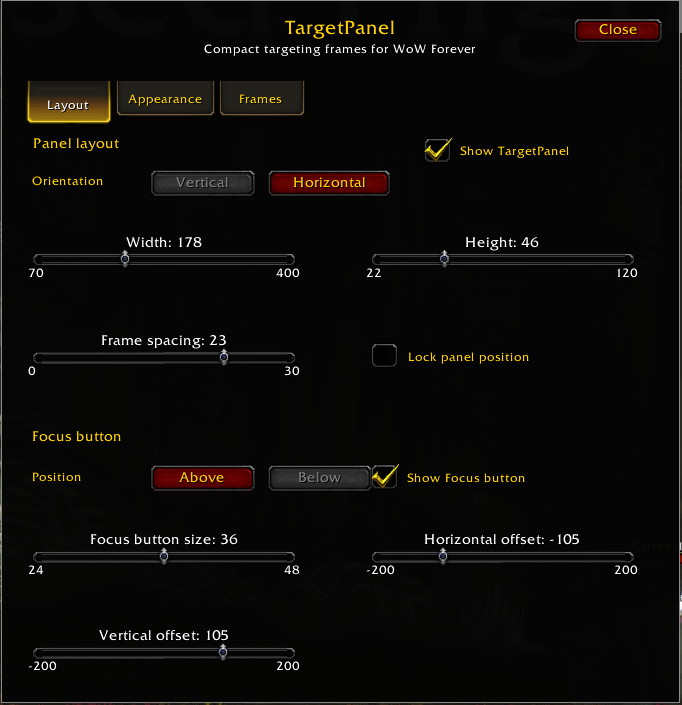
- Vertical or horizontal layout
- Configurable frame order and visibility
- Adjustable frame, portrait, bar, and spacing sizes
- Movable and lockable panel
- Complete TargetPanel show/hide option
- Per-character configuration
- Draggable minimap settings button
Available Unit Frames
- Focus
- Focus Target
- Target of Target
- Target
- Pet
- Pet Target
Focus Button
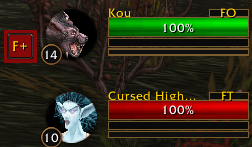
TargetPanel can display an optional compact F+ button for quick Focus control.
Right-click — Clear Focus
The Focus button can be enabled or disabled and its size, position, and offsets can be configured in the TargetPanel settings.
Raid Target Markers
TargetPanel includes quick access to standard Blizzard raid target markers directly from supported unit frames. Existing raid markers are also displayed on the unit portrait.
Customization
- Choose which unit frames are displayed
- Reorder unit frames
- Switch between vertical and horizontal layouts
- Adjust frame width and height
- Adjust spacing between frames
- Adjust portrait size
- Adjust health, power, and cast bar sizes
- Show or hide power bars
- Show or hide cast bars and cast icons
- Show or hide unit labels and reaction indicators
- Move the complete panel anywhere on the screen
- Lock the panel when its position is set
Settings
Click the draggable TargetPanel minimap button to open the settings window.
/tp — Open TargetPanel settings
/tp lock — Lock the panel position
/tp unlock — Unlock the panel position
Designed For
- players who regularly use Focus and Focus Target
- tanks, healers, and damage dealers who want quick access to important targets
- players who want Target of Target information without a large additional UI
- players who prefer a compact interface that stays close to the standard Blizzard UI
Blizzard UI Integration
TargetPanel is designed to stay close to the standard World of Warcraft interface. It uses Blizzard-style UI elements and secure actions where required instead of replacing the game's normal targeting system.
WoW Version
TargetPanel is currently developed specifically for World of Warcraft Forever Beta.
Beta Status
TargetPanel is currently in beta development. Features and compatibility may be adjusted as the WoW Forever Beta client changes.
You must be logged in to leave a comment.