

Sharing Is Caring
Find items in your bags and your friends' shared inventories in WoW: Forever, with category controls and optional Auctionator prices.
Details
Expansion
 Forever
 Categories
Developers

Having issues?
Sharing Is Caring
English
Find out which friend has the item you need, then contact them in game.
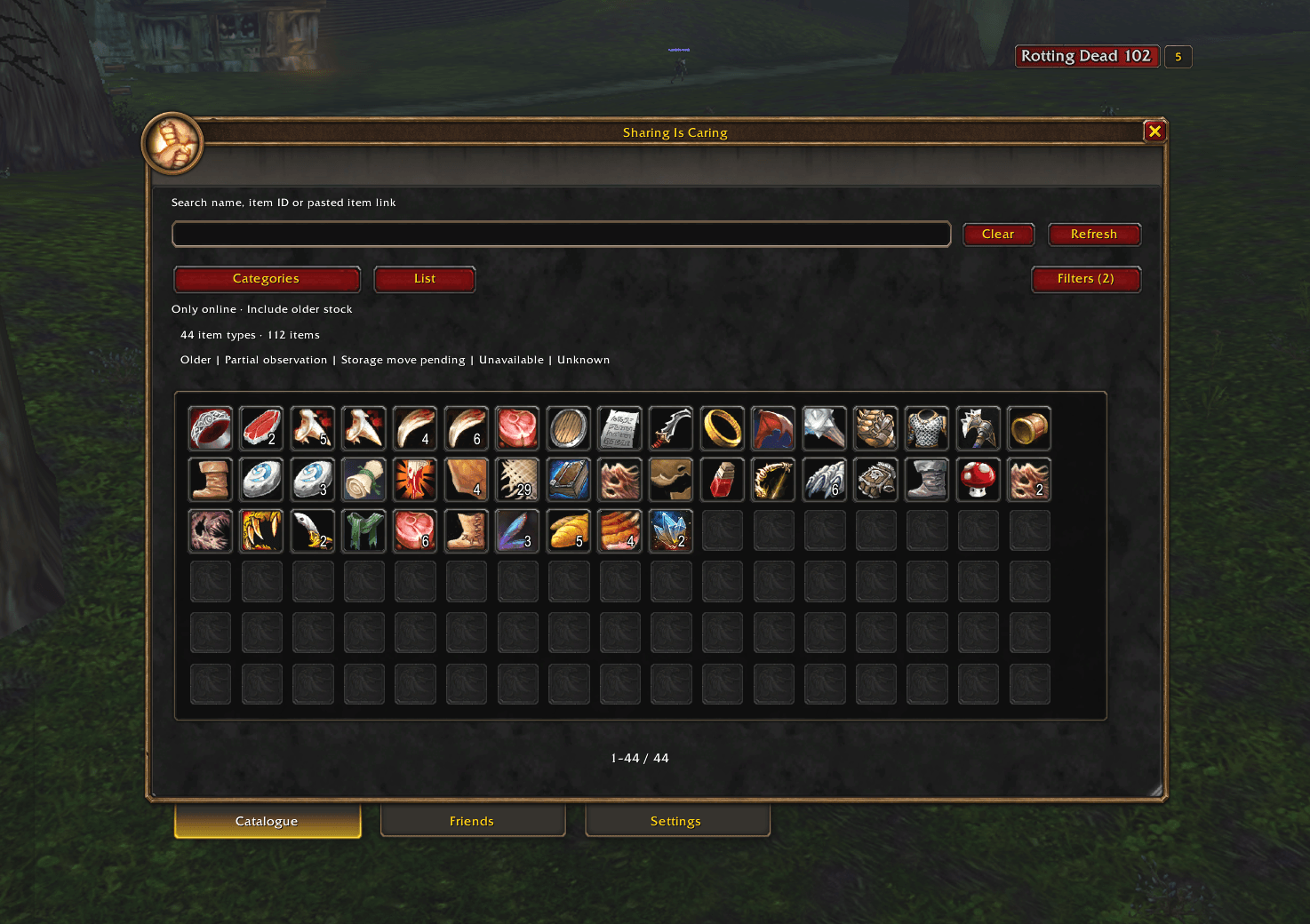
Sharing Is Caring brings your own inventory and the items your friends share into one searchable catalogue for World of Warcraft: Forever. Browse familiar item icons, see quantities and owners, and open a whisper when an owner is available.
For World of Warcraft: Forever 1.60.1. Both players need a compatible Sharing Is Caring addon and a native WoW or Battle.net friend connection. Other WoW versions are not currently supported.
What you can do
- Browse an inventory-style item grid or switch to a compact list.
- Search by item name, item ID or pasted item link.
- Open categories and filters beside the catalogue when needed.
- View item owners, quantities and the age of the recorded inventory; sort owners by quantity or name.
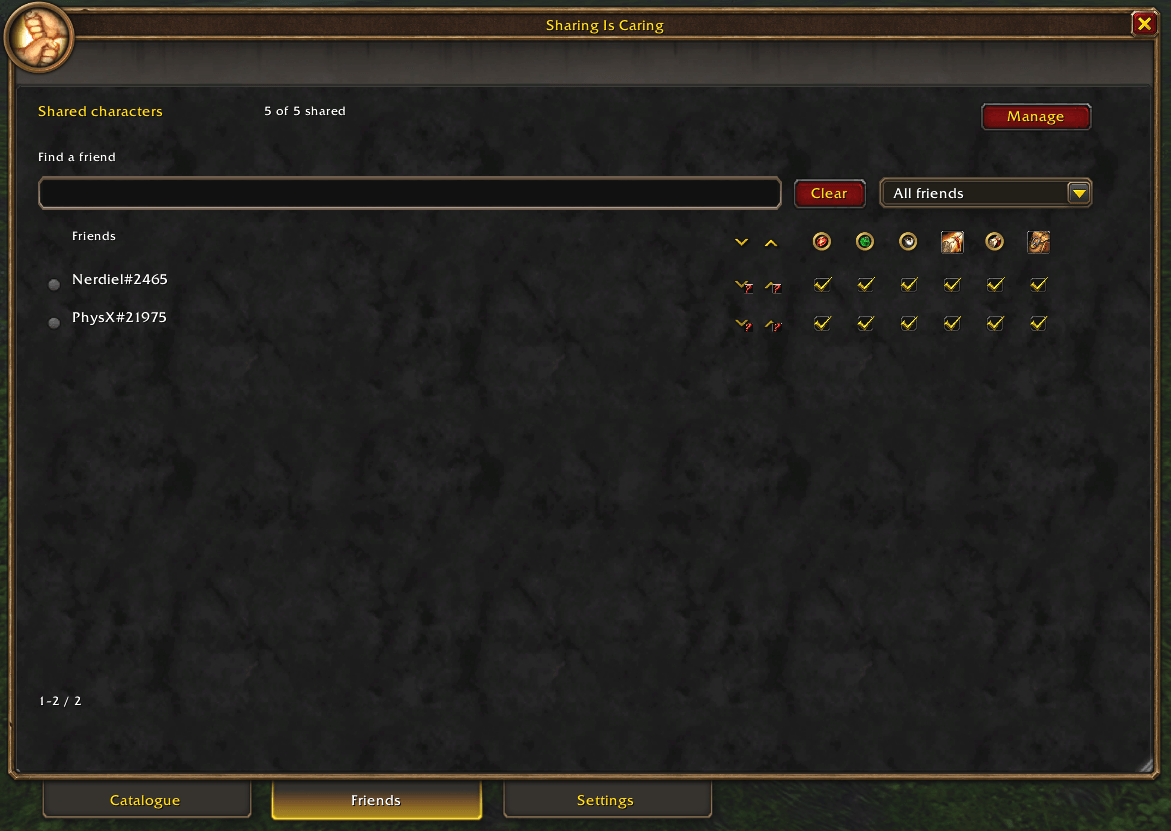
- Choose shared characters and adjust item categories for each friend in one Friends tab.
- See online status and incoming/outgoing sharing indicators, with details on hover.
- Open a blank whisper to an available owner. You write and send the message yourself.
- Show optional Auctionator price references with gold, silver and copper icons.
Sharing defaults — please read
A fresh installation automatically selects your current character for sharing. New compatible friends automatically receive all six item categories from your selected characters. Review Friends if you want to limit this.
The six categories are Trade goods, Consumables, Equipment, Recipes, Quest items and Miscellaneous. Uncheck categories in a friend's row to restrict what they receive; uncheck all six to stop sharing with that friend. Uncheck a character to exclude it from sharing with every friend. These settings control shared inventory information; they do not transfer actual items.
Existing category restrictions, stopped sharing and excluded characters are preserved when updating. Additional characters are discovered when you log into them with the addon enabled and must be selected separately. The addon cannot list account characters you have never logged into with it enabled.
Changes affect future sharing. They cannot erase information another player has already received or copied. Removing categories from a previously connected friend is possible while they are offline; adding categories requires a connected compatible addon.
Getting started
- Close WoW. Extract the ZIP so that
SharingIsCaring/SharingIsCaring.tocis directly inside your ForeverInterface/AddOnsdirectory. For the current beta, this is under_classic_beta_. Avoid an extra nestedSharingIsCaringfolder. - Start Forever and enable Sharing Is Caring in the character-selection AddOns list.
- Open
/sharingiscaring, click the minimap button, or use Options → AddOns → Sharing Is Caring. - Review your selected characters and per-friend categories in Friends. Both players must have the addon enabled and a compatible friend connection before exchanging items.
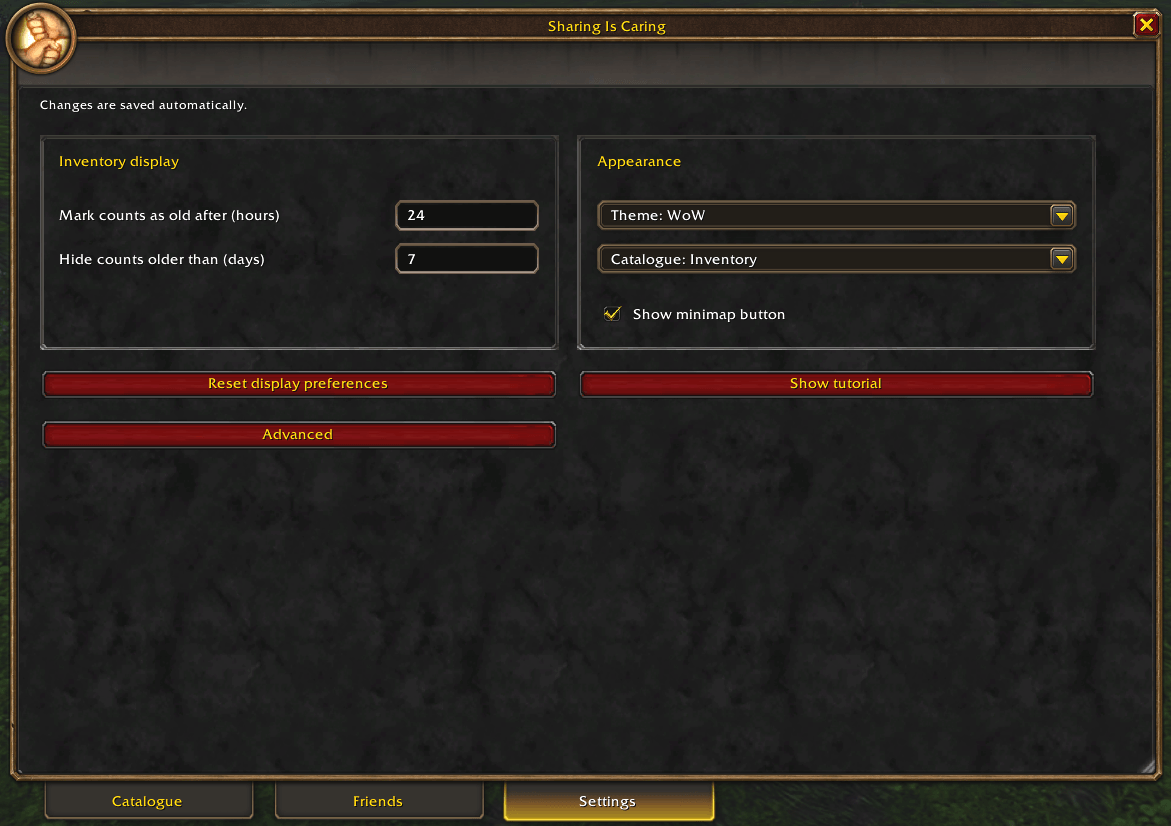
- Browse Catalogue. Hover for details, or click an item to see its owners. Settings apply automatically.
For an update, close WoW and replace only the SharingIsCaring addon folder with the new one. Keep your account SavedVariables and WTF folder. Restart the game and check the version in Settings. Do not use identity reset or delete saved data as a routine update step.
Auctionator prices
Auctionator is optional and is not included. Sharing Is Caring reads the prices and scan ages exposed by Auctionator; it does not scan the auction house or maintain a separate persistent price database. A displayed amount is a saved per-item reference, not a guaranteed current listing or sale price.
If no price is available, check that a compatible Auctionator is enabled and has data for that item. Bound items and unsupported item variants may have no usable AH reference. “No saved price” does not mean an item is worth zero. Available provider prices are read automatically; a scan is not intentionally required every login.
Known limitations
- Guild-bank inventory and offline forwarding are not available.
- Recorded inventories have an age and may not reflect what a player has right now. Online status alone does not prove fresh stock or successful sharing; hover the direction arrows for transfer status.
- A beta persistence issue has been reported: recorded characters, preferences or Auctionator prices may be missing after restarting or changing characters. This remains under investigation; the current release does not claim to fix it. Auctionator owns its price storage.
- Exchange with some earlier development builds has been tested locally, but universal backward compatibility is not guaranteed. Use the same current package when possible.
- Large inventories and reconnects can take time to synchronise.
When reporting an issue, include addon version, Forever version/build, what you did and what you expected. Remove player names, BattleTags, chat and private item data from screenshots. Never post account files or SavedVariables publicly.
Free to install and use. All Rights Reserved; see the included license for permissions. Independent community project, not affiliated with Blizzard Entertainment.
Česky
Zjisti, který kamarád má předmět, který potřebuješ, a napiš mu přímo ve hře.
Sharing Is Caring spojuje vlastní inventář a předměty sdílené přáteli do jednoho prohledávatelného katalogu pro World of Warcraft: Forever 1.60.1. Procházej ikony předmětů, zjisti jejich množství a vlastníky a otevři soukromou zprávu dostupnému hráči.
Oba hráči potřebují kompatibilní Sharing Is Caring a musí být přáteli ve WoW nebo na Battle.netu. Ostatní verze WoW zatím nejsou podporované.
Co addon umí
- Zobrazit předměty v mřížce podobné inventáři nebo v přehledném seznamu.
- Hledat podle názvu, ID předmětu nebo vloženého odkazu na předmět.
- Otevřít kategorie a filtry po stranách katalogu.
- Ukázat vlastníky, množství a stáří záznamu; vlastníky seřadit podle množství nebo jména.
- Vybrat sdílené postavy a nastavit kategorie pro každého přítele v záložce Friends.
- Zobrazit dostupnost přátel a směr sdílení pomocí ikon s vysvětlením po najetí.
- Otevřít prázdnou soukromou zprávu dostupnému vlastníkovi. Text napíšeš a odešleš sám.
- Zobrazit volitelné cenové údaje z Auctionatoru s ikonami zlatých, stříbrných a měděných mincí.
Výchozí sdílení
Nová instalace automaticky vybere aktuální postavu ke sdílení. Noví kompatibilní přátelé automaticky dostávají všech šest kategorií předmětů z vybraných postav. Pokud to chceš omezit, uprav nastavení ve Friends.
Kategorie jsou Trade goods, Consumables, Equipment, Recipes, Quest items a Miscellaneous. Odškrtnutím kategorie v řádku přítele omezíš, co uvidí. Odškrtnutím všech šesti sdílení s daným přítelem vypneš. Odškrtnutá postava se nesdílí s nikým. Sdílejí se pouze informace o inventáři; samotné předměty se nepřesouvají.
Při aktualizaci zůstávají zachovaná dřívější omezení, vypnuté sdílení i vyřazené postavy. Další postavy addon objeví, až se na ně přihlásíš se zapnutým addonem, a musíš je vybrat samostatně. Postavy, na které ses s addonem nikdy nepřihlásil, nemůže automaticky vypsat.
Změny ovlivňují další sdílení. Nemohou smazat informace, které jiný hráč už obdržel nebo si zkopíroval. Kategorie lze odebrat i dříve připojenému příteli, který je právě offline; jejich přidání vyžaduje připojený kompatibilní addon.
Jak začít
- Ukonči WoW. Rozbal ZIP tak, aby soubor
SharingIsCaring/SharingIsCaring.tocležel přímo ve složceInterface/AddOnspříslušné instalace Foreveru. U beta klienta jde o adresář_classic_beta_. Vyhni se dalšímu vnoření složkySharingIsCaring. - Spusť Forever a zapni Sharing Is Caring v seznamu AddOns na obrazovce výběru postavy.
- Použij
/sharingiscaring, tlačítko u minimapy nebo Options → AddOns → Sharing Is Caring. - Ve Friends zkontroluj sdílené postavy a kategorie jednotlivých přátel. Pro výměnu informací musí mít oba hráči addon zapnutý a kompatibilní spojení přes seznam přátel.
- V Catalogue procházej předměty. Najeď na ně pro stručné informace nebo klikni pro zobrazení vlastníků. Nastavení se ukládá automaticky.
Při aktualizaci ukonči WoW a nahraď pouze složku addonu SharingIsCaring. Zachovej SavedVariables i složku WTF. Znovu spusť hru a zkontroluj verzi v Settings. Reset identity ani mazání uložených dat nepatří k běžné aktualizaci.
Ceny z Auctionatoru
Auctionator je volitelný a není součástí balíčku. Sharing Is Caring čte ceny a stáří skenu poskytované Auctionatorem; sám aukci neskenuje ani neudržuje vlastní trvalou databázi cen. Zobrazená částka je uložená orientační cena za kus, nikoli záruka aktuální nabídky nebo prodejní ceny.
Pokud cena chybí, ověř, že je zapnutý kompatibilní Auctionator a má data k danému předmětu. Vázané předměty a nepodporované varianty nemusí mít použitelnou cenu. „No saved price“ neznamená nulovou hodnotu. Dostupné ceny se načítají automaticky; nový sken při každém přihlášení není záměrně vyžadovaný.
Známá omezení
- Inventář guild banky a předávání dat za offline hráče nejsou dostupné.
- Záznam inventáře má určité stáří a nemusí odpovídat právě aktuálnímu stavu. Online stav sám o sobě nepotvrzuje čerstvá data ani úspěšné sdílení; podrobnosti přenosu najdeš po najetí na směrové šipky.
- Ve Forever betě byl hlášen problém s uchováním dat: po restartu nebo změně postavy mohou chybět zaznamenané postavy, nastavení či ceny Auctionatoru. Příčina zůstává v šetření a současné vydání tento problém neprohlašuje za vyřešený. Ukládání cen spravuje Auctionator.
- Výměna dat s některými staršími vývojovými verzemi byla otestována lokálně, ale kompatibilita se všemi staršími verzemi není zaručená. Pokud možno používejte stejný aktuální balíček.
- Synchronizace velkých inventářů a opětovné připojení mohou chvíli trvat.
Při hlášení chyby přilož verzi addonu, verzi a build Foreveru, postup a očekávaný výsledek. Ze snímků odstraň jména hráčů, BattleTagy, chat a soukromé údaje o předmětech. Soubory účtu ani SavedVariables nezveřejňuj.
Instalace a používání jsou zdarma. All Rights Reserved; podmínky oprávnění najdeš v přiložené licenci. Nezávislý komunitní projekt bez spojení se společností Blizzard Entertainment.
You must be logged in to leave a comment.