

Sbuu Asked Me (Best In Slot maker)
Make your stuff, save it, load it, build it !
Details
Expansion
 Forever
 Categories
Developers

Having issues?
# SbuuAskedMe
Equipment catalog and gear preview addon for **World of Warcraft: Forever**, interface **16001**. Current addon version: **0.5.5**.
## Installation
Extract the `SbuuAskedMe` folder into `Interface/AddOns`. The folder must contain `SbuuAskedMe.toc` at its root.
Open the window with `/sbuu` or `/sbuuaskedme`. Press Escape to close it.
## Equipment filters
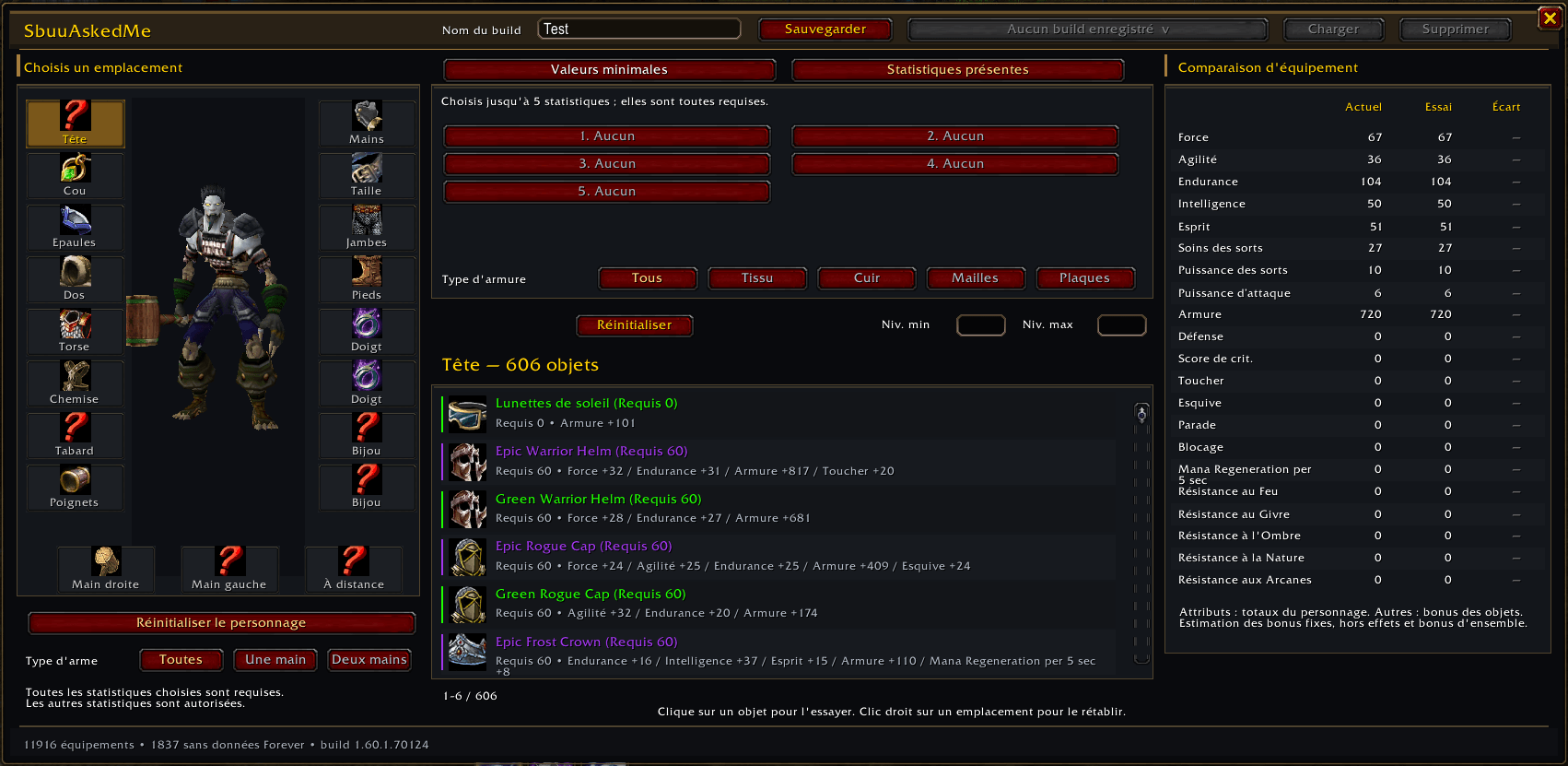
Select an equipment slot on the left, then choose a filter mode:
- **Minimum values:** enter stat thresholds and click **Apply**, or press Enter. Strength = 20 and Stamina = 10 require both thresholds on the same item. Zero disables a threshold.
- **Required stats:** choose up to five stats. Each selection applies immediately and requires a positive bonus to that stat. Other stats are allowed. **None** clears a choice; duplicate choices are disabled. Old choices in positions 6 through 10 are cleared during initialization.
The two modes keep separate stat selections. The active tab and filters persist across `/reload`.
**Min lvl** and **Max lvl** filter the level required to equip an item, with inclusive boundaries. Changes apply immediately in both tabs. Leave a field blank or enter zero to disable that boundary. An inverted range produces no results.
**Armor type** is shared by both tabs: All, Cloth, Leather, Mail, or Plate. A specific material excludes weapons, jewelry, and other categories. This filter uses numeric item categories, independently of the client language.
**Reset** clears the active mode's stat filters and the shared level range and armor type.
Use the mouse wheel or scrollbar to browse all results. The counter shows the visible range. Names, descriptions, and addon item tooltips display the required level instead of the item level. A leading number matching an item's item level is removed from its displayed name. Sorting still uses descending item level, with item ID as the tie-breaker.
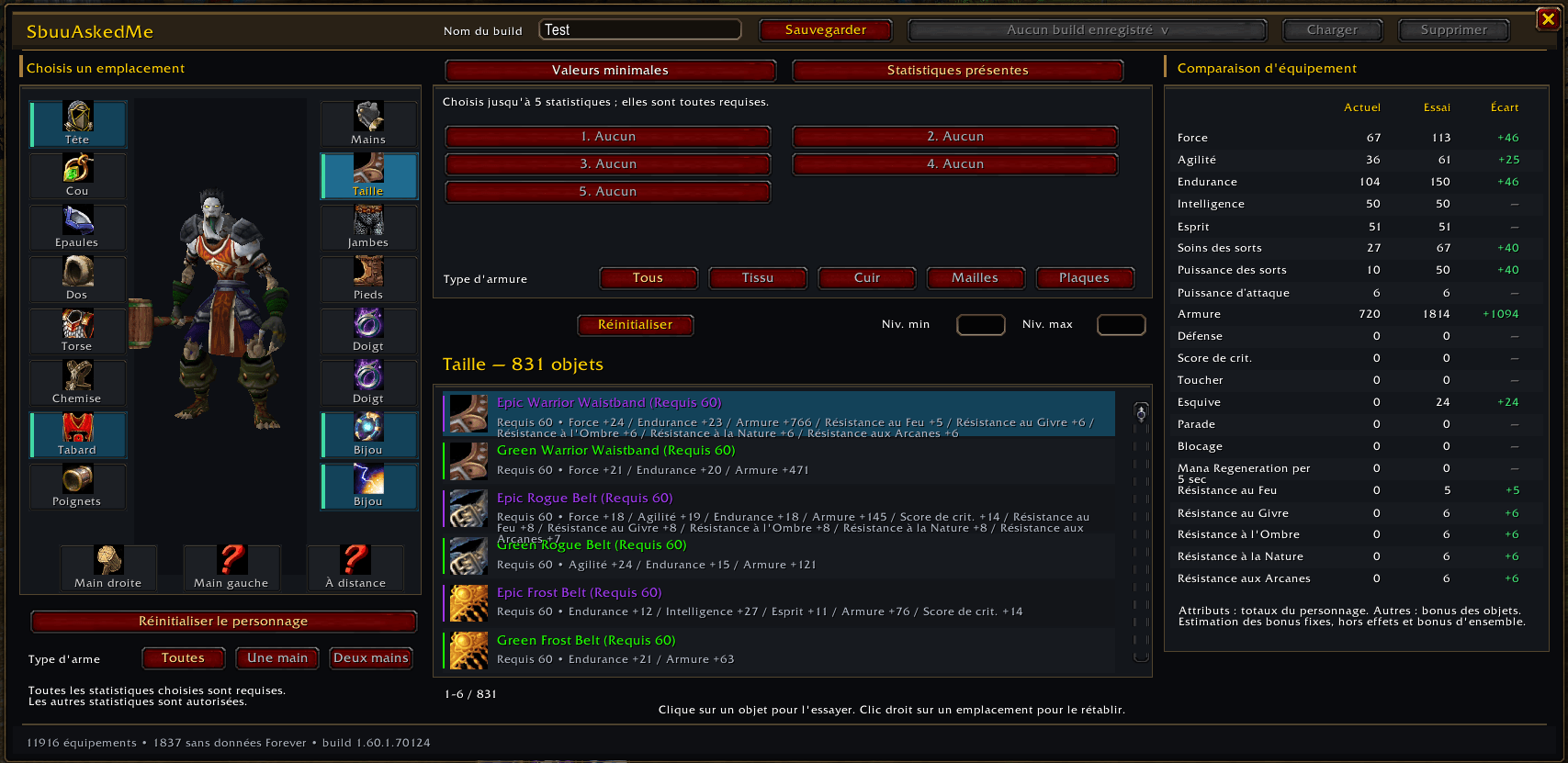
The selected slot has a gold background. Hovered results have a gold highlight; previewed items have a blue background that remains visible on hover.
## Client detection
The addon detects the running client using `GetBuildInfo()`. On Forever, it automatically hides equipment requiring a level above **60** and entries without data for the bundled Forever build. These restrictions apply in both tabs and remain active after resetting filters.
An item level above 60 is allowed when the required equip level is 60 or below. The level cap is independent of your character's current level and temporary beta progression limits.
For Classic clients 1.x through 5.x, the required-level caps are 60, 70, 80, 85, and 90 respectively. The bundled catalog remains a Forever catalog; detection does not supply a separate catalog for each expansion. Unknown clients do not receive an assumed level cap. The TOC targets Forever, and other clients have not been validated in game.
## Gear preview
Click a result normally to preview it in the selected slot. The slot icon and character model follow the selection. Multiple replacements accumulate and are always compared against your actual equipped gear. You can preview items you do not own; no equipment is changed in game.
The comparison panel shows **Current**, **Preview**, and **Delta**. Gains are green and losses are red.
- The five primary attributes use live character totals from `UnitStat` when available.
- Other rows sum equipment bonuses, excluding base character values and buffs.
- Deltas subtract the removed items' fixed bonuses and add the previewed items' bonuses.
The preview does not recalculate talent or buff multipliers, activated or triggered effects, set bonuses, attribute-to-attack-power conversions, or critical strike and dodge percentages.
Equipped items are read through their exact links using `C_Item.GetItemStats`, including variants and enchantments exposed by the API. Catalog data supplements passive bonuses omitted by that API. Data may remain incomplete. Candidates use their base catalog stats without additional enchantments. Items marked unknown cause the preview and delta columns to display `?`.
Right-click a slot to restore its actual equipped item. **Restore character**, below the character model, clears all previews and restores the equipped appearance and zero deltas. Previewing a two-handed weapon clears the off-hand; previewing an off-hand item clears an incompatible two-handed weapon. Class, proficiency, and unique-item restrictions are not evaluated.
Previews are cleared by `/reload`. Actual equipment changes update the comparison baseline.
### Saved builds
Use the build controls in the window's title bar: enter a name and click **Save** (or press Enter). Select a saved build from the dropdown and click **Load**. Selecting a build fills the name field so you can save an updated version under the same name. The dropdown scrolls when there are more than eight builds. Saving an existing name replaces it.
Right-click a build in the dropdown to delete its saved snapshot. The menu closes and the build disappears from the list; the active equipment preview stays unchanged.
You can also use commands:
```text
/sbuu build save Raid healing
/sbuu build load Raid healing
/sbuu build list
/sbuu build delete Raid healing
```
French aliases are `enregistrer`, `charger`, `liste`, and `supprimer`. Names may contain spaces and are case-sensitive. Saving an existing name replaces that build.
Builds are stored per character and realm in `SbuuAskedMeDB` and survive `/reload`, logout, and game restarts. A build captures all slots: preview replacements, unchanged equipped items with their exact links and available stats, and empty slots. Loading restores that complete simulation even if your real equipment has changed. It never equips actual items. Restoring equipment clears the active preview without deleting saved builds. Builds retain the item data available when saved; save again to update a snapshot. Unsaved previews still clear on reload. WoW writes SavedVariables during a normal logout or reload.
Shift-click shares an item link and Ctrl-click opens the game's usual dressing-room preview, according to your configured modified-click bindings.
## Bundled catalog
Source: [ForeverChanges](https://foreverchanges.pro/items), French `new`, `changed`, `same`, and `missing` exports for build **1.60.1.70124**, dated **September 30, 2026**. Generation used cached local exports, rather than a fresh download of the latest online build.
The four exports contain 21,543 entries and produce **11,901 equipment items**. Consumables, recipes, bags, and ammunition are excluded from the results. Client data does not establish whether an item is currently obtainable.
The **1,837 entries without Forever data** remain in the catalog counts but are hidden from results on Forever. Their Classic stats are never used. On other clients, a positive stat requirement also excludes these entries.
Healing combines stat IDs 41 and 45; spell power combines IDs 42 and 45, matching the source site's calculations. Activated effects, triggered effects, and set bonuses are not evaluated. Random-affix items appear under their base IDs; individual suffix variants are not enumerated.
There is no BiS score or automatic restriction by class, character level, or armor proficiency.
Bag and equipped item IDs are added automatically. You can also add IDs manually:
```text
/sbuu add 12345 67890
/sbuu ajouter 12345 67890
```
Bundled stats stay tied to the catalog build. Localized names and native tooltip content come from the client when available. The addon makes no web requests in game.
## Languages
Automatic detection through `GetLocale()` supports French, English (US/GB), German, Spanish (ES/MX), Italian, Brazilian Portuguese, Russian, Korean, and Chinese (Simplified/Traditional).
Slots and stats use native Blizzard labels. Addon-specific text is translated. Localized item names are requested only for visible results; export names serve as fallbacks while loading or when the client does not know an item.
## Updating the catalog
Keep all four exports from the same build in one directory:
- `gsf-forever-items-new.json`
- `gsf-forever-items-changed.json`
- `gsf-forever-items-same.json`
- `gsf-forever-items-missing.json`
Run this command from the addon directory:
```powershell
node tools/build-catalog.cjs "C:pathtoexports"
```
The script regenerates `Data/Items.lua`, checks duplicate equipment IDs, and rejects mixed builds. Export URLs use `https://foreverchanges.pro/items/fr/new.json` and the corresponding paths for the other three statuses.
## Validation
Run the Lua suites from the addon directory using a Lua interpreter or Fengari:
```text
lua tests/filters.lua
lua tests/catalog.lua
lua tests/simulation.lua
lua tests/builds.lua
lua tests/ui.lua
```
They cover filters, catalog integrity, client detection and level caps, translations, asynchronous loading, scrolling, exact equipped links, cumulative replacements, ring slots, weapon handling, unknown data, stat delta colors, restoration, and required-level names and tooltips.
In game, run `/reload` and `/sbuu`. Check the character model, tooltips, known Strength and Healing thresholds, scrolling to the final result, highlights on every row, and filter persistence after `/reload`. Mocked API tests do not replace visual validation in Forever.
## Known issues
- With an actual one-handed weapon and shield equipped, previewing a two-handed weapon and then restoring only the off-hand can retain the previewed two-handed weapon alongside the restored shield. Use **Restore character** to clear the combination.
- Dynamically added items with unavailable stat data may be treated as known with empty stats, producing an incomplete comparison without an unknown-data marker.
See [CHANGELOG.md](CHANGELOG.md) for release notes.
You must be logged in to leave a comment.