
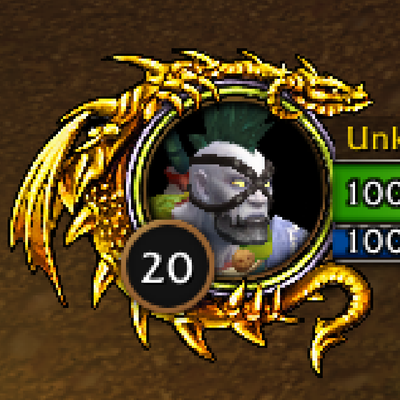
Rubius Dragon Portrait
Customize your default player portrait with a gold or silver dragon.
Details
Addon ID:
25826
Addon Version:
1.2.0
Expansion:
1.60
Upload date:
Oct 06, 2026
Last Updated:
Oct 06, 2026
Downloads:
Less than 100
Website:
Source Link
Expansion
 Forever
 Categories
Developers

RubiusWoW
Creator
Having issues?
Rubius Dragon Portrait
Customize your default player portrait with a gold or silver dragon in WoW Forever.
## Features
- Gold and silver dragon artwork in one addon.
- Enable or disable the decoration at any time.
- Switch styles without reloading the interface.
- Remembers your selected style and enabled state between sessions.
- Follows your player portrait's position and scale.
- English interface with automatic Spanish localization for esES and esMX clients.
## Settings
Open **Options > AddOns > Rubius Dragon Portrait**, or type `/dragon`.
Selecting **Gold** or **Silver** also enables the decoration. Use the checkbox to hide it.
## Commands
| Command | Action |
| --- | --- |
| `/dragon gold` | Select and enable the gold dragon. |
| `/dragon silver` | Select and enable the silver dragon. |
| `/dragon on` | Enable the last selected style. |
| `/dragon off` | Hide the dragon. |
| `/dragon toggle` | Toggle the decoration on or off. |
| `/dragon` | Open the addon settings. |
Commands stay in English in every client language.
## Compatibility
Designed for **WoW Forever 1.60.1** and Blizzard's default player portrait. Addons that replace the player unit frame are not supported. Disable other portrait decorations if they overlap.
## Version 1.2.0
- Renamed to Rubius Dragon Portrait.
- English options, description and chat messages by default.
- Automatic Spanish translations for Spain and Latin America.
- Standardized style commands to `/dragon gold` and `/dragon silver`.
- Preserves settings from previous versions.
## Español
Personaliza el retrato original de tu personaje con un dragón dorado o plateado en **WoW Forever 1.60.1**. Ambos dejan visibles el nivel, el nombre, la vida y el maná.
Abre **Opciones > AddOns > Rubius Dragon Portrait** o escribe `/dragon`. Usa `/dragon gold` para el dorado, `/dragon silver` para el plateado, `/dragon off` para ocultarlo y `/dragon on` para recuperar el último estilo.
La interfaz aparece automáticamente en español para clientes esES y esMX. Los comandos permanecen en inglés. La elección se guarda entre sesiones. Compatible con el retrato original de Blizzard.
You must be logged in to leave a comment.