

PaladinTrackerForever
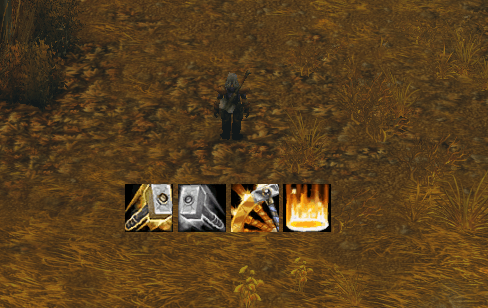
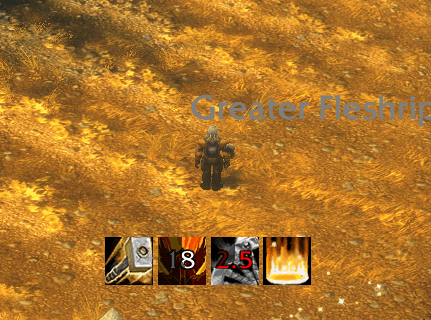
Shows cooldown of Holy Strike, Judgement and Consecration and the buff duration of your Seals.
Details
Expansion
 Forever
 Categories
Developers

Having issues?
PaladinTrackerForever
A lightweight, Paladin-only tracker for your core rotation – all key cooldowns and your active Seal at a glance, right below your character frame.
Supported languages
PaladinTrackerForever supports the following client languages:
- English
- German (Deutsch)
- French (Français)
- Spanish – Europe and Latin America (Español EU / AL)
- Portuguese – Brazil (Português)
The addon only works on these client languages. On any other client language (e.g. Russian, Italian, Korean, Chinese) spells are not recognized and the icons will not work. You'll get a chat message after login if your client language is not supported.
What it does
PaladinTrackerForever shows a compact row of up to five 40x40 spell icons centered under your Player Frame:
| Icon | Shows |
|---|---|
| Holy Strike | Cooldown remaining |
| Seal (Fury / Righteousness / Command / Crusader / Justice / Light / Wisdom) | Remaining duration of your active Seal |
| Judgement | Cooldown remaining – automatically adjusted for Improved Judgement |
| Consecration | Cooldown remaining |
| Exorcism | Cooldown remaining |
You decide which of these icons are shown and in which order (see Options). Spells you haven't learned yet stay hidden until you learn them.
Clear visual feedback
- On cooldown: icon is greyed out, remaining time shown in large red text, with a cooldown swipe
- Ready: icon is shown in full color
- Seal active: icon in full color, remaining duration shown in white
- No Seal active: icon is greyed out
All timers use a large 20pt font, so they stay readable in the middle of a fight.
Features
- Paladin only – on any other class the addon stays completely inactive (no icons, no events, no overhead)
- Improved Judgement support – the Judgement cooldown is recalculated on every cast based on your current talent rank (10s / 9s / 8s)
- Glow effects in combat
- Pulsing glow on the Seal icon when you're in combat without an active Seal
- Pulsing glow on Holy Strike, Judgement, Consecration and Exorcism when they're ready in combat
- Custom, taint-free glow – does not touch Blizzard's action bar system
- Seal expiring warning sound – plays once when your Seal has 2 seconds or less left
- Choose from a list of sounds (Raid Warning, Alarm, Bell, Quest Complete, Coins and more), or turn it off
- Selecting a sound plays a preview immediately
- Optional: only play the warning in combat
- Hide out of combat – optionally hide all icons while you're not in combat
- Choose your icons – hide any cooldown or buff you don't want to see; the remaining icons close up without gaps
- Custom icon order – arrange the icons in any order you like, right in the options panel
- Movable – Shift + drag to move the icon row anywhere; the position is saved per character
Options
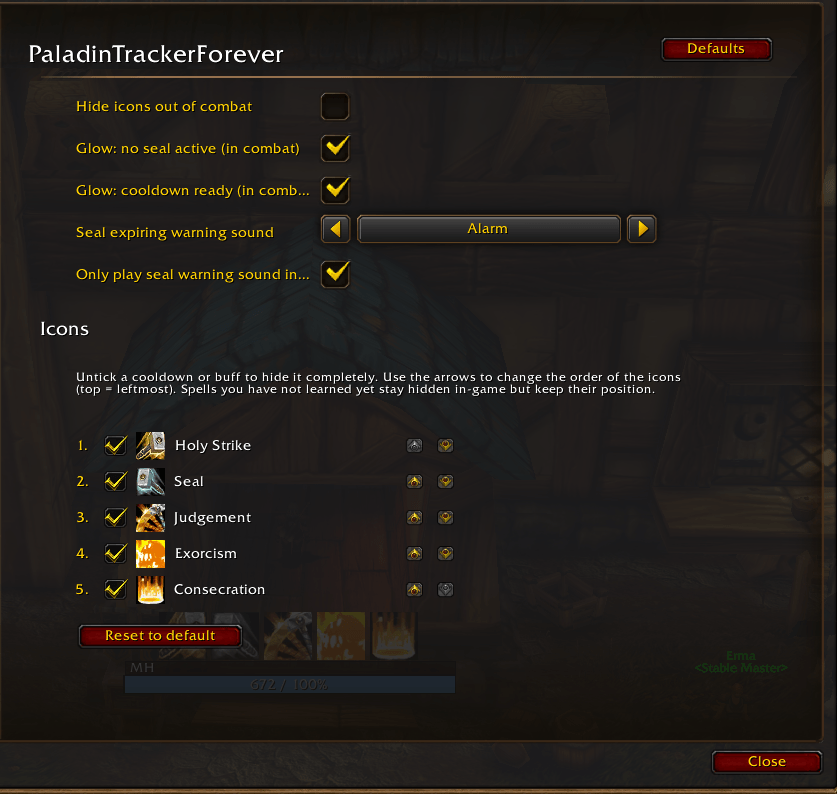
Open via ESC → Options → AddOns → PaladinTrackerForever, or type /ptf options.
| Setting | Description |
|---|---|
| Hide icons out of combat | Hides the icon row while you're not in combat |
| Glow: no seal active (in combat) | Glow on the Seal icon when no Seal is up in combat |
| Glow: cooldown ready (in combat) | Glow on ready cooldowns in combat |
| Seal expiring warning sound | Sound played when your Seal is about to expire ("None" disables it) |
| Only play seal warning sound in combat | Suppresses the warning sound outside of combat |
Icons
Below the settings above, the Icons section lists every tracker with its icon:
- Checkbox – untick a cooldown or buff to hide it completely. Hidden spells are still tracked in the background, so the timer is correct as soon as you show them again. Note: hiding the Seal icon also disables the Seal expiring warning sound.
- Arrows (▲ / ▼) – move an icon up or down; the top entry is the leftmost icon. Changes apply instantly.
- Reset to default – shows all icons again and restores the default order (Holy Strike → Seal → Judgement → Consecration → Exorcism).
Slash commands
| Command | Action |
|---|---|
/ptf | Show the command list |
/ptf options | Open the options panel |
/ptf reset | Reset the icon position to default |
/ptf talent | Diagnostics: show the detected Improved Judgement rank |
/ptf spells | Diagnostics: check the spell names for your client language |
You must be logged in to leave a comment.