

Paladin Seal Watch
A smooth, color-changing Paladin seal countdown for WoW Forever, with native icons, customizable text, alerts and profiles.
Details
Expansion
 Forever
 Categories
Developers

Having issues?
Paladin Seal Watch
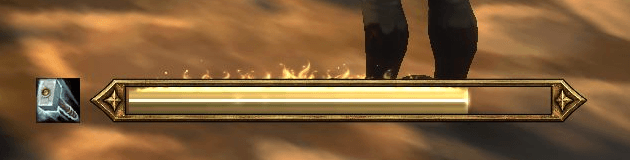
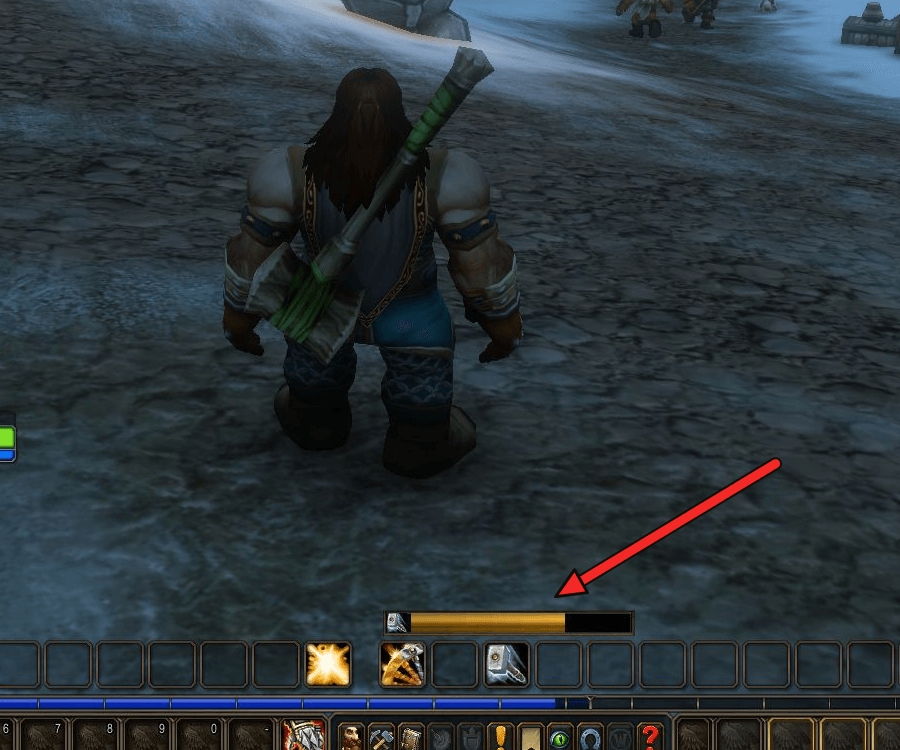
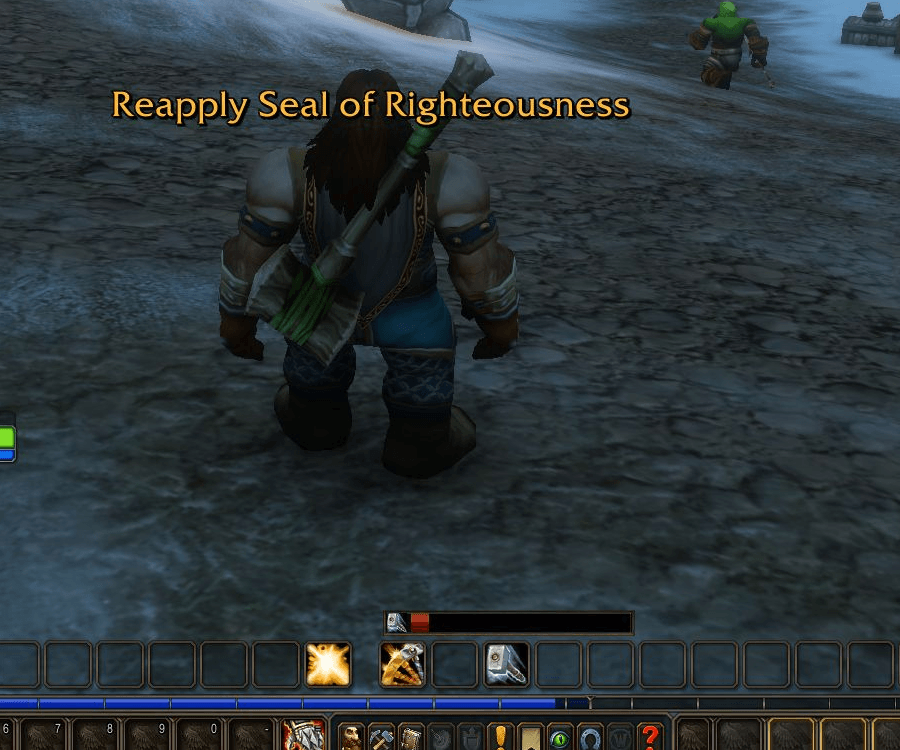
Keep your seal in sight with a compact, Paladin-themed countdown. The bar drains smoothly and gradually shifts color as your seal approaches expiry, with the actual in-game spell icon and a clear, centered timer.
For World of Warcraft: Forever 1.60.1 only. The add-on runs only for Paladins. Retail, Classic Era, Anniversary and Burning Crusade clients are not supported.
Release 0.2.13 targets client 1.60.1, build 70009 (interface 16001).
Latest fixes: The WoW AddOns list now shows Paladin Seal Watch's gold hourglass icon instead of a question mark. Click Icon to Recast Seal and its optional Recast Key remain available when a dead target is selected. Seals apply to your character; the target's life state does not hide the action. Your existing settings and layouts are preserved.
Optional Seal Button and Expired Reminder
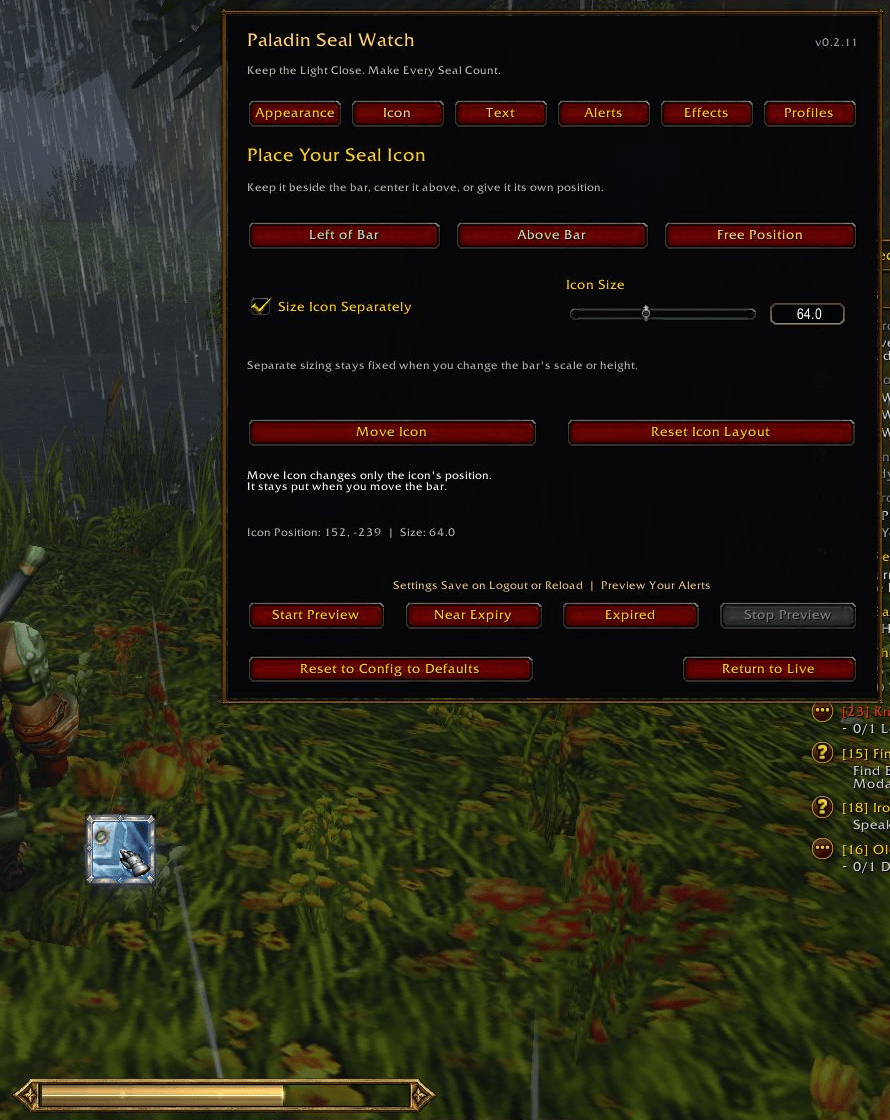
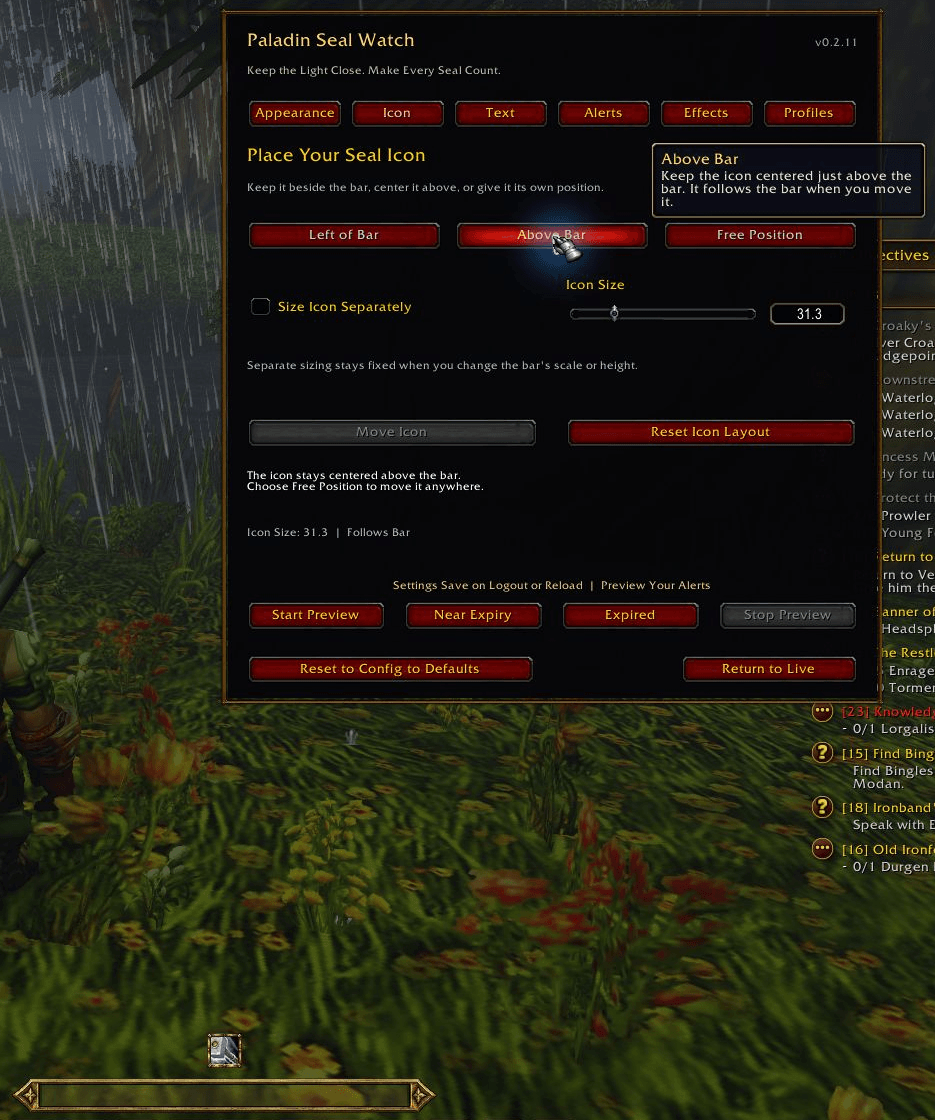
The Icon tab can place the icon Left of Bar, Above Bar, or at a Free Position. Enable Size Icon Separately to adjust it without changing the bar's scale. For free placement, choose Move Icon, drag and release to save and lock it. Existing users keep the original left-side layout and linked size; each profile remembers its own choices.
Enable Show Seal Icon and Click Icon to Recast Seal on Appearance, then choose a learned Seal with the Recast selector. Left-click the native icon to apply that Seal to yourself. Its border follows the classic or Tarnished Gold style, with cooldown and mana feedback. Enemy target distance does not disable a self-cast Seal.
The chosen click action stays fixed during combat, and its icon remains available after the timer expires. Change its Seal or layout outside combat; drag the unlocked bar body to move it. Previews never cast. The icon respects combat-only display and hides on death, mounting and vehicle/possess controls.
Optionally choose a Recast Key on Appearance. Press a key or mouse button, with optional Shift, Ctrl or Alt, then select Use Key. It triggers the same Seal as clicking the icon and saves to the active profile. Clear removes it; leaving it Not Bound applies no key binding. Existing assignments are shown before saving, and their original WoW bindings return when recasting is unavailable or the key is cleared. Configure the key outside combat.
On Alerts, Keep Visible After Expiry retains the empty bar until you refresh. Gently Pulse Expired Bar adds a slow, gentle fade that never becomes fully invisible. The clickable icon stays steady; Reduce Motion stops the pulse. These options default to off and preserve the current appearance for existing users.
Optional Tarnished Gold
Enable Use Tarnished Gold Style on the new Effects tab for worn-gold trim, flowing white-gold light and a bright draining edge. Your existing classic appearance remains the default.
Holy Fire Streak adds flickering flames and rising embers after three full Seal durations of uninterrupted uptime: 90 seconds for a 30-second Seal. Early recasts preserve it; rapid recasts and damage procs do not accelerate it. Expiry, a detected removal, death, disabling the add-on or reloading ends it. Reduce Motion keeps a steady glow while the timer drains. Preview Holy Fire lets you see the effect without altering your live streak.
All effects are optional, use your saved size and position, and leave your native spell icon intact. The streak uses the same aura or cast-estimate data as the timer; hidden removals share the beta limitations below.
Make It Your Own
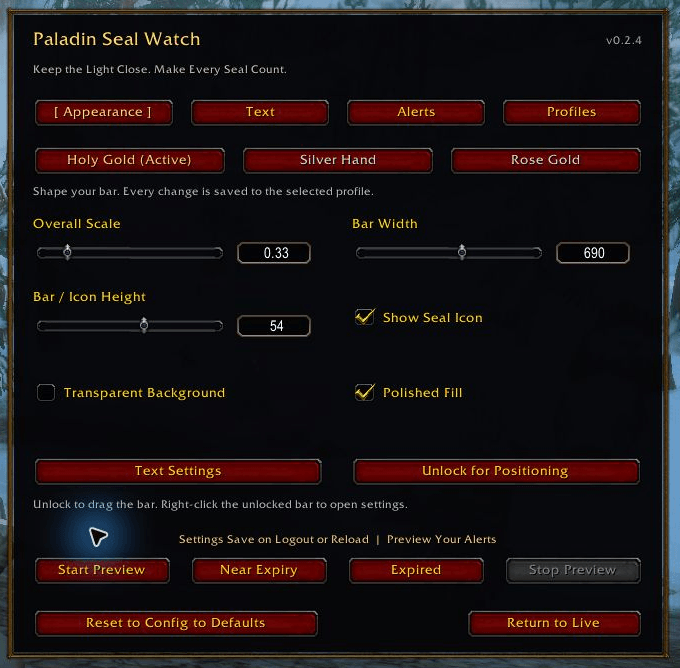
- Choose Holy Gold, Silver Hand or Rose Gold.
- Drag the bar into place, then lock it against accidental movement.
- Adjust scale, width, height and countdown text size independently. Use the mouse wheel for fine steps or enter an exact value.
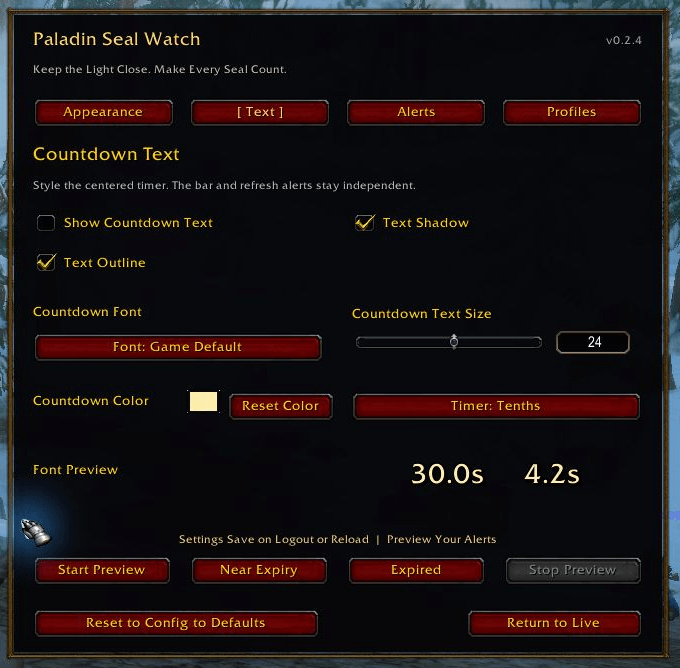
- Show or hide the countdown numbers independently of the bar, icon and alerts.
- Choose Game Default, Friz Quadrata, Arial Narrow, Morpheus or Skurri, with an in-game font preview.
- Toggle text shadow and outline separately, choose your countdown color, and switch between Tenths, Whole Seconds or Smart precision.
- Hide classic decorative backgrounds and borders while keeping the fill visible. In Tarnished Gold, transparency removes the dark track while retaining the metal rim.
- Show the native seal icon, or turn it off for an even simpler layout.
Know When to Refresh
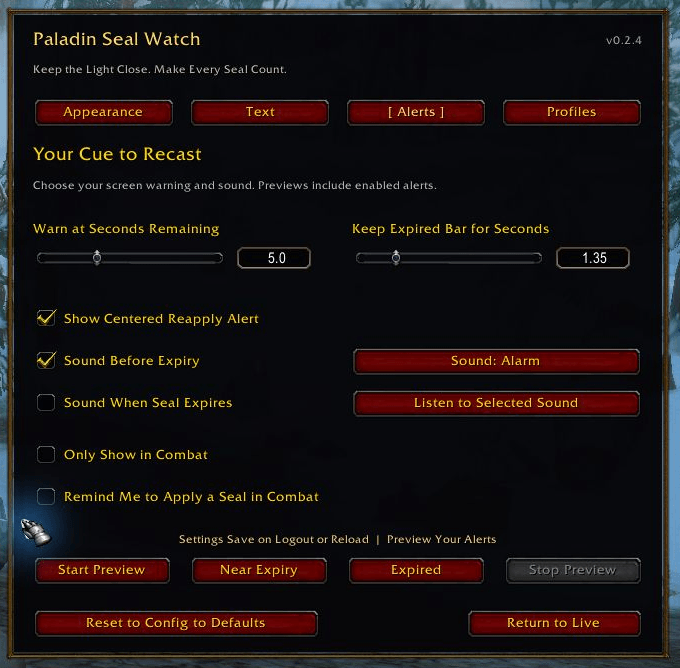
- Set a refresh-warning threshold and how long the expired bar stays visible.
- See a large centered Reapply warning naming your expiring seal. Show Centered Reapply Alert is on by default and can be turned off separately.
- Sound Before Expiry defaults to on with Alarm for new/reset profiles. The optional expiry sound defaults to off. Existing saved sound choices are preserved.
- Choose from twelve built-in WoW sounds: Raid Warning, Ready Check, Alarm, Alarm Bell, Soft Click, Quest Complete, Whisper, Map Ping, Coins, Fishing Reel, Repair and Boss Warning. Use Listen to Selected Sound to hear your choice.
- Choose combat-only display or an optional missing-seal reminder.
- Keep separate settings for one character or share a profile across your Paladins.
Get Started
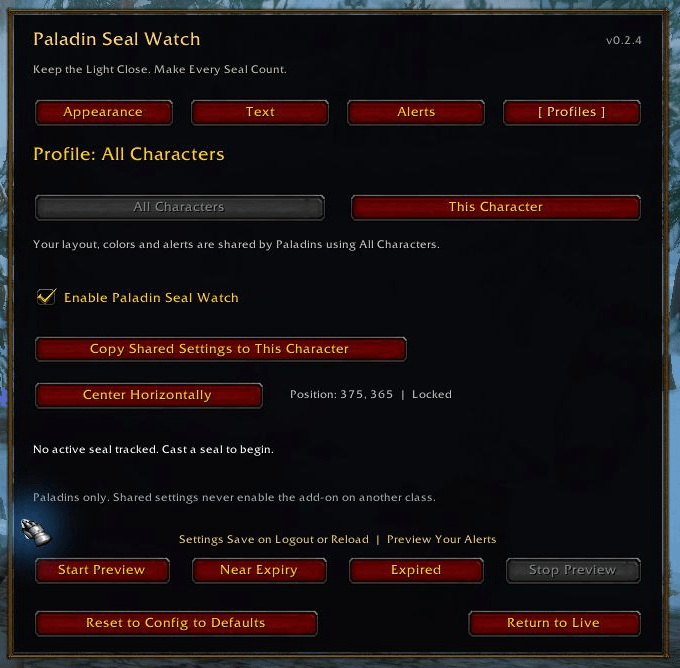
Type /psw to open the in-game configuration. Select Start Preview, adjust your layout on Appearance, then use Lock in Place. Open Text to choose whether the countdown numbers appear and adjust their font, shadow, outline, size, color and precision. Open Alerts to choose the centered warning, timing and sounds. Previews include enabled alerts once per countdown cycle. Font and sound buttons advance with a click; the mouse wheel browses in either direction. Select Return to Live to close settings and show your actual seal.
Changes apply immediately; WoW writes settings on /reload, logout or normal exit. Existing profiles are preserved. A new This Character profile starts with your current shared settings when first selected.
Earlier Forever beta builds had a settings-loading issue. Add-on authors now report restored loading on build 70009 in the SavedVariables discussion. If preferences still reset, include your client build, active profile and /psw status output, which now shows whether the client supplied settings at login. Keep saved-file backups; do not delete your WTF folder or reset preferences to troubleshoot. No external workaround is included.
Hover over controls for help. Profiles lets you choose All Characters or This Character. Reset to Config to Defaults restores the selected profile after a second confirmation click; it does not reset other profiles.
There are no required libraries or other add-ons. The installed folder is SealWatch; the displayed name is Paladin Seal Watch. Keep one copy only so upgrades preserve your settings.
Combat Timing
Successful Seal applications start or refresh the countdown in combat, including after the previous bar has disappeared. Learned spellbook IDs distinguish actual applications from same-name damage or absorb procs: Seal of Command procs no longer reset the timer. The client supplies localized family names, including Seal of Fury; Paladin Auras are excluded. When Forever exposes readable aura information, the timer uses it. When that information is withheld, the timer uses the last observed seal duration, or a 30-second fallback, measured from your successful cast.
Hidden dispels, early consumption and automatic extensions cannot always be detected while aura data is withheld. The timer resynchronizes when readable data becomes available. Forever is a beta client, so client changes may require add-on updates.
Commands
/psw,/psw configor/psw options— Open or close settings./psw preview— Show a looping countdown preview./psw preview streak— Preview the optional holy-fire effect./psw expiringor/psw preview expiring— Preview the last few seconds./psw expired— Preview the expired appearance./psw liveor/psw clear— Stop preview and return to live tracking./psw unlockor/psw lock— Position or lock the bar./psw profile allor/psw profile account— Use the shared profile./psw profile characteror/psw profile this— Use this character's profile./psw scale 0.75— Set the bar scale (also scales linked icons); allowed range is 0.20–1.60./psw onor/psw off— Enable or disable the bar and its automatic alerts./psw reset— Immediately restore the active profile to defaults, including position. Unlike the configuration button, this command does not ask for a second confirmation./psw status— Show the version, current timing source and tracked spell ID./psw seals— List recognized Seal spell IDs and names./psw help— Show the command summary.
/paladinsealwatch is the long alias and accepts the same commands. No font or sound files need to be installed separately.
Feedback
When reporting a problem, include your Forever client version, add-on version, game language, what happened and any Lua error text. Mention whether you were in combat and whether /psw status showed an aura-confirmed timer or a cast estimate. For an unsupported Seal, include /psw seals output. Do not include account details or other private information.
Author and License
By rbigbie. All Rights Reserved. Game assets are supplied by the client and are not redistributed with the add-on. This is an independent add-on, not an official Blizzard product.

You must be logged in to leave a comment.