
MyXPBar Forever
A clean, lightweight and fully customizable XP bar: styles, rested XP, reputation, quest XP, XP/h. In 7 languages.
Details
Expansion
 Forever
 Categories
Developers

Having issues?
MyXPBar Forever
A clean, lightweight and fully customizable XP bar for World of Warcraft: Forever.
Now in 7 languages: English, Français, Deutsch, Español, Português, Русский, Italiano.
MyXPBar replaces the default Blizzard experience bar with a sleek, readable bar you can place anywhere on your screen. Inspired by the popular Luxthos WeakAuras look, it shows your rested XP, your reputation, the XP waiting in your finished quests, and how long it will take you to reach the level you aim for. Everything is set up from a full in-game options menu, built in the World of Warcraft style. No libraries, no dependencies.
What it does
- Replaces the Blizzard XP bar. The default bar and the reputation bar at the bottom of the screen are hidden, and given back at max level.
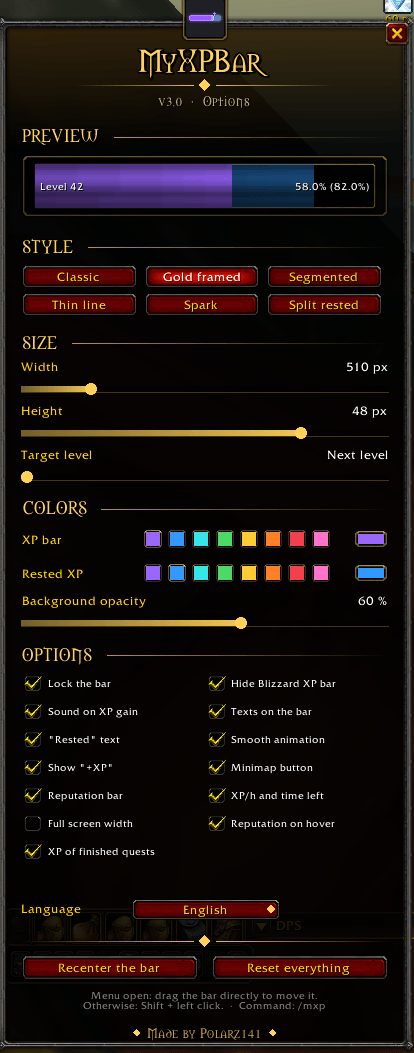
- 6 bar styles: classic, gold framed, segmented, thin line, spark and split rested, switched in one click with a live preview.
- Full screen width: one click and the bar runs from one edge of the screen to the other, at any resolution.
- Rested XP overlay: a translucent layer shows exactly how far your rested XP will take you.
- Reputation: a thin bar under the XP bar with your tracked faction, or the same information when you mouse over the bar. Your choice.
- XP of finished quests: the XP of the quests you finished but did not turn in yet shows on the bar in gold, with the list of quests when you hover it, and tells you the level you will reach once you turn them all in.
- XP per hour and time left: your rate since you logged in, and the estimated time to the level you aim for. The XP needed per level is learned as you play, so the estimate keeps getting better.
- Mobs-to-level estimate: how many kills you still need, based on your last XP gain.
- Smooth and alive: the bar slides to its new value, a floating
+245 XPrises on every gain, and the bar flashes on level up. Both can be turned off. - 7 languages, picked from a drop-down in the options. Your game client's language is used automatically the first time.
- Settings that stick: position, size, colors, style and options survive a reload, a relog and a full restart of the game, even with the Forever beta bug that resets other addons (see below).
- Lightweight: texts are only redrawn when they change, and nothing runs while the bar is hidden.
Options menu
Open it from the minimap button or with /mxp. The menu is built in the World of Warcraft style — stone frame, gold ornaments, gothic titles, Blizzard checkboxes — and every change is applied live.

| Section | What you can change |
|---|---|
| Style | Classic, gold framed, segmented, thin line, spark, split rested |
| Size | Width (200 px up to your screen width), height (8 to 60 px) and target level |
| Colors | 8 quick colors or the full color wheel, for the XP bar and the rested XP, plus background opacity |
| Options | Lock the bar, hide the Blizzard bar, sound on XP gain, texts on the bar, rested text, smooth animation, floating +XP, minimap button, full screen width, reputation bar, reputation on hover, XP per hour, XP of finished quests |
| Language | English, Français, Deutsch, Español, Português, Русский, Italiano |
Commands
| Command | Description |
|---|---|
/mxp or /myxpbar | Open / close the options menu |
/mxp debug | Check the settings backup |
Move the bar with Shift + left click, or simply drag it while the options menu is open.
Installation
- Extract the MyXPBar folder into
World of Warcraft<Forever folder>InterfaceAddOns. - Relaunch the game. The folder must be named
MyXPBar.
About the Forever beta saving bug
During the WoW Forever beta, the client writes addon settings at logout but never reads them back after a relog or a restart, so every addon starts from defaults. MyXPBar keeps two extra copies of its settings: addon CVars (which cover a relog) and one account macro named MyXPBar, which the server stores and sends back at every login. Keep that macro: clicking it does nothing, and it is recreated a few seconds after you delete it.
Translations
The German, Spanish, Portuguese, Russian and Italian translations were made by the author, not by native speakers. Corrections are very welcome in the comments or on GitHub, and they will be credited.
Support
MyXPBar Forever is free, and it stays free and complete. If it made your
bars nicer and you feel like saying thanks, you can leave a tip here:
Entirely optional.
Français
Une barre d'XP propre, légère et entièrement personnalisable pour WoW Forever. Elle remplace la barre d'expérience de Blizzard : styles au choix, XP de repos, réputation, XP des quêtes terminées, XP par heure et temps estimé jusqu'au niveau visé.
- Menu d'options complet en jeu, dans le style de World of Warcraft : bouton minimap ou
/mxp. - Barre déplaçable avec Maj + clic gauche, jusqu'à toute la largeur de l'écran.
- Disponible en français, et en six autres langues.
- Tes réglages sont conservés malgré le bug de sauvegarde de la bêta Forever.
Made by Polarz141






You must be logged in to leave a comment.