

Malitor’s Disenchanting Box
Malitor’s Disenchanting Box is a World of Warcraft addon that gives enchanters a focused, easy-to-use interface for finding and disenchanting eligible items in their bags.
Details
Expansion
 Forever
 Categories
Developers

Having issues?
Malitor’s Disenchanting Box
Now supporting Mainline and Forever!
Overview
Malitor’s Disenchanting Box is a World of Warcraft addon built to make disenchanting faster, cleaner, and easier for enchanters.
Instead of manually digging through your bags, the addon gives you a focused interface for finding eligible items and disenchanting them with a more streamlined workflow.
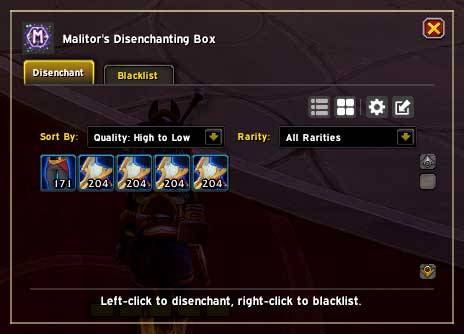
It includes multiple view modes, sorting and filtering tools, blacklist support, Compact Mode, and a polished visual presentation.
Features
Multiple View Modes
Malitor’s Disenchanting Box supports different layouts so you can use the addon the way you prefer.
Grid View
A compact icon-based layout for quickly scanning items.
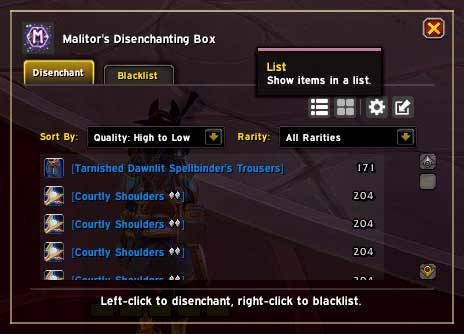
List View
A more detailed row-based layout that displays item names and item levels for easier readability.
Compact Mode
A small movable disenchant widget for quick access without keeping the full window open.
Compact Mode
Compact Mode is designed for fast, convenient disenchanting while taking up very little screen space.
Current Item Display
Shows the icon of the current disenchantable item.
Item Quality Borders
Item borders are colored based on the item's quality.
Movable Toolbar
A compact toolbar provides quick access to addon controls.
Position Locking
Lock or unlock the Compact Mode frame to prevent accidental movement.
Maximize Button
Quickly return to the main addon window.
Settings Button
Open the addon settings directly from Compact Mode.
Disenchant Animation
An animated visualization is displayed while an item is actively being disenchanted.
Sorting and Filtering
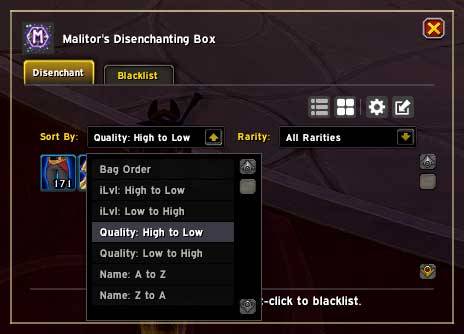
The addon includes several tools for controlling which items appear and how they are ordered.
Bag Order
Display items using their normal bag order.
Item Level
Sort items by item level in ascending or descending order.
Item Quality
Sort items by item quality in ascending or descending order.
Item Name
Sort items alphabetically in ascending or descending order.
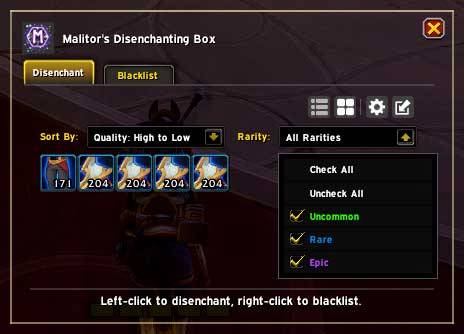
Rarity Filters
Choose which supported item rarities should appear.
Check All / Uncheck All
Quickly enable or disable all rarity filters.
Blacklist Support
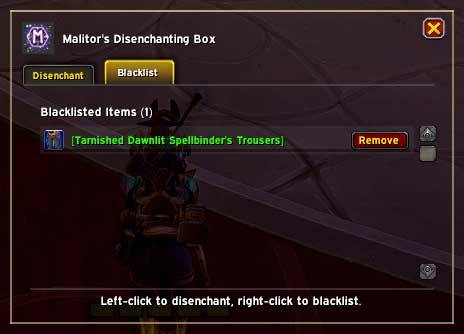
The blacklist system lets you exclude items you do not want to disenchant.
Right-click an item to blacklist it and prevent it from appearing as a disenchanting option.
Settings and Controls
Malitor’s Disenchanting Box includes quality-of-life options and convenient controls for everyday use.
Minimap Button
Show or hide the addon minimap button.
Minimap Button Locking
Lock or unlock the minimap button's position.
Compact Mode Locking
Lock or unlock Compact Mode frame movement.
Settings Panel
Access addon information, options, and project links.
Slash Commands
Quickly switch between the available display modes.
Keybinding Support
Assign a keybinding to quickly toggle the addon window.
Slash Commands
Base Command
/malde
Grid View
/malde grid
Button View
/malde buttons
List View
/malde list
Compact Mode
/malde compact
Why Use Malitor’s Disenchanting Box?
If you regularly disenchant gear, Malitor’s Disenchanting Box helps reduce the hassle of searching through bags by giving you a clean, focused interface with quick access to the items that matter.
Whether you prefer a full item list, a compact grid, or a lightweight Compact Mode widget, the addon is designed to make disenchanting more efficient and convenient.
Notes
This addon is intended for players who want a dedicated disenchanting workflow with better visibility, flexible display options, and simple controls.
You must be logged in to leave a comment.