
Macro Bench – Macro Builder & Editor, Mouseover Macros, Error Checker
Build a macro from blocks you drag about, watch the macro text write itself beside them, and have every line checked before it goes into a slot.
Details
Expansion
 Forever
 Categories
Developers

Having issues?
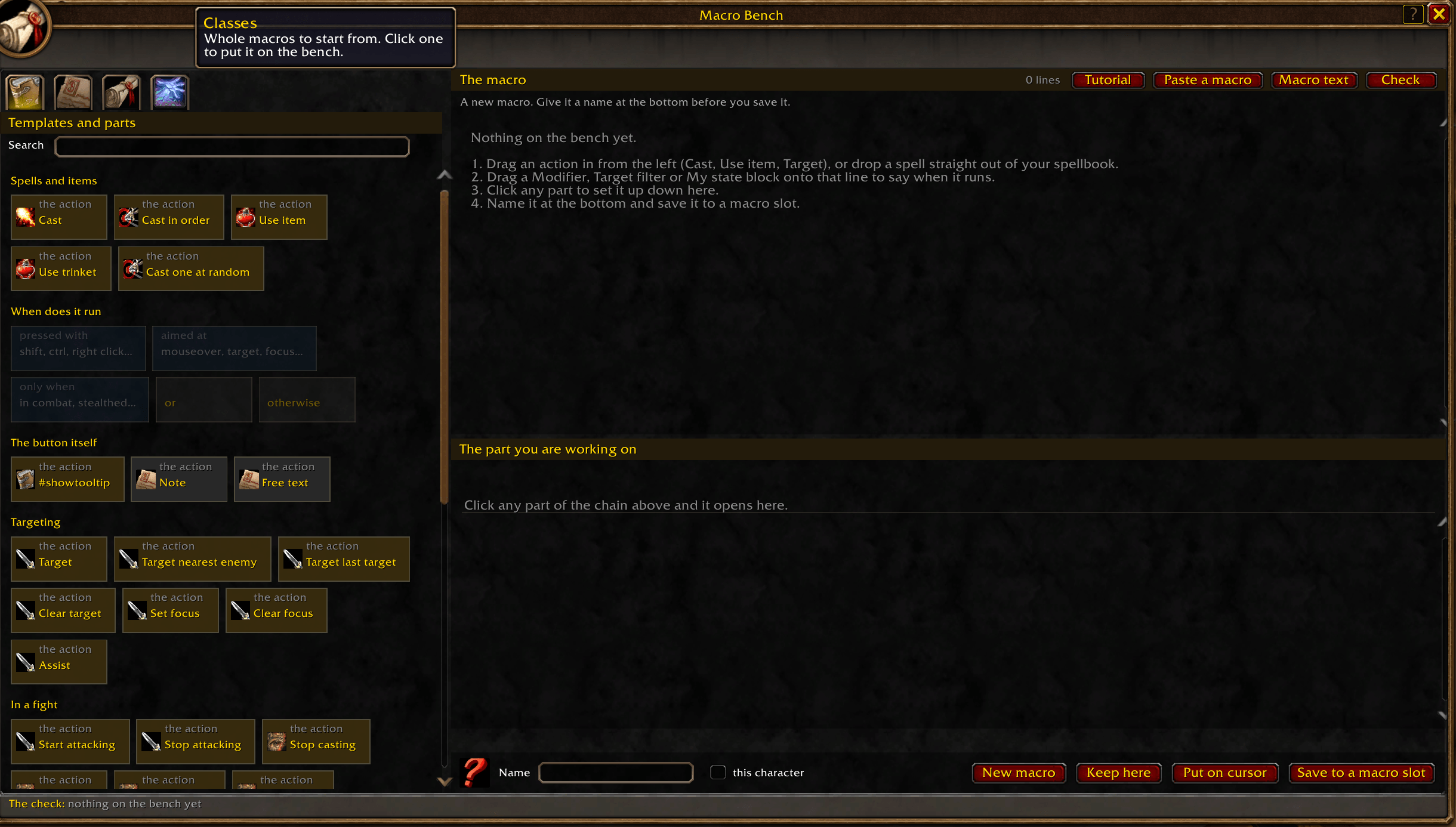
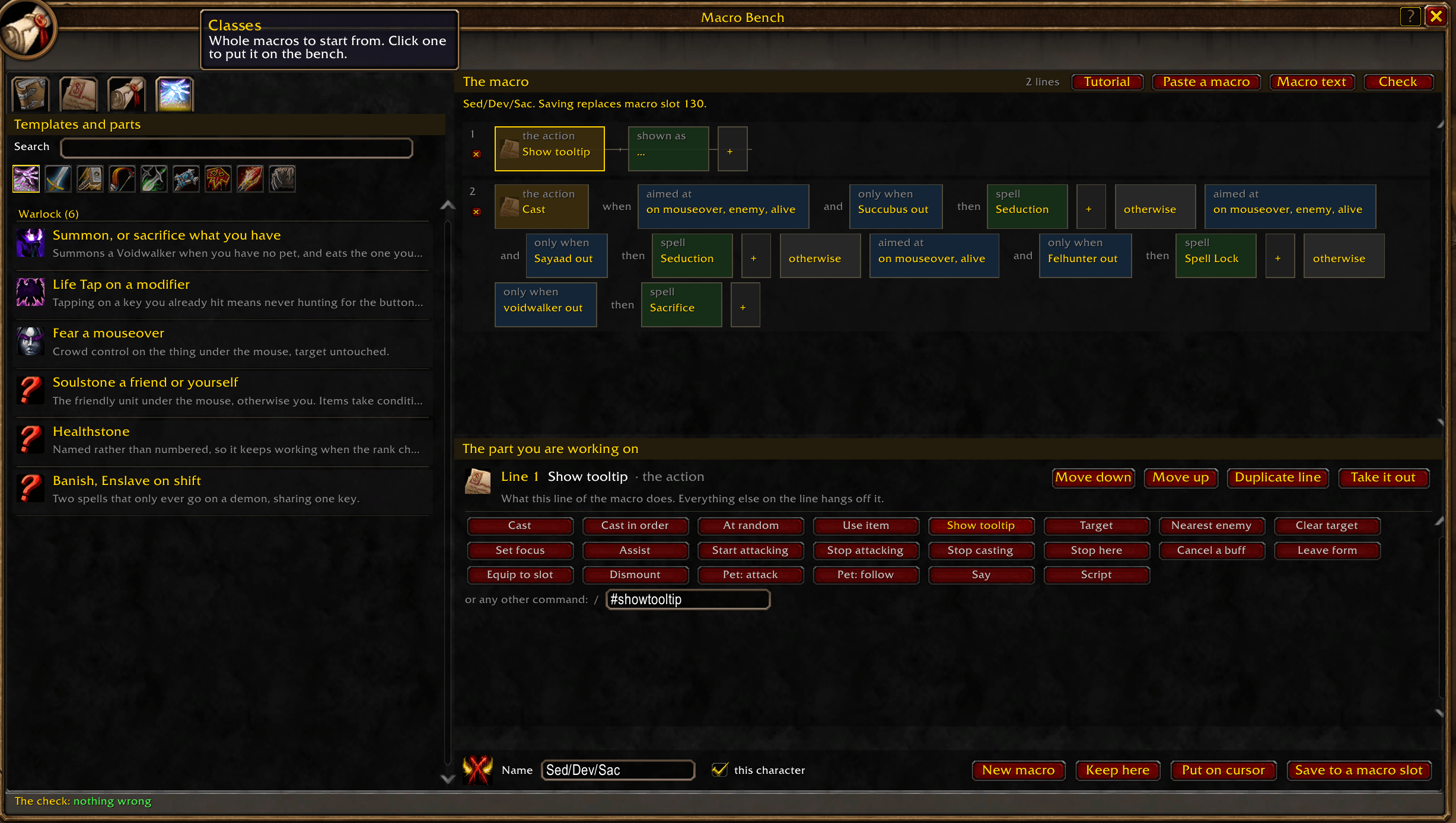
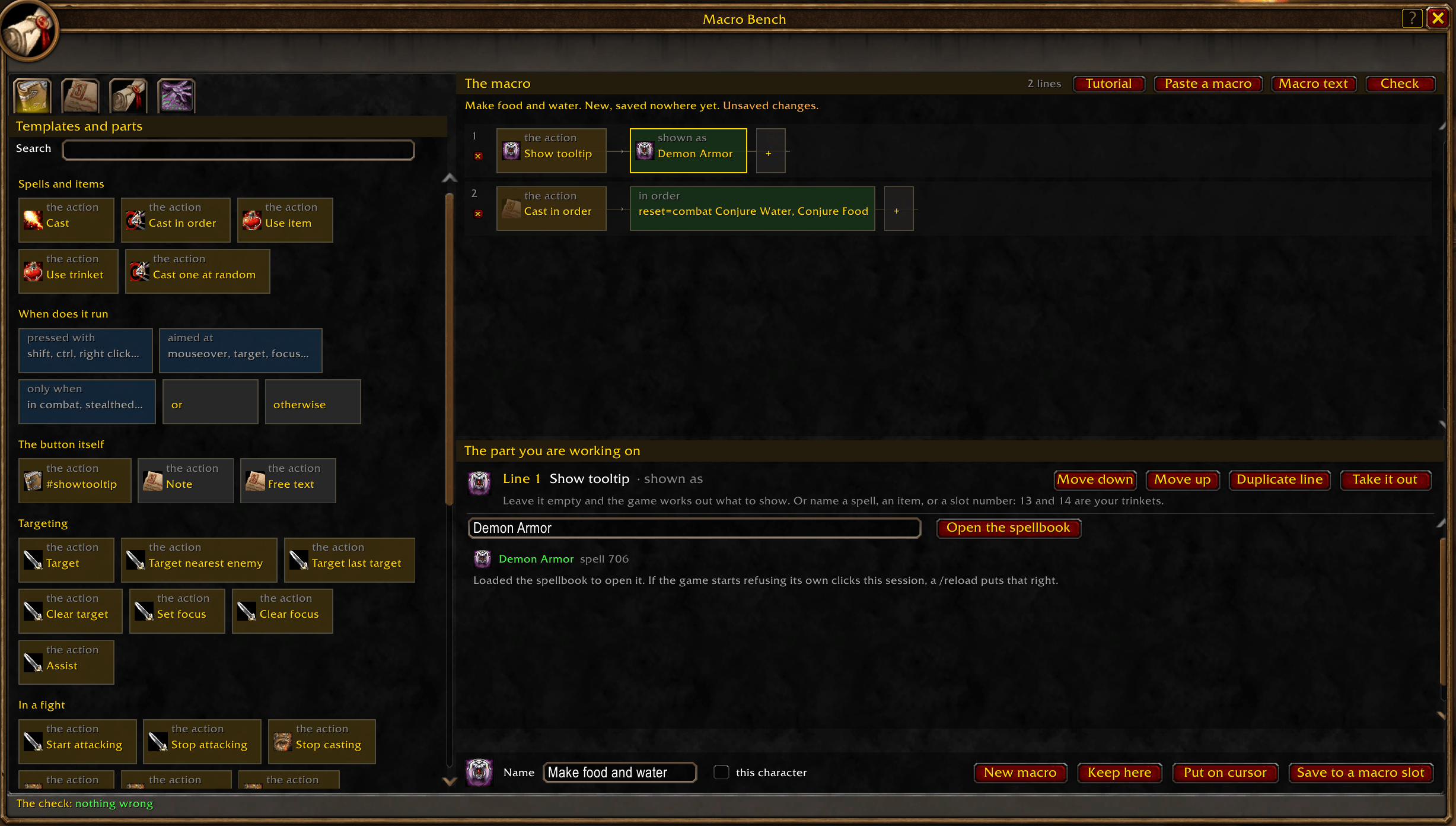
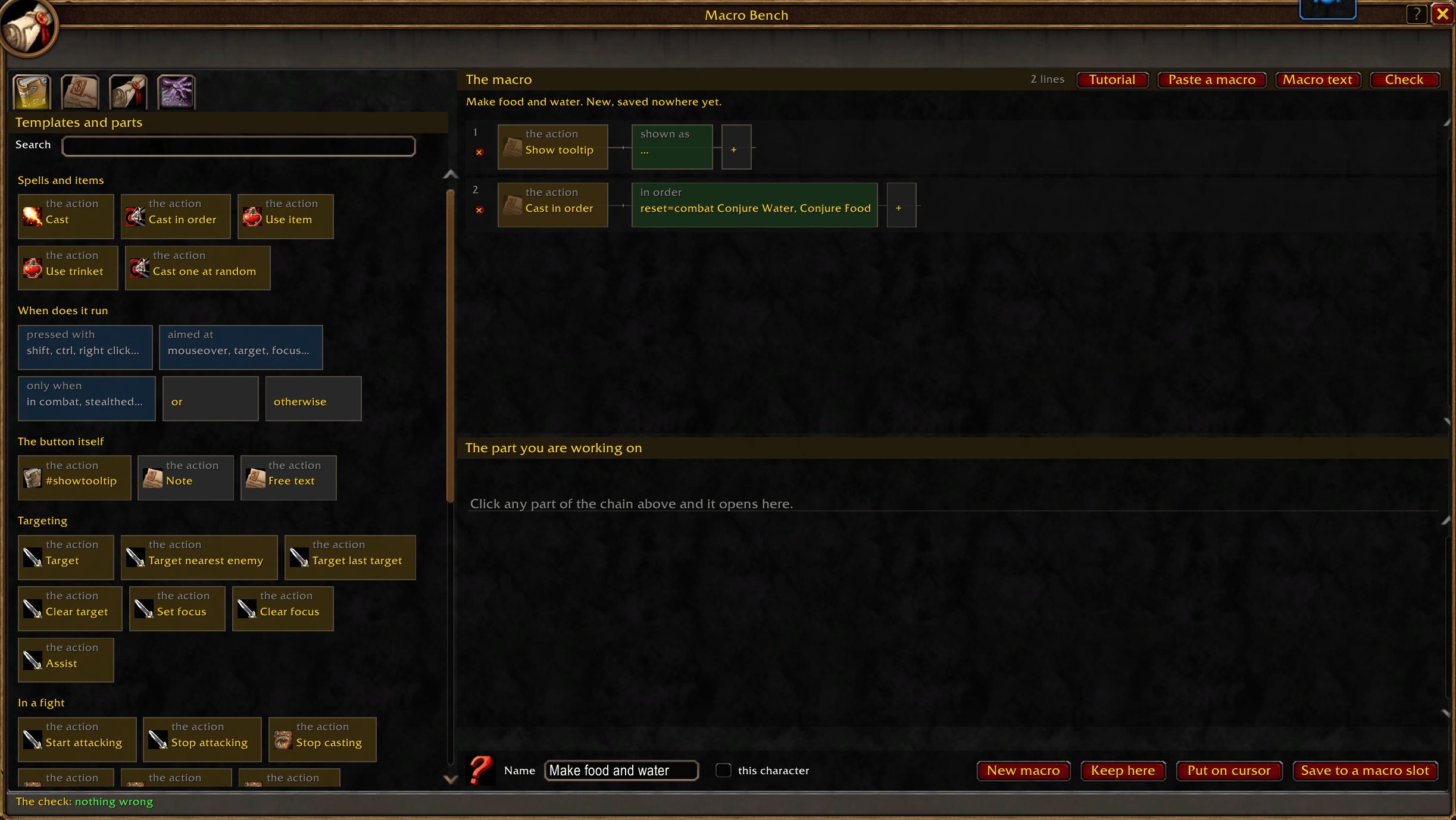
Macro Bench builds a macro out of small blocks. One line of the macro is one chain, read left to right:
[Cast] when [pressed with: shift] and [aimed at: mouseover, an enemy, alive] then [Polymorph]
which is /cast [mod:shift,@mouseover,harm,nodead] Polymorph. Every part is its own block: drag it, drop it on another line, throw it away, or click it to open its own options underneath. Beside the chain, in a window of its own, is the macro text those blocks add up to, and both are live. Change a block and the text rewrites itself. Type or paste into the text and the chain is read back out of it. Neither is a copy of the other; they are the same macro, seen twice.
The text is what is real and the blocks are a view of it. That is the rule the whole addon turns on, and it is what lets you paste in somebody else's macro, take it apart, change one condition and put it back without a character being touched anywhere else. A command another addon added, a line of Lua, something odd pasted off a forum: all of it survives being loaded, shown and saved.
EVERY CONDITION THE GAME HAS IS A CONTROL. The ones that ask only yes or no are three-way buttons: not asked, must be true, must be false. The ones that take an answer have a box beside them, from which pet has to be out to what you have equipped. Modifiers and which mouse button pressed the macro sit together, the unit it is aimed at has its own row, and anything with no control of its own is still written out underneath, so nothing is hidden from you.
NOTHING IS SAVED WITHOUT BEING CHECKED. Three passes, none of which run the macro:
- The grammar and the slots. Commands the game does not have and conditions that do not exist, both with the nearest real one suggested. Brackets left open. A clause nothing can ever reach. Two casts on one press where only the first can fire. reset= written wrongly. #showtooltip somewhere the game will not read it. A spell named by id instead of by name, or one that is not in your spellbook. And the 255 character wall, with how much is over.
- Scripts. A /run body is handed to loadstring, which compiles it and gives back a real syntax error with a position, without executing a single line. The same pass flags calls the game refuses from a script during combat, which is the usual reason a script macro that "works" dies in a raid.
- Now. Conditions are handed to the client's own condition parser, so what a line will do as things stand is answered by the game rather than guessed at. Hold shift and watch it change.
TYPING A SPELL FINISHES ITSELF. Two letters in and the names you actually have appear under the box: your spellbook for a cast, your bags and what you are wearing for a use, and what your pets can cast, including the pets you do not have out. Click one, or press tab. What you end up with is matched against the game, with its icon, its id and its own tooltip, so a name that is nearly right is caught here and not in a fight.
TEMPLATES AND TUTORIALS. Sixty-seven macros to start from, a general chapter and one per class, each saying what it is for. Five tutorials build a real macro on the bench with your own spells, a step at a time, pulsing a ring round the block being talked about and moving on by itself when the bench says the step is done.
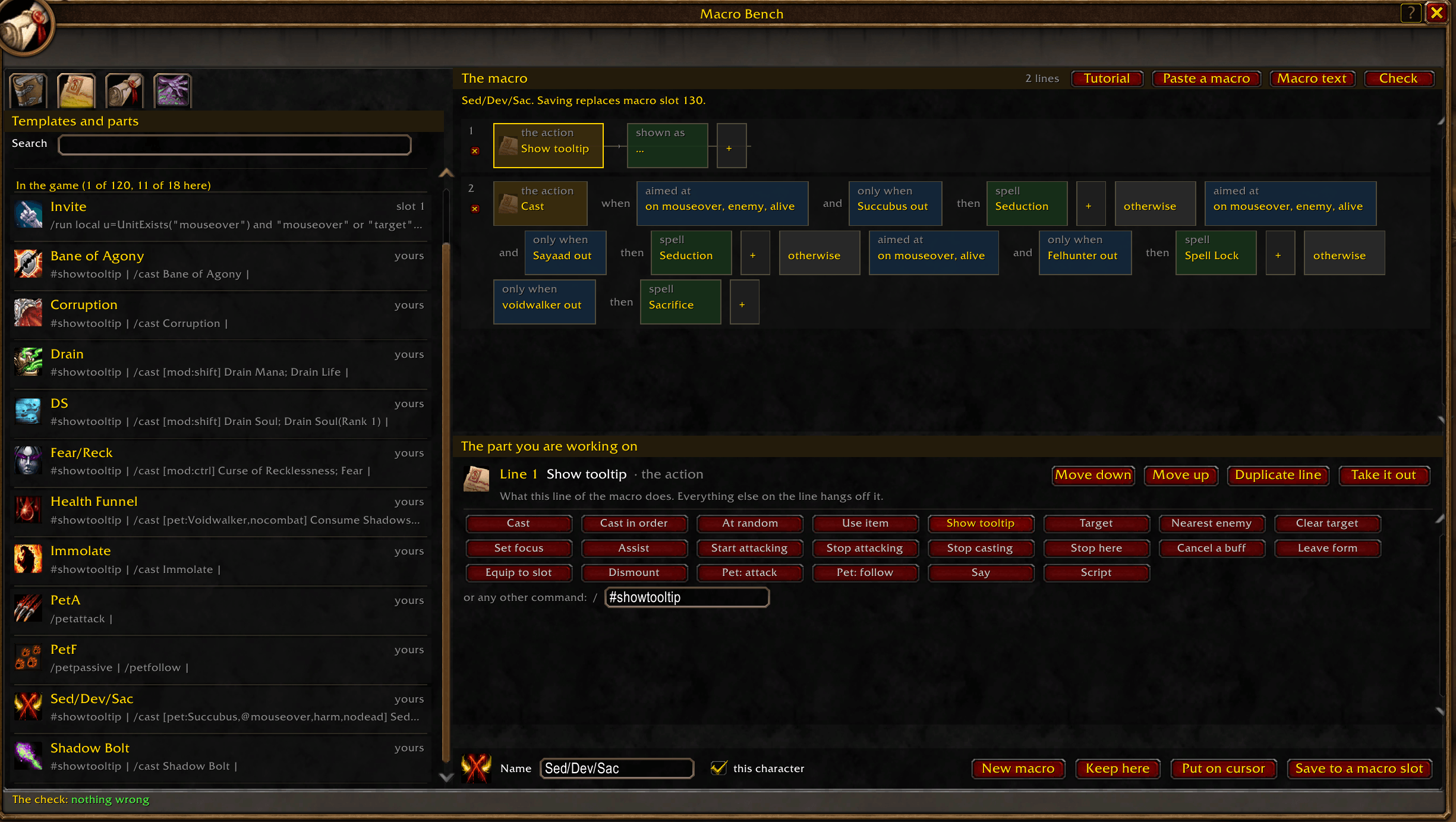
TWO PLACES TO KEEP A MACRO. The game's macro slots, which is what makes it a real macro you can put on a bar, and a library inside the addon with no limit at all, for everything you are still working on. Saving over a slot asks first and shows what it would replace.
Nothing here can do what a macro cannot: no automation, no casting for you in combat, and never more than 255 characters. Everything it builds could have been typed by hand into the game's own macro window. The point is that it is built quickly, read at a glance, and checked before it costs you a pull.
Built for the WoW: Forever client, from Blizzard's own interface art.
- /macrobench, the minimap button, or the addon compartment opens the bench.
- Parts is the first chapter on the left. Click or drag Cast onto the chain. A block that cannot be used yet is dimmed: a condition needs a line to belong to, so before there is a line only the actions are lit.
- Click that block. In the panel underneath, type a spell. Names you have appear as you type; click one or press tab to finish it. A spell dragged straight out of your spellbook or an item out of your bags lands on the chain already filled in.
- Drag a Modifier, Target filter or My state block onto the line to say when it runs, then click it and set it: shift, right click, aimed at your mouseover, only in combat, only when the Voidwalker is out.
- "Or these instead" adds a second set of brackets, tried when the first does not apply. That is the mouseover ladder: [@mouseover,help][help][@player] Flash Heal. "Otherwise" adds another attempt after the semicolon.
- Cast in order and At random get an editor built for a list: a numbered box per step, arrows to move a step up or down, a cross to take one out, and a button to add another. Names finish themselves in every box, and when a sequence goes back to the start is set with tick boxes (leaving combat, changing target) or a number of seconds.
- Add more lines the same way. Drag a line by its action block to move it, or use the delete under its number.
- "Macro text" opens the text in a window, editable, and "Paste a macro" opens it ready for ctrl+V: anything you paste is read into the chain.
- Watch the check along the bottom. Click it for the whole list, and click a finding to jump to the line it is about.
- Click the icon beside the name to choose one: every icon a macro may wear, your own spells and items first, searchable. Right-click it to go back to working it out.
- Name it at the bottom, then "Save to a macro slot", and "Put on cursor" to drop it on a bar. Or "Keep here", which puts it in the addon's own library where there is no limit.
The first time you open it on a fresh install the tutorials offer themselves. After that: the ? beside the close button, the Tutorial button, or a right-click on the minimap button starts a tutorial that builds one with you.
Commands
- /macrobench opens or closes the bench (/mbench and /mb work too)
- /macrobench tutorial opens the tutorials
- /macrobench check checks what is on the bench and prints the findings
- /macrobench load followed by a macro name puts one of your game macros on the bench
- /macrobench scan checks every macro you have and lists the broken ones
- /macrobench confirm asks, or stops asking, before a macro slot is replaced
- /macrobench minimap shows or hides the minimap button
- /macrobench pets shows what your pets have been seen to know (pets forget starts it over)
- /macrobench debug shows what this client allowed
Discord
Join my Discord for Feedback, Development Updates, Addon Ideas, Feature Requests, and Bug Reports.
You must be logged in to leave a comment.