
ForeverTweaks
Make hidden and advanced WoW Forever settings simple, safe and understandable.
Details
Expansion
 Forever
 Categories
Developers

Having issues?
ForeverTweaks makes hidden and advanced World of Warcraft: Forever settings simple, safe, and understandable.
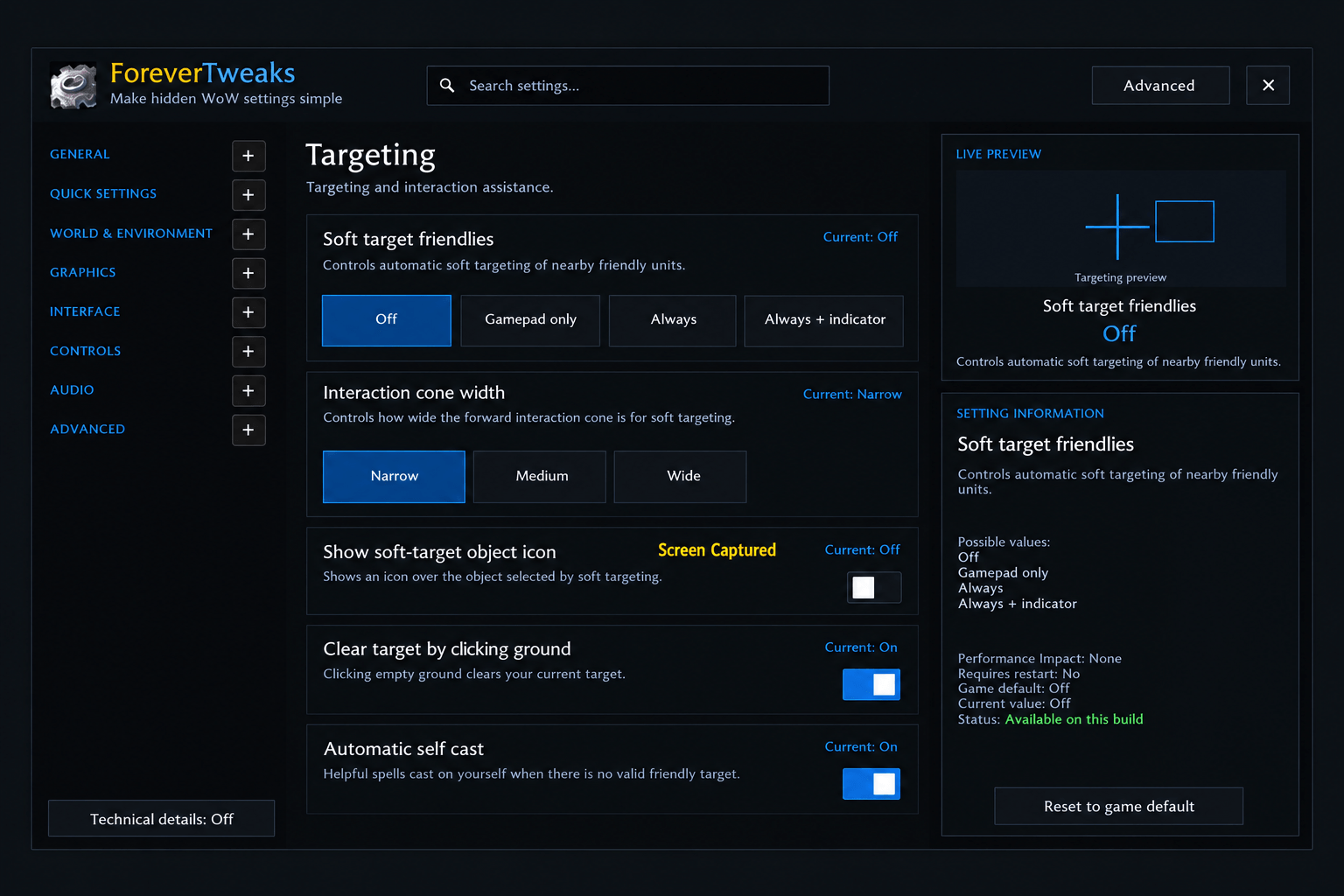
Instead of requiring players to use /console commands or remember raw CVar names and values, ForeverTweaks provides a clean settings interface with readable labels, explanations, safe controls, current/default values, performance information, and visual previews.
Features include:
- 147 curated settings across 23 pages
- Graphics Quality and Display & FPS controls
- Weather, Environment, View Distance, Lighting and Shadows
- Separate Raid Graphics controls
- Camera and Field of View settings
- Nameplates and Targeting options
- UI & HUD, Chat and Sound settings
- Blizzard Combat Text controls
- Live visual previews for many settings
- Simple, Advanced and Developer modes
- Search by normal setting names or technical CVar names
- 4 curated presets with a preview of every change before applying
- Undo Last Change
- Restore All ForeverTweaks changes
- Read-only runtime CVar Explorer for advanced users
- Hardware-aware graphics validation
- Automatic client-build safety audit
- Embedded Ace3 libraries — no separate dependency required
Safety
ForeverTweaks does not blindly change CVars.
Before allowing a setting to be changed, it checks the current WoW Forever client. Locked, secure, read-only, unsupported and combat-protected settings are handled safely.
Graphics settings use Blizzard hardware-support checks where available, and changed values are read back from the client to verify the actual result.
Unknown CVars shown in the Developer CVar Explorer remain read-only.
Languages
ForeverTweaks includes full interface support for:
- English
- Nederlands
- Deutsch
- Français
- Español
English is the default and fallback language. An Auto option can follow the WoW client locale where supported.
Compatibility
- World of Warcraft: Forever
- Forever baseline: 1.60.1.70205
- Interface: 16001
- Camelot Interface: 16001
Commands
- /ft — Open ForeverTweaks
- /ft audit — Re-run the safety audit
- /ft explorer — Open the Developer CVar Explorer
- /ft resetui — Reset the ForeverTweaks window position
ForeverTweaks is designed to make useful WoW Forever settings accessible to normal players while keeping advanced and experimental controls safe and clearly separated.
You must be logged in to leave a comment.