

Drag n’ Macro
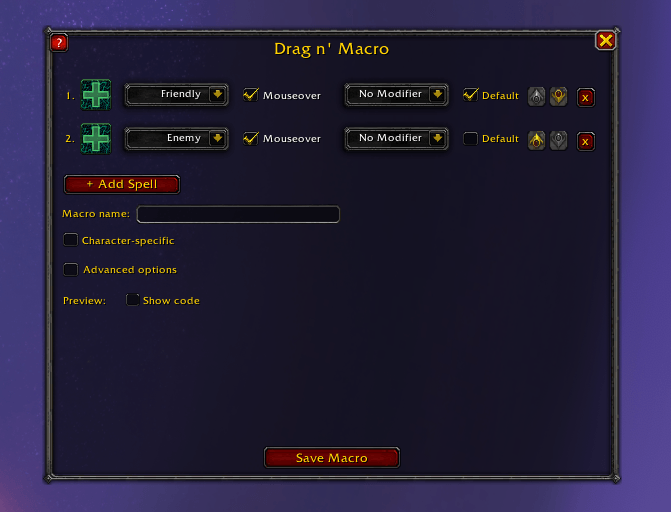
Build conditional macros (heal if friendly, attack if enemy) by dragging spells into a window - no macro syntax required.
Details
Addon ID:
27899
Addon Version:
DragNMacro 2026-09-29 21:22
Expansion:
1.60
Upload date:
Oct 06, 2026
Last Updated:
Oct 06, 2026
Downloads:
Less than 100
Website:
Source Link
Expansion
 Forever
 Categories
Developers

jinroftw
Creator
Having issues?
Drag n' Macro
Build macros by dragging spells into a window instead of typing syntax — conditional ones (heal if friendly, attack if enemy), ground-targeted AoE placed at your cursor, simple self-casts, PvP arena macros with modifiers, or just a single spell with a nicer icon picker. No macro syntax required, for any of it.
Features
- Drag & drop, or search: drag spells straight from your spellbook onto icon slots, or click a slot to search your full spellbook by name instead (talents and pet abilities included).
- Friendly / Enemy / Self / Cursor: pick who — or where — each spell should target, per row. Cursor targeting covers ground-placed AoE spells like Blizzard or Mass Dispel.
- Advanced options: optionally reveal Target / Focus / Arena 1-3 for PvP and niche setups, kept out of the way by default. Arena targets only show up where arenas actually exist.
- Works for single-spell macros too: only need one spell with no conditions? Just drag it in, skip the rest.
- Mouseover-aware: automatically checks your mouseover target first, falling back to your current target.
- Modifier support: optionally require Shift / Ctrl / Alt to be held.
- Default fallback: mark one row as the catch-all so the button always does something, even with no valid target.
- Priority order: rows are checked top to bottom — the first matching condition wins, so nothing double-casts. Reorder rows anytime with the up/down arrows.
- /stopcasting support: optionally cancel your current cast before this macro's spell fires.
- Live preview: see the generated macro update as you build, with a running character count so you don't quietly hit the 255-character macro limit. The raw macro syntax itself stays hidden by default — you don't need to read it.
- Never overwrites: always creates a new macro, existing macros are untouched. Deleting a row that already has a spell configured asks for confirmation first.
- Character-specific macros: optionally save to your current character only instead of the General list.
- Built-in interactive tutorials: guided walkthroughs (via the "?" button) for a first macro, a self-cast buff/defensive, a ground-targeted spell, and a PvP arena macro — each one sets up the rows for you so you can focus on picking spells.
- Available in English and German (falls back to English for other locales).
How to use
- Open the macro window (
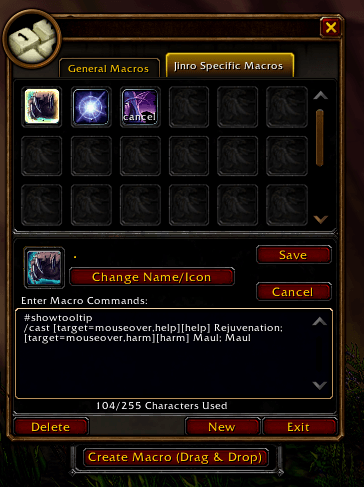
/macro) and click "Create Macro (Drag & Drop)" at the bottom, or type/dm(or/dnm). - Click "?" for a guided walkthrough of your first macro, or dive in yourself:
- Drag a spell onto the first icon (or click it to search), pick Friendly as its target.
- Click + Add Spell, add a second spell, pick Enemy.
- Optionally check Default on one row so it always fires if nothing else matches.
- Enter a macro name, optionally check Character-specific, and click Save Macro — it's picked up on your cursor, ready to drop on an action bar.
You must be logged in to leave a comment.