

CooldownManagerUtils (Buff Reminders, Proc Reminders)
Adds a Buff Reminders tab to the Cooldown Manager and shows icons for tracked buffs you are missing.
Details
Addon ID:
25215
Addon Version:
0.4.4
Expansion:
1.60
Upload date:
Oct 06, 2026
Last Updated:
Oct 06, 2026
Downloads:
Less than 100
Website:
Source Link
Expansion
 Forever
 Categories
Developers

D4KiR
Creator
Having issues?
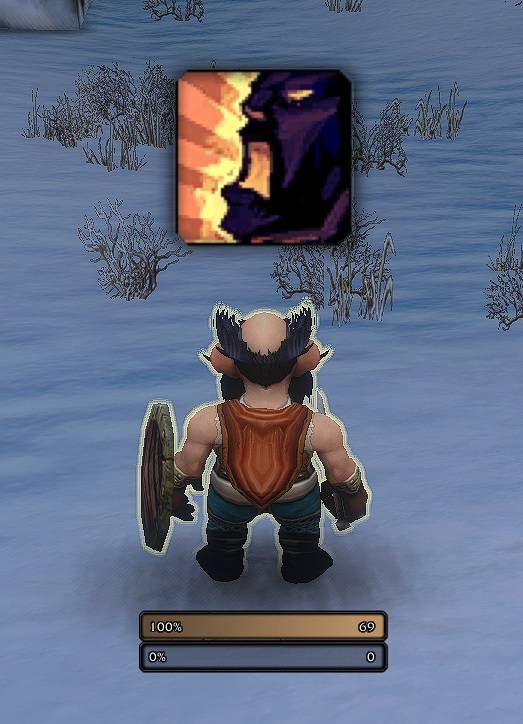
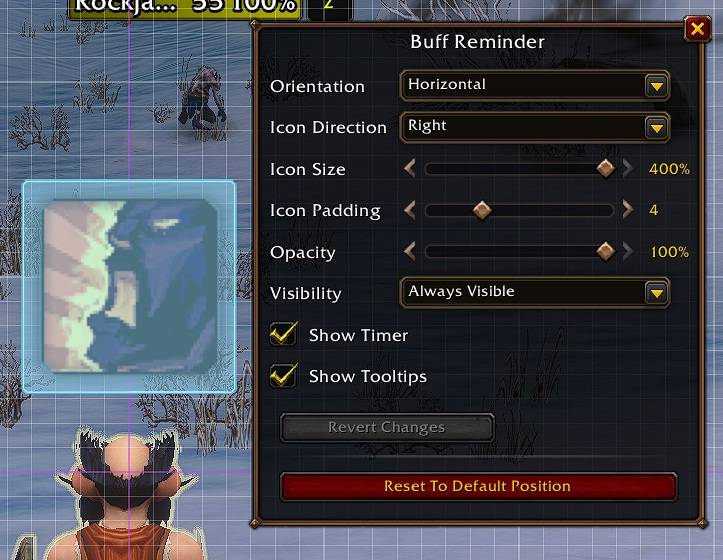
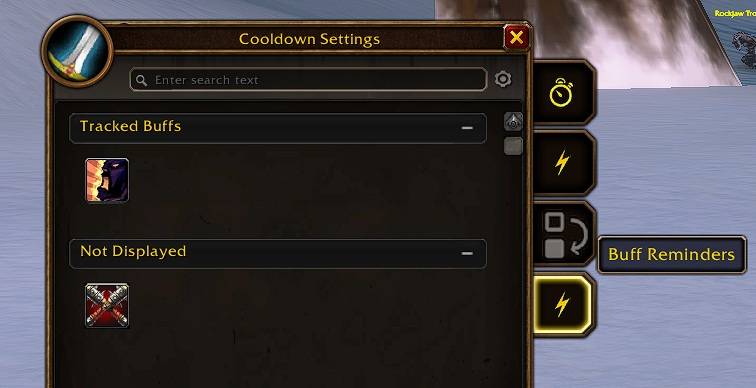
Cooldown Manager Utils adds missing-buff and reactive-proc reminders to World of Warcraft's built-in Cooldown Manager.
Features
- Adds a Buff Reminders tab to the side tabs of Blizzard's Cooldown Manager settings.
- Adds a separate Proc Reminders tab. On Retail it lists the Essential and Utility spells of the Cooldown Manager; on WoW Forever Warriors, Rogues, and Hunters it lists their reactive abilities (Overpower, Revenge, Riposte, Mongoose Bite, Counterattack). Selected abilities appear on the Proc Reminder bar only while Blizzard marks their reactive combat window active.
- Lists active spells from all class spellbook tabs (on Retail: class and current specialization) that apply a buff to your character, independently of Blizzard's Auras tab.
- Includes the gathering tracking abilities Find Herbs, Find Minerals, and Find Fish when they are available to your character. Their reminders disappear while the matching minimap tracking is active.
- Also covers temporary weapon enchants cast by you, such as the Shaman weapon imbues (Rockbiter, Flametongue, Frostbrand, Windfury, Earthliving) and the Paladin rites. Tracked weapon enchants are checked together against every equipped weapon (main hand and, when dual wielding, off hand; shields only if a shield imbue is tracked): they stay hidden while every weapon carries one of them, otherwise the tracked enchants that are not active on any weapon are shown (or all of them, if each one is already active on another weapon).
- Sorts available entries into Tracked Buffs/Abilities, Not Displayed, and Not Learned. Learned entries can be moved by drag and drop; unlearned or currently unselected talent spells are shown disabled but retain their spell tooltip.
- The Buff Reminder bar shows an icon for every tracked buff that is currently missing on your character. The bar is hidden while nothing is missing.
- The separate Expiring Buffs bar shows selected buffs when they are missing or approaching expiration. Seconds before expiry controls the warning window (1–60 seconds) and is available in both the add-on options and the bar's Edit Mode settings. Both controls use the same value.
- Group buffs (Blizzard's Group Buffs list, plus Mark of the Wild, Blessing of the Bronze, Arcane Intellect, Power Word: Fortitude, Skyfury, and Battle Shout) are also checked on every eligible party or raid member. Their reminder appears as soon as one living, connected, visible member in range is missing the buff, and the icon shows how many eligible members have it, for example
2/5or3/40. Offline, dead, invisible, and out-of-range members are excluded from both numbers. Disable Check buffs on the group in a bar's Edit Mode settings to check only your own buffs instead. Group checking is enabled by default. - Paladin Blessing reminders work as one group: every eligible party or raid member needs any recognized Blessing cast by you. If one member is missing your Blessing, all selected Blessing reminders are shown; Blessings from another Paladin do not count.
- On WoW Forever, Paladin Seal reminders also work as one group. Any active recognized Seal hides all selected Seal reminders; when no Seal is active, they are all shown.
- Shows spell cooldowns with a swipe and optional countdown. Each bar has a CD threshold slider directly below Show timer in Edit Mode. With Show timer enabled, reminders with longer cooldowns stay hidden and appear when the remaining cooldown reaches the threshold. The default is 5 seconds; 0 disables the cooldown display. This setting is separate from the buff expiration warning.
- Shows the spell tooltip when hovering a reminder icon.
- Hides live reminders while your character is dead, a ghost, flying, or on a flight path. The Edit Mode preview remains available.
- Adds independently movable Buff Reminder, Expiring Buffs, and Proc Reminder bars to Edit Mode. The bars snap to other Edit Mode elements, screen edges, the grid, and each other like Blizzard's own frames.
- Clicking a bar in Edit Mode opens its independent settings: orientation, icon direction, icon size (50–400%), icon padding, opacity, visibility, timer, cooldown threshold, tooltips, group buff checks, and Blizzard's proc glow (on by default). The Expiring Buffs bar also includes the expiration warning slider. Both timing sliders have explanatory tooltips. A button in that dialog leaves Edit Mode and opens the matching Cooldown Manager tab.
- Keeps a separate reminder selection for each Cooldown Manager layout and specialization.
- Keeps Blizzard's Cooldown Manager layout dropdown visible on both reminder tabs and provides a matching add-on-owned Revert Changes button for reminder edits made since opening the window or selecting the layout.
Notes
- Passive spells and spells without a player buff are excluded. Class and specialization flyouts are included.
- Not Learned uses the reminder-eligible spell sources available for the character's class and specialization. It does not display unrelated spells from other classes or races.
- The game does not tell add-ons directly which buff a spell applies. Spells the game does not flag as buffs (for example Thorns) are learned automatically the first time their buff from you lands on your character; they then appear in the list.
- A buff also counts as active when an aura with the same name is on you, so other ranks or IDs of the same buff are recognized.
- Weapon enchant spells learn their exact enchant the first time you cast them. Until then, any temporary weapon enchant counts as active for them.
- The list of available buff spells is not refreshed during combat; it updates as soon as combat ends. Reminders themselves keep updating in combat.
- When the game does not reveal whether an aura is active, for example in combat or in restricted content, the last known state is kept instead of showing a false reminder.
- While an aura is hidden this way, its reminder still appears when the buff runs out: the add-on uses the last known expiration time, or the cast time plus the buff's remembered duration if you cast it during combat. The duration is remembered whenever the game reveals the buff, for example out of combat.
- The same applies to group members: while their auras are hidden, the last known count is kept. Casting the group buff yourself during that time counts every member as buffed.
- A buff that is cancelled or dispelled while it is hidden cannot be detected; its reminder appears once the game reveals the aura again, usually when combat ends.
- Reminder selections and their order are saved per Cooldown Manager layout and specialization. Switching between layouts such as Starter Layout and a custom layout switches the reminder contents too. A layout the add-on has not seen yet starts with a copy of the previously active reminder setup.
- All bar positions and each bar's settings are saved separately per Edit Mode layout in the add-on's own saved variables: account layouts and presets account-wide, character layouts per character. A new Edit Mode layout starts with a copy of the previous layout's bar settings. Changes are saved immediately and are not affected by Blizzard's "Revert Changes".
Localization
Locale files exist for all World of Warcraft client locales:
deDE, enUS, esES, esMX, frFR, itIT, koKR, ptBR, ruRU, zhCN, and zhTW.
You must be logged in to leave a comment.