

Controller Rebound
Rebind XYAB Base controls in Wow Forever
Details
Expansion
 Forever
 Categories
Developers

Having issues?
Getting tired of Forever’s base A/B/X/Y face buttons not being rebindable?
Controller Rebound lets you put your own conditional spells or macros on bare A/B/X/Y without breaking Forever’s native controller system.
Without usable bare face-button bindings, you can end up training yourself to hold LT or RT throughout combat encounters. I speak from experience: that can become wrist and hand pain fast. It feels like a major controller-accessibility oversight by Blizzard.
Controller Rebound keeps the normal controller layout intact, while giving bare A/B/X/Y meaningful conditional actions.
Features
- Assign a spell or macro to bare A, B, X, or Y.
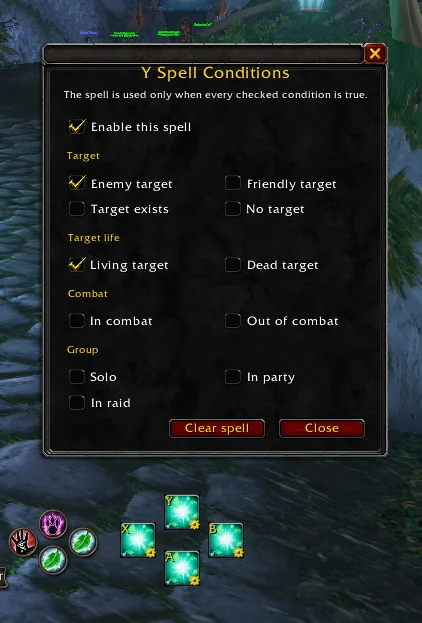
- Choose when each action should activate: target type, target life state, combat state, and group state.
- If a rule does not match, the normal Forever action still happens.
- LT, RT, LT+RT, LB, RB, and LB+RB face-button layers remain fully native.
- Works both in and out of combat.
- No Steam remapping or keyboard-emulation workaround required.
- Keeps Forever’s native targeting, shortcut, and action-bar layers intact.
- Macro support, including safe automatic macro updates after out-of-combat edits.
- Cooldown feedback for spells and supported macros.
- Resource feedback when you do not have enough mana, energy, rage, etc.
- Clear red out-of-range feedback for supported direct spells.
- Separate Controller Rebound profiles for each character.
- Draggable face-button cluster. (drag from center of the 4 buttons)
How to use it
- Drag a spell or macro onto one of the visible A/B/X/Y buttons.
- Click the small cog in the lower-right corner of that button to configure its rule.
- Click and drag the space in the centre of the four buttons to move the whole cluster.
Feedback and testing
I’m a developer, but I built Controller Rebound with AI assistance. If that is not for you, please skip it.
If you are happy to test an AI-assisted community addon, I would really appreciate feedback from different classes, controllers, layouts, and gamepad setups.
You must be logged in to leave a comment.