
Bobber Forever
A button that turns the sound up so you hear the bobber splash, and puts your sound settings back after.
Details
Expansion
 Forever
 Categories
- No categories available.
Developers

Having issues?
Bobber Forever
A button to manage fishing sound in WoW Forever.
I kept missing the bobber because the music and ambience drowned it out, and changing the sound settings back and forth every time got old. So now it's a button.
Click it and the sound effects go to full, music and ambience go off, and the game keeps playing sound when it's in the background. Click it again and you get your own settings back, exactly as you had them. If the game closes with it on, they're put back next time you log in.
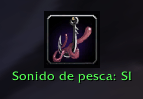
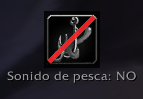
The fishing pole on the button means the fishing sound mode is on. Grey and crossed out means it's off. Right click and drag to move it wherever you want.
Commands
| Command | |
|---|---|
/bobber toggle | fishing sound on or off |
/bobber lock | lock or unlock the button |
/bobber reset | put the button back in the middle |
/bobber show | show the button |
/bobber hide | hide it |
Languages
English, Spanish, German, French, Italian, Portuguese, Russian, Korean and Chinese (simplified and traditional). Anything else falls back to English.
Made for WoW Forever 1.60.1. Source on GitHub: https://github.com/APGM82/BobberForever
You must be logged in to leave a comment.