
Simple Holy Power
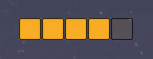
A simple and basic Holy Power display, that can moved and sized to your preference.
Details
Expansion
 Cataclysm
 Developers

Having issues?
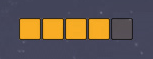
A simple Holy Power display that shows how many charges you have.
To move the display boxes, Alt+drag the leftmost box.
Slash command: /shp
/shp color - Opens a window to let you change color of the holy power frame.
/shp scale <number> - Sets the scale of the bar. Numbers between 0.5 and 3 are recommended. Sample usage: /shp scale 1.5
/shp alpha <number> - Sets the alpha value of holy power charges. Default value is 1.0, values must be between 0.2 and 1.0.
/shp nocombat on|off - Whether the boxes should be shown outside combat or not.
/shp hidedefault on|off - Whether the blizzard default holy power frame should be hidden or not.
/shp reset - Resets the addon settings back to the default. Useful if you for example accidentally dragged the frame outside the screen.
More of the simple-series:
Simple Combo Points
Simple Chi
Simple Shaman Resources
Simple Shadow Orbs
Interested in translating my addons? Send me a PM!
You must be logged in to leave a comment.